





 English


Gamdom App: The Crypto Casino & Sportsbook

- Detailed site menus
- Simple navigation
- Separate sports and casino areas
- No way to sort slots
- Limited Royalty Club info
A dedicated Gamdom app isn’t currently available, but you can still access the online crypto casino and sportsbook site through your mobile browser. The website works well on both Android and iOS mobile devices.
Not having a native app doesn’t affect you much, as you can add the Gamdom website to your home screen for easy one-tap access. The mobile site is practical, readable, and won’t bog down your phone the moment you load a game. This guide shows you how to set up the mobile web app and covers some of its features.
How do I download the Gamdom app?
Since there isn’t a native Gamdom app to speak of, you don’t have to visit the Play Store or App Store. The Gamdom website is accessible via your mobile browser, and it is compatible with most Android and iOS devices.
Gamdom app system requirements and compatibility
Because a downloadable Gamdom app is absent, you don’t necessarily have to be overly concerned with mobile device specifications. However, you’ll experience better performance on modern smartphones as they tend to have better processing power, optimization, and network speeds. And since the Gamdom mobile site functions as a shortcut on your mobile screen instead of a full-on app, it won’t take up much of your device storage space.
| Feature | Android | iOS |
|---|---|---|
| Downloadable App Present? | No | No |
| OS Requirements | Android 8+ | iOS 12+ |
| Compatible Devices | Smartphone, Tablet | iPhone, iPad |
How to download and install Gamdom app on Android
Follow these steps to add the Gamdom mobile site to your Android device’s home screen.
-
Click the banners on this page to launch the Gamdom website on your device.
-
Tap the 3 small dots in the top right corner of your mobile screen.
-
Scroll down to “Add to home screen”.
-
A message will pop up prompting you to install the Gamdom website on your device or to cancel the action.
-
Click Install, and the Gamdom Android icon is immediately added to your mobile device.
How to download & install the Gamdom app on iOS
To add Gamdom to your iPhone, you:
-
Click the banners on this page to open the official Gamdom website in your Safari browser.
-
Tap on the “Share” button, characterized by a small square with a small arrow facing upwards.
-
Scroll down and select “Add to Home Screen”.
-
You can rename the Gamdom icon to how you want it to appear on your device or leave it as is.
-
Tap “Add,” and the Gamdom iPhone mobile site is immediately added to your device’s home screen.
Gamdom mobile crypto casino
According to our full Gamdom review, the site has over 8,000 casino games, covering slots, live casino, table games, crash games, and in-house exclusive games under the Gamdom Originals. Here’s what to look forward to in each genre.
Table games
61 table games are available to play on the mobile site. When you click “Table games,” common titles like Auto Roulette and Dragon Tiger are displayed. But Gamdom also has plenty of unique games like Red Dog from Betsoft and Multifire Roulette. You can try them out in demo mode first before depositing real money. Games have flexible bet limits. For instance, you can bet between $0.5 and $5,000 for Classic Blackjack.
Online slots
Slots powered by leading software studios like Pragmatic Play and Hacksaw Gaming are the main attraction at Gamdom. You can use Gamdom free spins on over 7,000 slots, including high RTP fan favorites like Sweet Bonanza, Gates of Olympus, and Wanted Dead or a Wild. As you can expect, these games play very well on mobile screens, with adjusted controls to suit one-handed operation. Players get to choose games based on the software developer, their popularity, alphabetical order, or the latest slots to be added.
Live casino
Gamdom has 882 games for your dose of mobile live casino gaming. Most of the games are provided by Evolution Gaming and Pragmatic Play Live. Some of our favorites include titles like Sweet Bonanza Candyland, Speed Roulette, and Lightning Baccarat. Gamdom throws in in-house live games like Gamdom Blackjack. Game shows like Crazy Time and Mega Wheel are also part of the fun.
Gamdom Originals
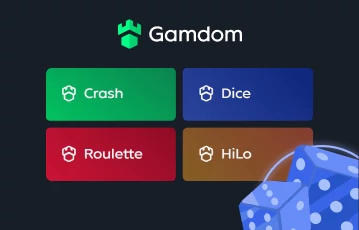
You can choose from these nine original titles to spice up your crypto casino gaming:
- Crash
- Dice
- Roulette
- Hilo
- Plinko
- Mines
- Keno
- HiLo
- Pocket Dice
- Limbo
These games are listed under “Originals” and mostly have minimum bets of only $0.01, which is convenient if you’re working on a budget. They also have a 100% RTP.
Gamdom mobile sportsbook
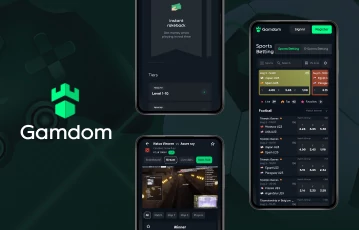
The Gamdom mobile sportsbook covers over 40 sports, not counting esports and virtual sports.
- Betting options: Once you’ve funded your betting account using a Gamdom gift card, you can bet on sports like soccer, basketball, baseball, and cricket using the mobile site. We also found niche sports like bandy, biathlon, and ski jumping. We appreciate how you can place an unimaginable number of bet types. For example, soccer has Correct Score, Both Teams to Score, Draw No Bet, Double Chance, and more.
- Racebook: A separate section is available to bet on greyhound and horse racing events across the world. Popular horse races covered include those happening in Bunbury and Pakenham. For greyhound racing, Gamdom covers events in Sandown Park and Parklands. You can bet on the Winner, Place, and Top 2 Positions.
- Live betting: Gamdom allows live bets on several sports, including soccer, volleyball and futsal. Any live matches are marked by a red Live icon for easy identification. Placing live bets is easy on the mobile site, and you won’t experience any delays.
How do I register on the Gamdom app?
Signing up on the Gamdom mobile site is straightforward and takes less than a minute. If you’re asking, where is Gamdom available, you can access the app in 100 countries, including New Zealand and Canada. Follow these steps to register:
-
Click the banners on this page to launch the mobile site on your mobile device.
-
Click the green Register button in the top right corner.
-
Enter your username, password, and email address.
-
Agree to the operator’s Terms of Service and to receive the latest news and offers.
-
Click Start Playing, and you’re immediately logged into the Gamdom site.
-
Click the link sent to your email to fully activate your account.
Gamdom app pros & cons
There’s no downloadable Gamdom app, but adding the website to your mobile screen lets you experience convenient play on the move. But even then, the mobile site has its limitations.
- One-tap access
- Offers an app-like experience
- Easy to install
- Takes up negligible storage space
- Access to full Gamdom casino and sports services
- No features like biometric login
- No downloadable app
Should you get the Gamdom app?
Don’t let the absence of a downloadable Gamdom app stop you from joining the site. The betting site offers just as good a mobile gambling experience via a web app. The mobile site performs very well and offers the full casino and sports betting experience on your phone or tab.
Not having a native app means you don’t get features like biometric login and push notifications. But still, pages load fast, live betting is stable, and game filters are clear. You can click the banners on this page to sign up with Gamdom or other top betting sites available in your region.
Gamdom app review FAQs
Is there a Gamdom app?
According to our Gamdom app review, there isn’t any. You can access the site directly from your mobile browser.
Can I add the Gamdom website to my mobile device?
Yes, you can install the Gamdom site onto your mobile device as a shortcut. You don’t have to search for the website each time you want to play. Simply tap the Gamdom icon from your device’s home screen for quick access.
Does the Gamdom mobile site work with all mobile devices?
You experience fewer compatibility issues with newer phones, but you can even access Gamdom using older mid or top-range mobile devices.
In this review