





 English


Vave Casino App: Download and Mobile Betting

- Diverse casino game catalog
- 30+ sports markets are available
- Robust welcome bonuses
- Separate casino/sports VIP programs
- No official iOS/Android app
You won't find an official Vave Casino app to download from the App Store for iOS or Google Play for Android, but there is a Progressive Web App (PWA) that delivers a smooth, app-like experience directly through your mobile browser.
By adding the PWA to your home screen, you can launch Vave just like a regular mobile casino app, with full-screen functionality, fast loading times, and access to all of the same games and features. In this guide, we explain how Vave Casino works on mobile devices, including step-by-step instructions for installing the PWA on iOS and Android.
Key facts about Vave’s Casino app
Before we get into all the details, here’s a quick overview of what you can expect from Vave.
| Parent company | Chestoption Sociedad de Responsabilidad Limitada |
| Established year | 2022 |
| App type | Progressive Web App (PWA) |
| Native app available | No |
| Supported devices | iOS and Android |
| Installation method | Add to home screen via browser |
| Number of games | 12,000+ games |
| Software providers | 130+ providers |
| Demo mode | Available without a deposit or login |
Is there a Vave Casino app?
Yes and no. There is no official Vave Casino app available on the Apple App Store or Google Play for direct download.
Instead, what’s often referred to as the “Vave Casino app” is actually a Progressive Web App, or PWA. It’s available in all regions where the casino operates.
A PWA isn’t a traditional app you install from an app store. It’s a web-based application that runs through your browser.
You can add it to your home screen for quick access, and it opens in a standalone window without typical browser elements like the URL bar. It looks and feels very similar to a native mobile app, with a responsive interface, fast load times, and full access to all of Vave’s games and features.
Pros and cons of the Vave’s Casino app
- No download required from app stores
- Fast loading speeds and smooth performance
- Full access to all games and features
- Works on both iOS and Android
- Not available in App Store or Google Play
How to install Vave’s Progressive Web App
Installing Vave’s Progressive Web App is quick and easy. It works the same way as installing the JustCasino app, which is also a PWA. You don’t need to download anything from an app store. Instead, you install it directly through your mobile browser.
This is how it works on iOS and Android:
iOS
-
Open Safari and visit the Vave website (other browsers are not supported)
-
Tap the Share icon in the bottom menu
-
Scroll down and tap “Add to Home Screen”
-
Rename the app if you want to
-
Make sure “Open as Web App” is enabled (toggle should be green)
-
Tap “Add” in the top-right corner
Android
-
Open Chrome (recommended) and visit the Vave website
-
Tap the three-dot menu in the top-right corner
-
Select “Install app” or “Add to Home Screen”
-
Rename the app if you want to
-
Tap “Install” to confirm
Once installed, the app will appear on your home screen and launch in full-screen mode, just like a regular mobile app.
Will Vave Casino release a mobile app in the future?
Our review team contacted Vave directly and spoke with customer support. They confirmed that there is no mobile app available at the moment, and none is currently in development.
As a result, there is no indication that Vave Casino plans to release a traditional mobile app on the Apple App Store or Google Play in the near future.
This may be a drawback for some players. However, the Progressive Web App delivers essentially the same experience you’d expect from a native app, so it has not affected our overall rating of Vave Casino.
If Vave releases an official mobile app in the future, we will test it out and update this page with our findings.
Mobile experience at Vave Casino
Vave’s mobile website and Progressive Web App are both well optimized for mobile devices. The interface is fully responsive, adapting smoothly to different screen sizes, and the layout is clean and uncluttered.
Game categories are clearly organized, and the search tool helps you find specific titles quickly. You can also filter games by software provider and mark your favorites for easy access later by clicking the heart icon on each game thumbnail.
From a technical standpoint, everything works as it should. This includes deposits and withdrawals, with the Vave Casino withdrawal time remaining the same on the PWA as on desktop.

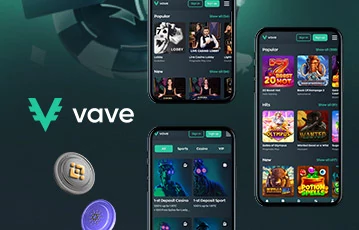
Vave Casino’s mobile games library
All of the same games you’ll find on desktop are also available on mobile through the main website and Progressive Web App. This includes an impressive selection of over 12,000 slot games from over 130 software providers.
In addition to slots, Vave offers a wide range of other games, including table games and live dealer options such as roulette, blackjack, and poker. You’ll also find game shows, crash games, instant win titles, and Vave Originals, which are exclusive in-house creations. With such a diverse selection, you have plenty of options to choose from.
Most games in the library, except for table games, can be played in demo mode for free on mobile devices. You can access demo mode without logging in or making a deposit. If you want to play in real mode without depositing, check whether a Vave Casino no deposit bonus is available in your region.
Conclusion: There is no official Vave Casino app
While there is no official Vave Casino app available on the App Store or Google Play, the Progressive Web App is a solid alternative.
It takes just a few seconds to install. Once added to your home screen, you can launch it instantly, and it opens in a standalone, full-screen window that looks and feels just like a native app.
You still get the complete Vave experience through the PWA, including access to all games and features, along with fast load times and reliable performance.
So while the lack of a traditional app might seem like a drawback, it makes little difference in practice. The PWA delivers everything you would expect from a native app.
Rather than taking our word for it, try it yourself and see how it performs. You can use one of the banner links on this page to claim the latest bonuses available in your region.
Vave Casino app FAQ
What is the Vave Casino app?
The Vave Casino app is not a traditional mobile app that you download from the App Store or Google Play. Instead, it is a Progressive Web App that runs through your mobile browser and can be added to your home screen. This isn’t unusual in the iGaming industry. For example, there is no TG Casino app either, which is a similar online casino.
How do I install the Vave Casino app on iOS?
Start by opening the official Vave website in Safari. Other browsers are incompatible. Once the site loads, tap the Share icon at the bottom of the screen. Scroll down and select “Add to Home Screen.” You can rename the app if you want, then tap “Add” to confirm. The app will appear on your home screen and launch just like a regular app.
How do I install the Vave Casino app on Android?
Open Google Chrome and go to the official Vave website. Tap the three-dot menu in the top-right corner and select “Install app” or “Add to Home Screen.” You will have the option to rename the app before confirming the installation. After tapping “Install,” the app icon will be added to your home screen.
In this review
- Key facts about Vave’s Casino app
- Is there a Vave Casino app?
- Pros and cons of the Vave’s Casino app
- How to install Vave’s Progressive Web App
- Will Vave Casino release a mobile app in the future?
- Mobile experience at Vave Casino
- Vave Casino’s mobile games library
- Conclusion: There is no official Vave Casino app
- Vave Casino app FAQ