
How To Stake Chainlink (LINK)
2
1
Follow this blog for step-by-step instructions on how to stake your LINK in the recently launched Chainlink Staking v0.1.
Why Stake LINK?
A core initiative of Chainlink Economics 2.0, Chainlink Staking enables LINK token holders and node operators to earn rewards for helping increase the cryptoeconomic security of oracle services. With the Chainlink Network already enabling more than $6.6 trillion dollars in transaction volume, it’s important for the security of the network to scale to match the increasing amount of value secured within Chainlink-powered applications. The launch of Staking v0.1 represents a key milestone in Chainlink’s new era of sustainable growth and security.
With Chainlink Staking v0.1 Early Access now live, community members who meet at least one of the criteria on the Early Access Eligibility List can stake up to 7,000 LINK in the limited-size v0.1 Staking pool. The capped Staking pool will open to General Access in two days on December 8, 2022 at 12PM ET, giving anyone the chance to stake up to an initial limit of 7,000 LINK per address, subject to the initial 25M LINK pool cap and other applicable participation requirements.
In the initial v0.1 pool, 22.5M LINK is allotted for Community Stakers on a first-come, first-served basis, while 2.5M LINK is allotted and reserved for Node Operator Stakers. Staked LINK and rewards will be locked until the release of Staking v0.2, which is planned for release in approximately 9-12 months. Note that Staking v0.1 consists of a non-custodial smart contract on the Ethereum blockchain, so Staked LINK in v0.1 cannot be moved by anyone but the staker themselves once unlocks are enabled.
Before participating in Chainlink Staking, it is important you as a staker understand and are comfortable with the staking pool parameters, such as the lock-up period, alerting, staking rewards, and other key mechanisms. Refer to this recent blog on the launch details of Staking v0.1 to learn more about its design.
Staking Prerequisites
In order to begin staking LINK, you must:
- Hold your LINK tokens on the Ethereum mainnet in a self-custodial Web3 wallet or hardware wallet supported by Web3 wallets.
- Have at least 1 LINK to stake.
- Have a sufficient amount of ETH to pay Ethereum transaction fees.
Self-Custody
Chainlink Staking v0.1 supports a wide range of popular Web3-enabled wallets, including MetaMask, Coinbase Wallet, WalletConnect-compatible wallets, and smart contract wallets such as Argent and Gnosis Safe (via WalletConnect). Hardware wallets such as Trezor and Ledger can be connected to Web3 wallets like MetaMask in order to access Web3 dApps.
If you don’t have self-custody of your LINK tokens yet, check out the video below for a walkthrough of the process of self-custodying Ethereum-based tokens in a MetaMask, Trezor One, or Ledger Nano S wallet.
If you have—or plan to set up—a hardware wallet, the video tutorial below provides step-by-step instructions on how to connect it to MetaMask.
Minimum Requirement and Ethereum Gas Fees
To successfully participate in Staking v0.1, you must have at least 1 LINK in your self-custodial wallet. In order to stake, an on-chain transaction must be made on Ethereum mainnet, meaning you must have a sufficient amount of ETH to pay for transaction gas fees.
Note that Ethereum transaction fees/gas prices can be unpredictable and volatile, determined by global network activity. For an estimate of current gas fees, you can refer to the Etherscan Gas Tracker. Before broadcasting any transaction to the Ethereum Network, make sure to check the estimated transaction fee cost in your Web3 wallet to ensure that you’re comfortable with the amount. Note that if the transaction fee is too low, your transaction may be delayed for a period of time before getting confirmed on-chain. Your Web3 wallet will estimate the gas limit of the transaction, otherwise a default of 150K gas will be set.
Additionally, because LINK is an ERC-677 token (ERC-20 compatible with additional functionality), only a single transaction is required to stake. Note that the official contract address for Staking v0.1 on the Ethereum mainnet is located at 0x3feB1e09b4bb0E7f0387CeE092a52e85797ab889.
To learn more about the Ethereum Network, refer to the Ethereum Foundation’s Learn Hub. Specific questions regarding your Web3 wallet should be directed to the official support channels of that wallet provider.
How To Stake LINK
Note: these tutorials are based on the Goerli testnet and are for demonstration purposes only. While these tutorials accurately reflect the staking process on Ethereum mainnet, the specific staking parameters and gas fees in the video, GIF, and screenshots below may differ from the mainnet implementation of Chainlink Staking v0.1.
Video Tutorial
https://www.youtube.com/watch?v=wfSETSSDG6c
GIF Tutorial
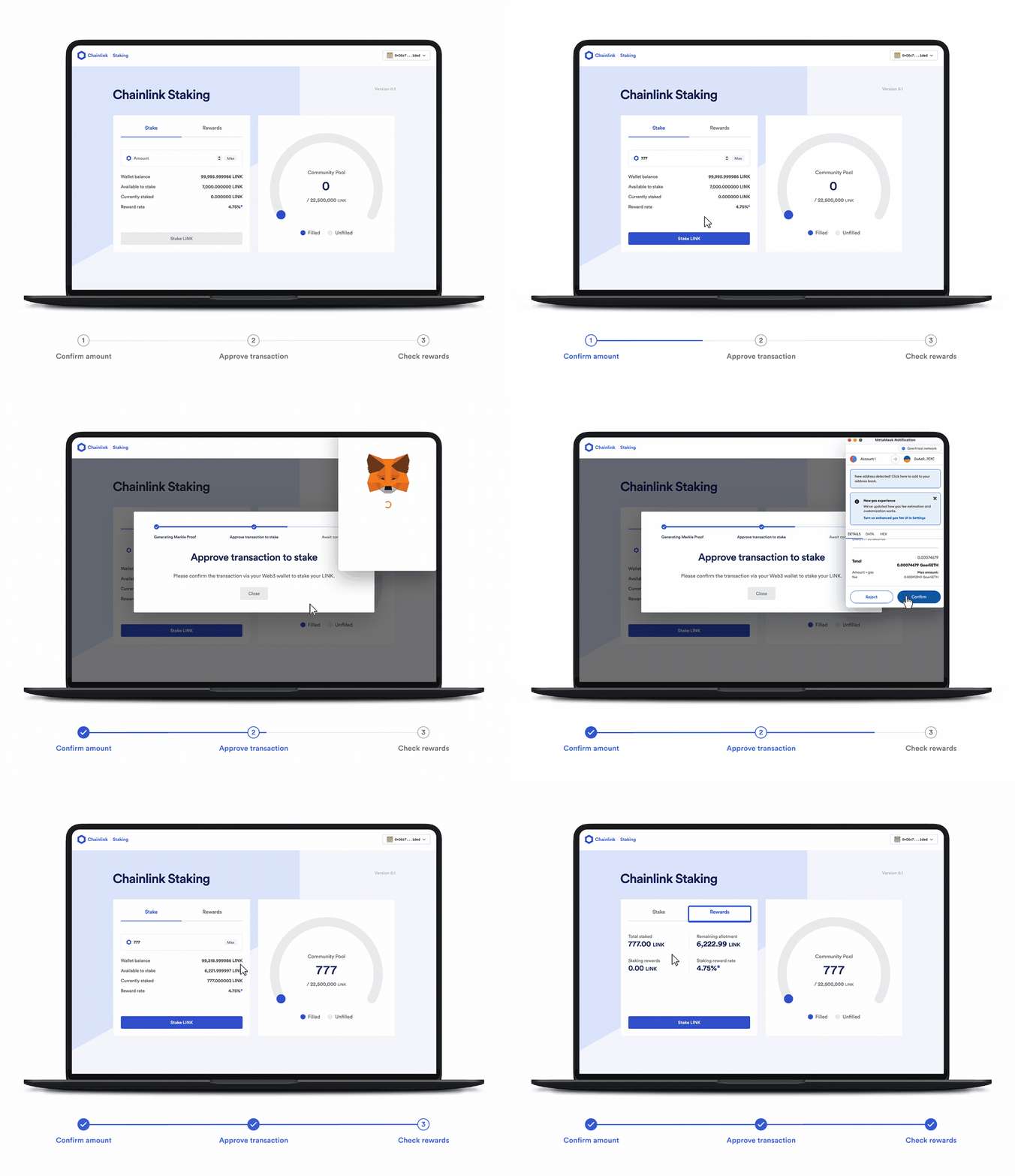
Step-by-Step Written Tutorial (MetaMask)
For this tutorial, we will showcase how to stake LINK using a MetaMask wallet.
1. Go to the Chainlink Staking web page.
Make sure to verify that the URL in your browser is the correct official Chainlink Staking website. Bookmark it for future reference: https://staking.chain.link.
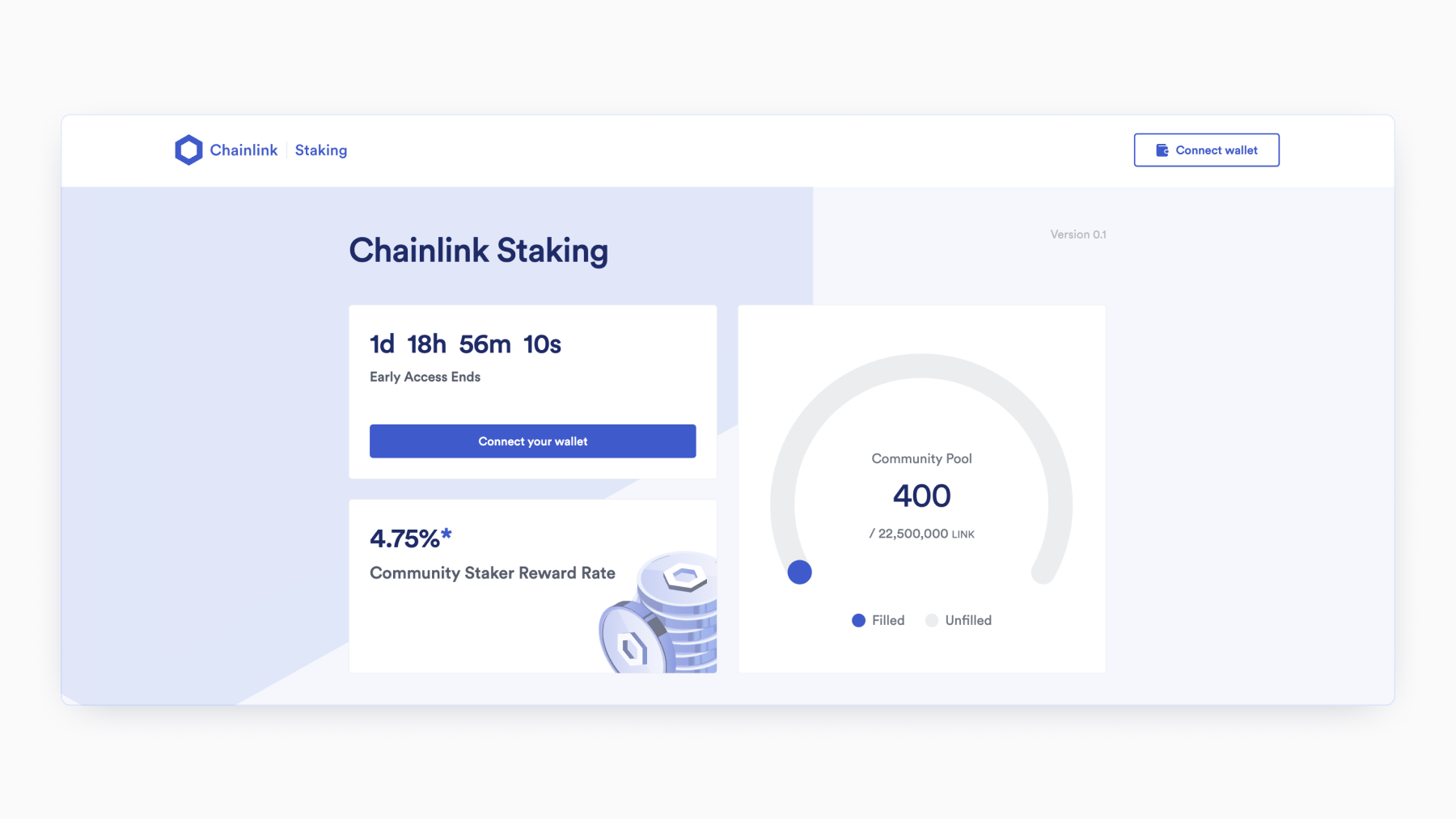
2. Click “Connect Wallet.”
Click the “Connect Wallet” button at the top right of the web page.
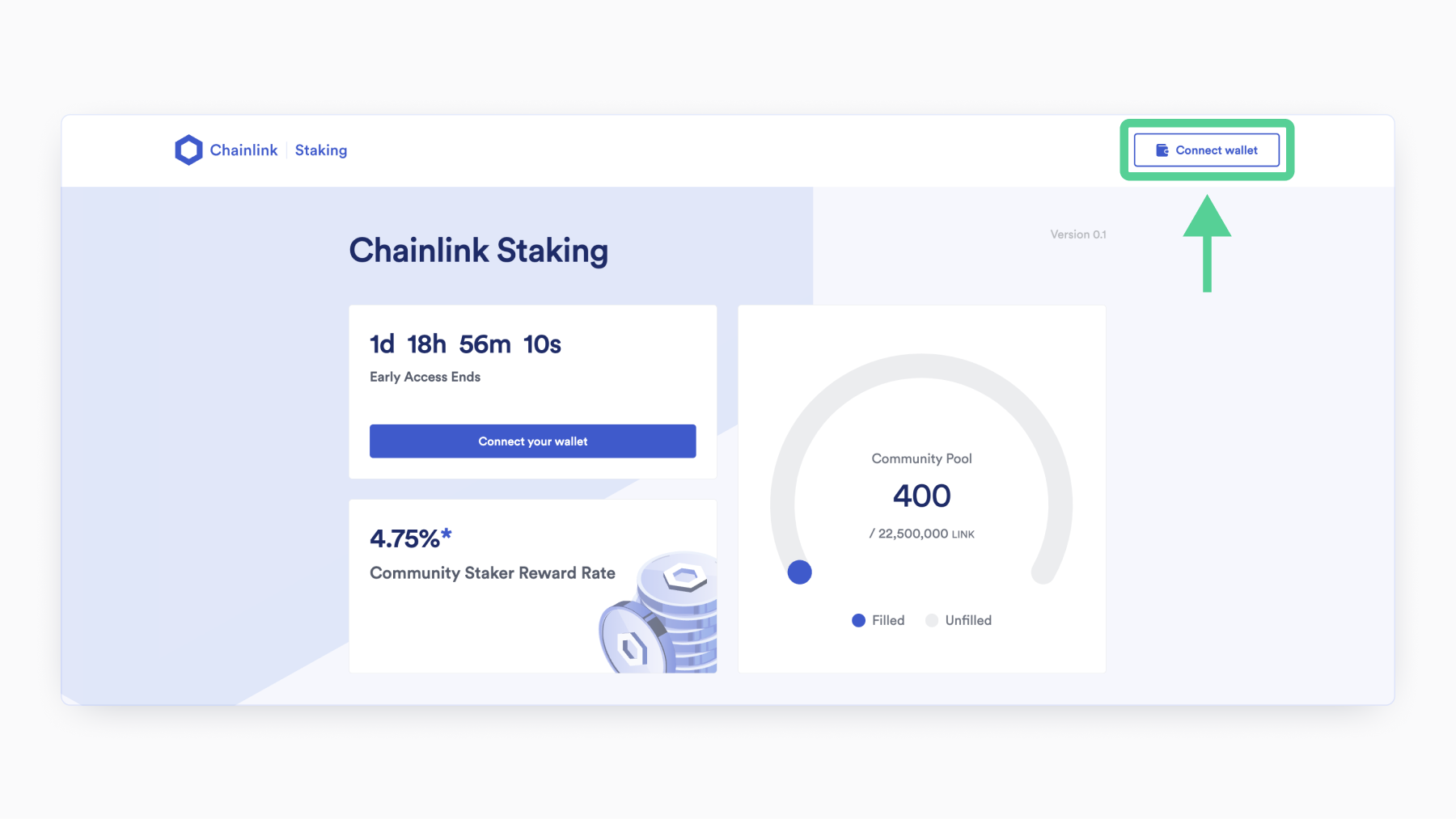
3. Choose your wallet.
Choose the Web3 wallet that holds your LINK tokens and ETH. In this example, we’ll be using MetaMask.
4. Choose your wallet account.
If you have only one account, click the only option.
If you have more than one wallet connected to your MetaMask, click the wallet address that holds your LINK tokens.
Then press “Next” in order to connect your wallet to the Chainlink Staking web page.
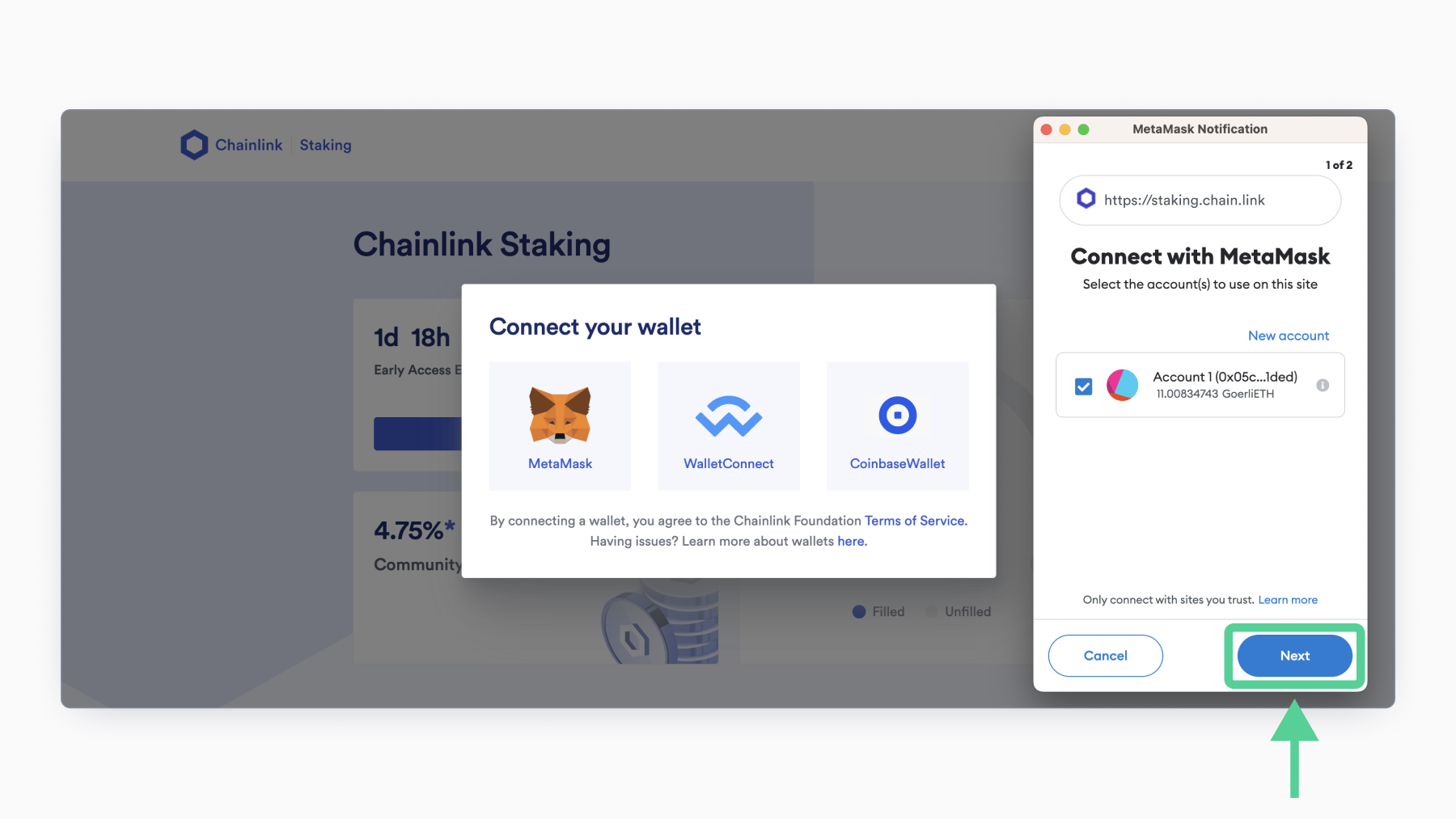
5. Press “Connect.”
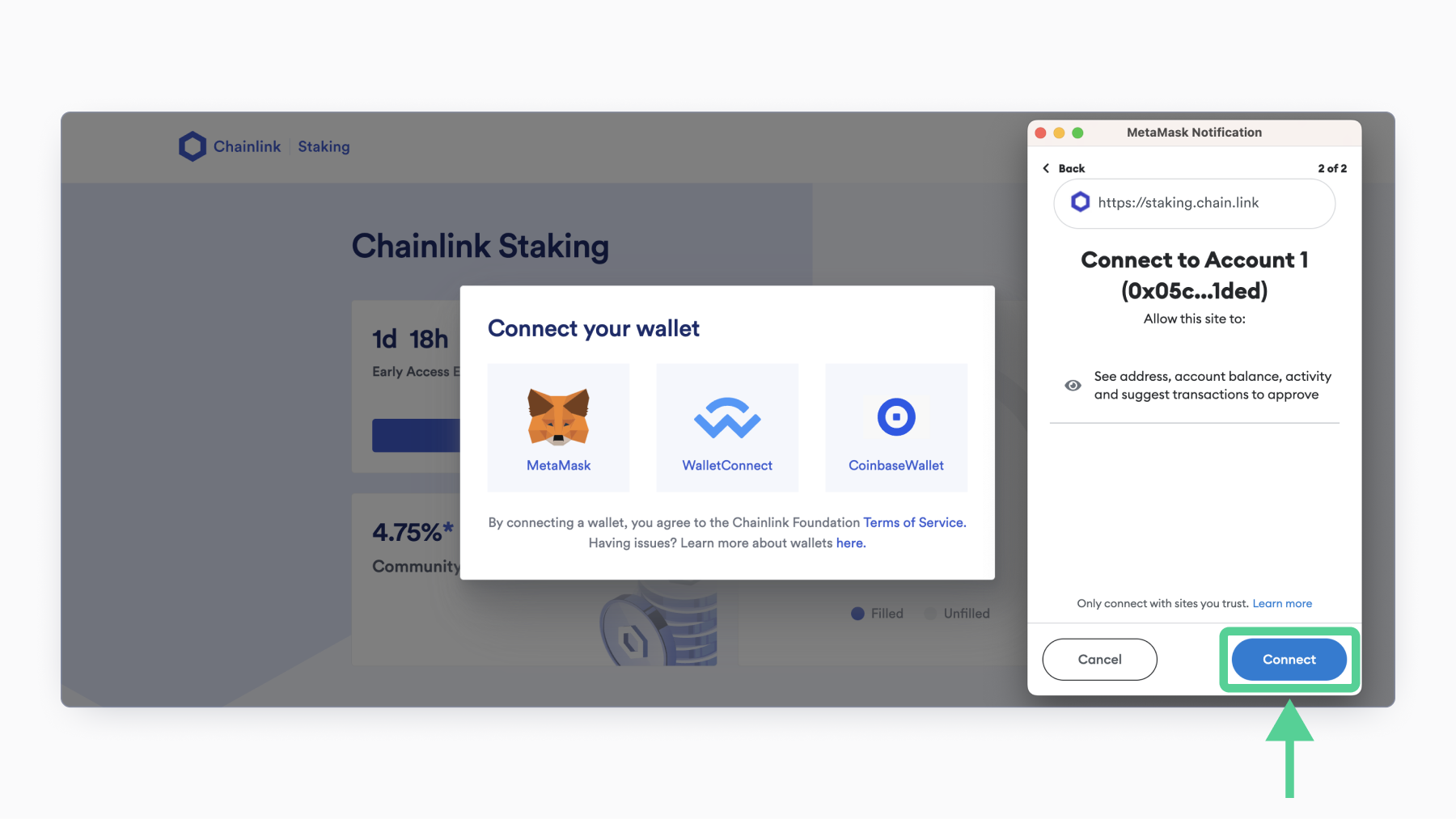
After this step, you should be returned to the Chainlink Staking web page, with your wallet address in the top right corner.
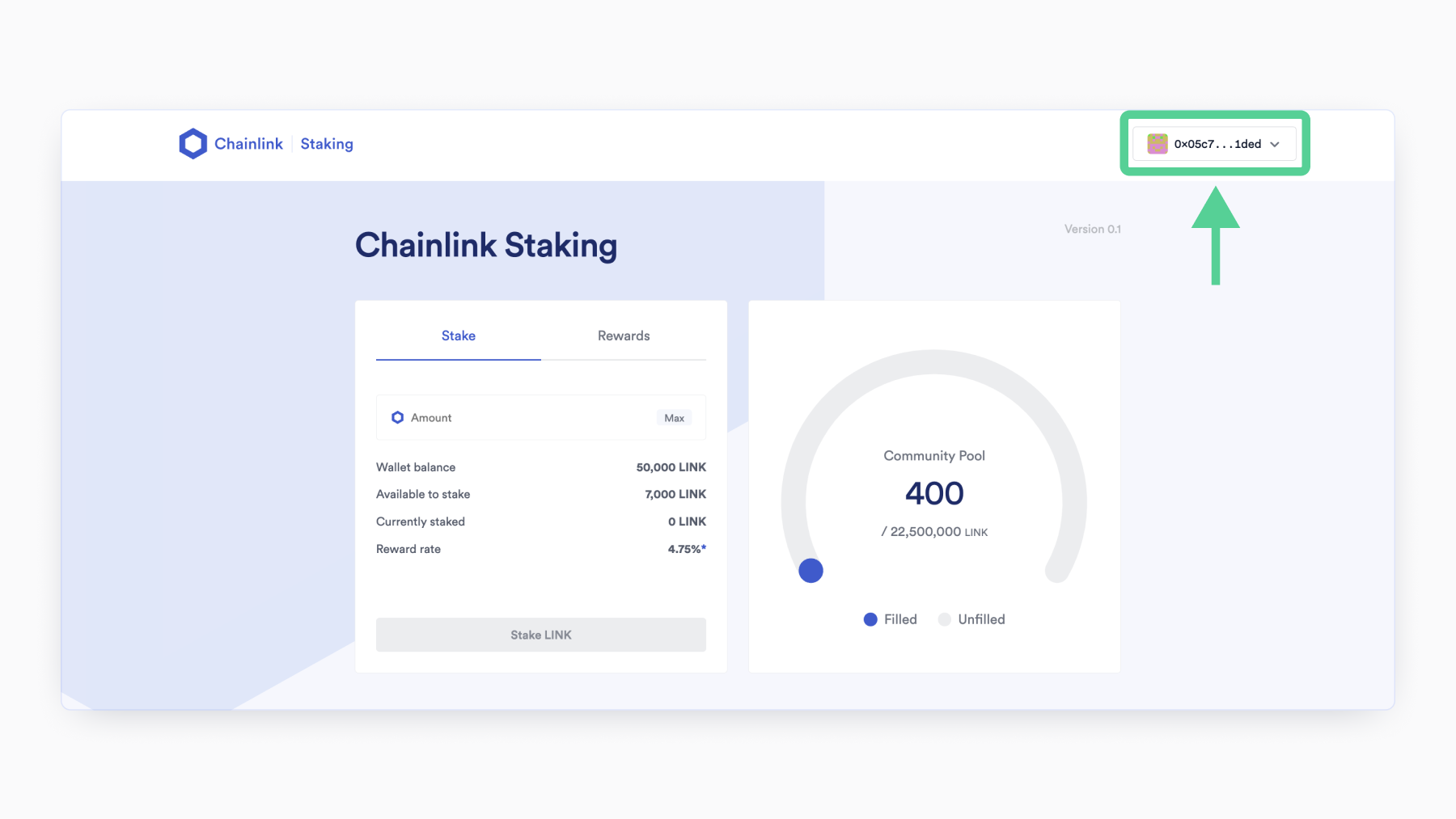
6. Enter the amount of LINK you want to stake.
You cannot enter a value higher than the number of LINK tokens in your wallet, or more than the number listed next to “Available to stake.”
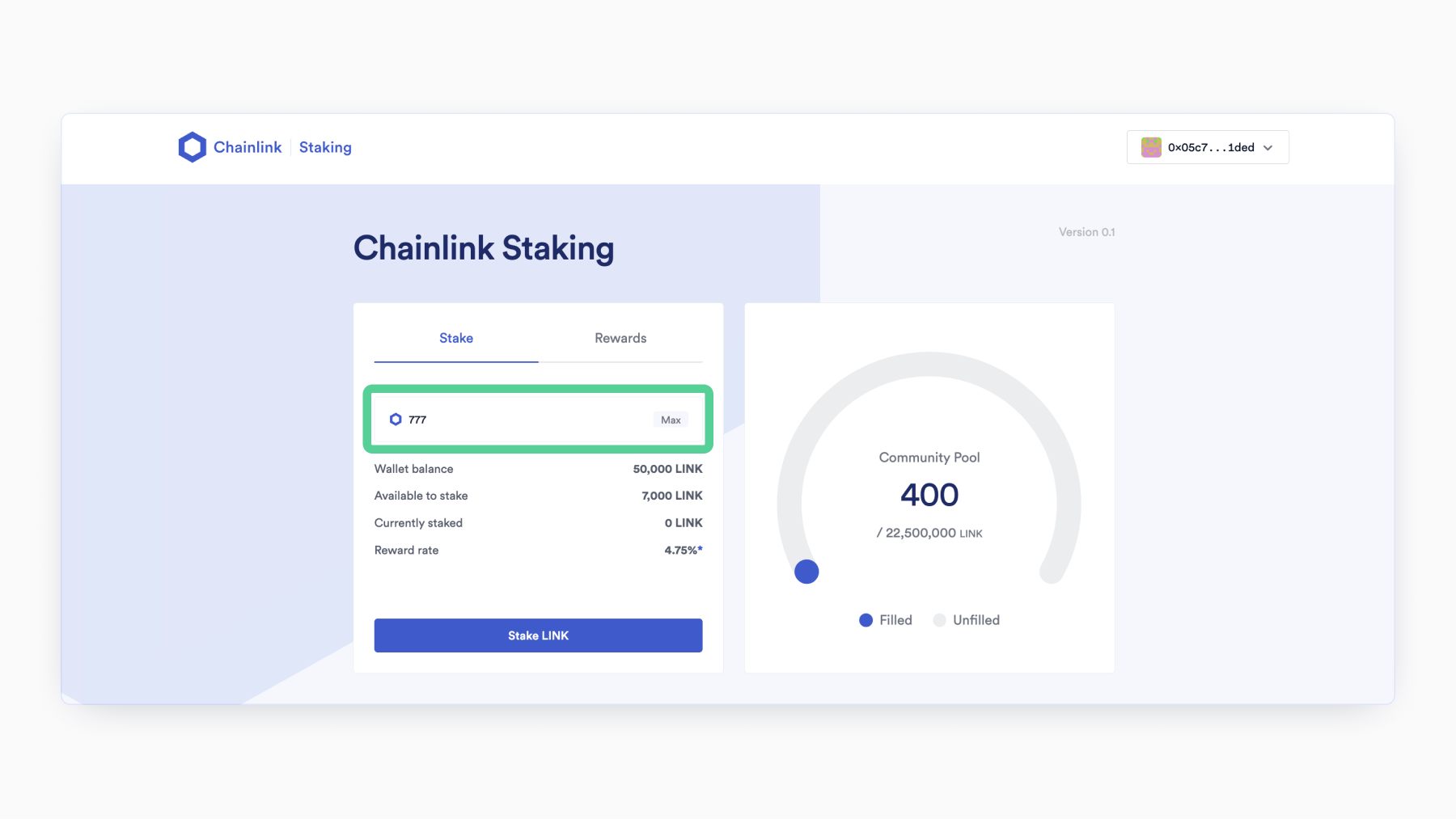
7. Press “Stake LINK.”
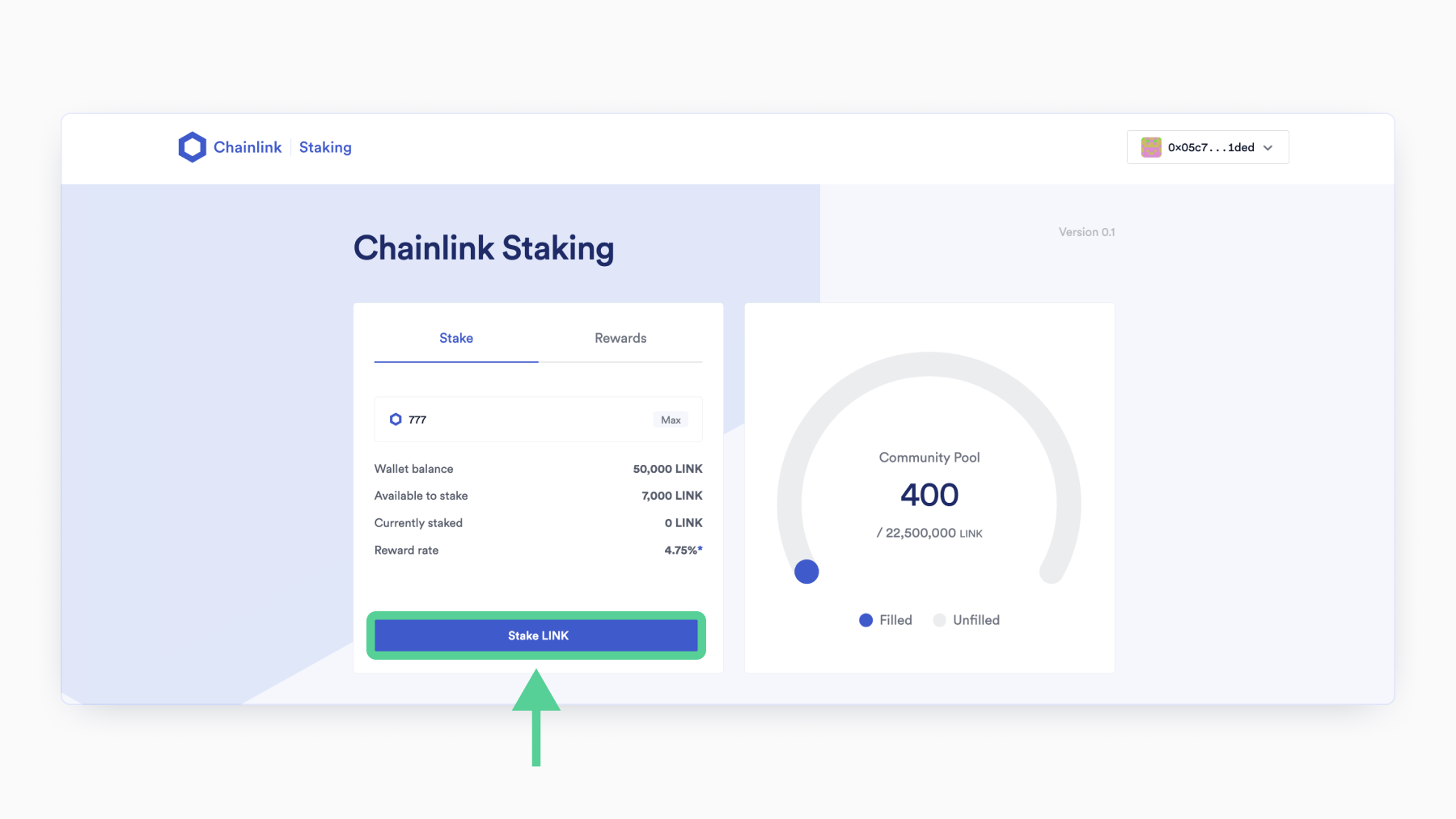
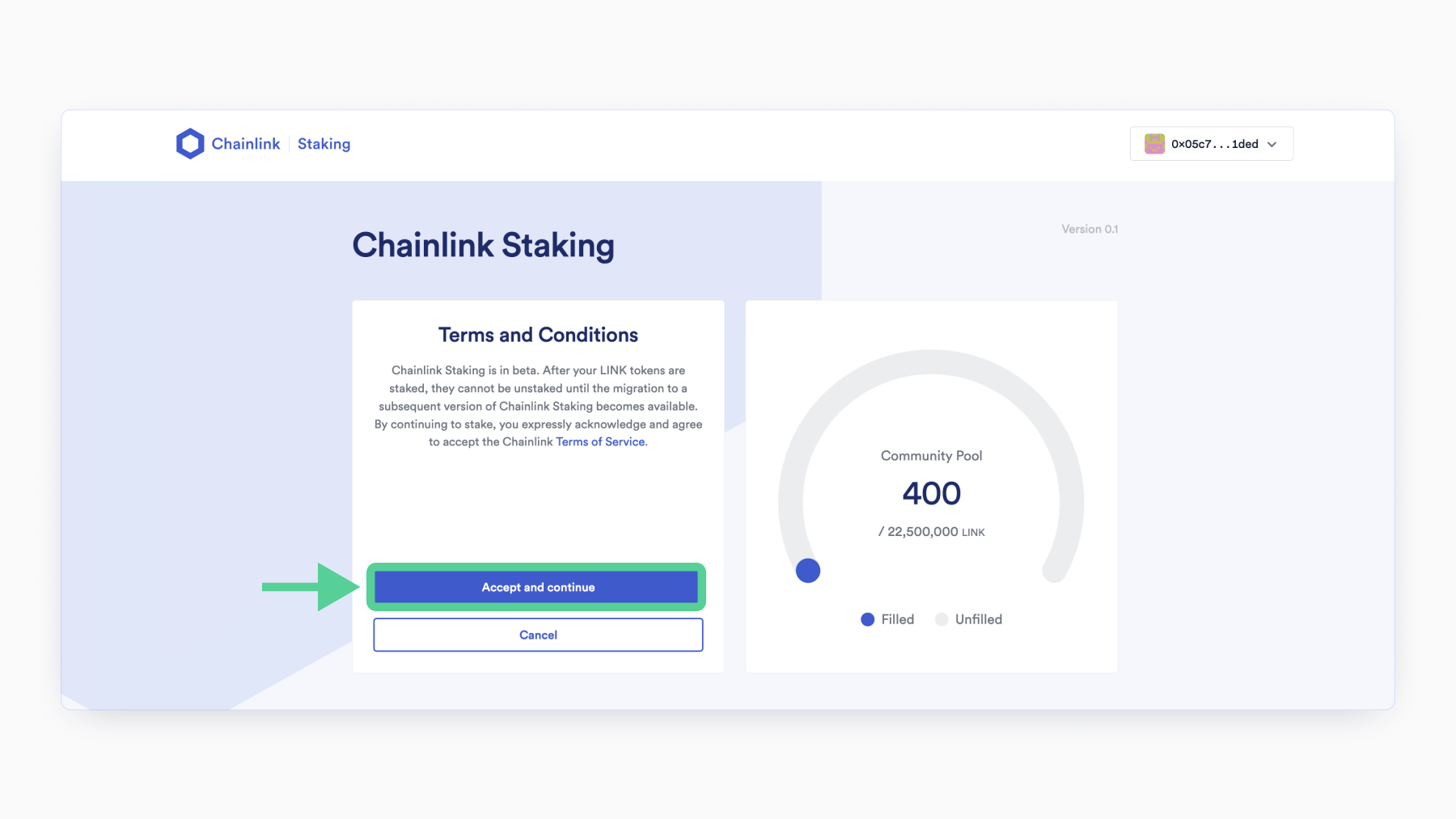
8. Press “Accept and continue.”
Please make sure to read the terms of service on this page before continuing further.
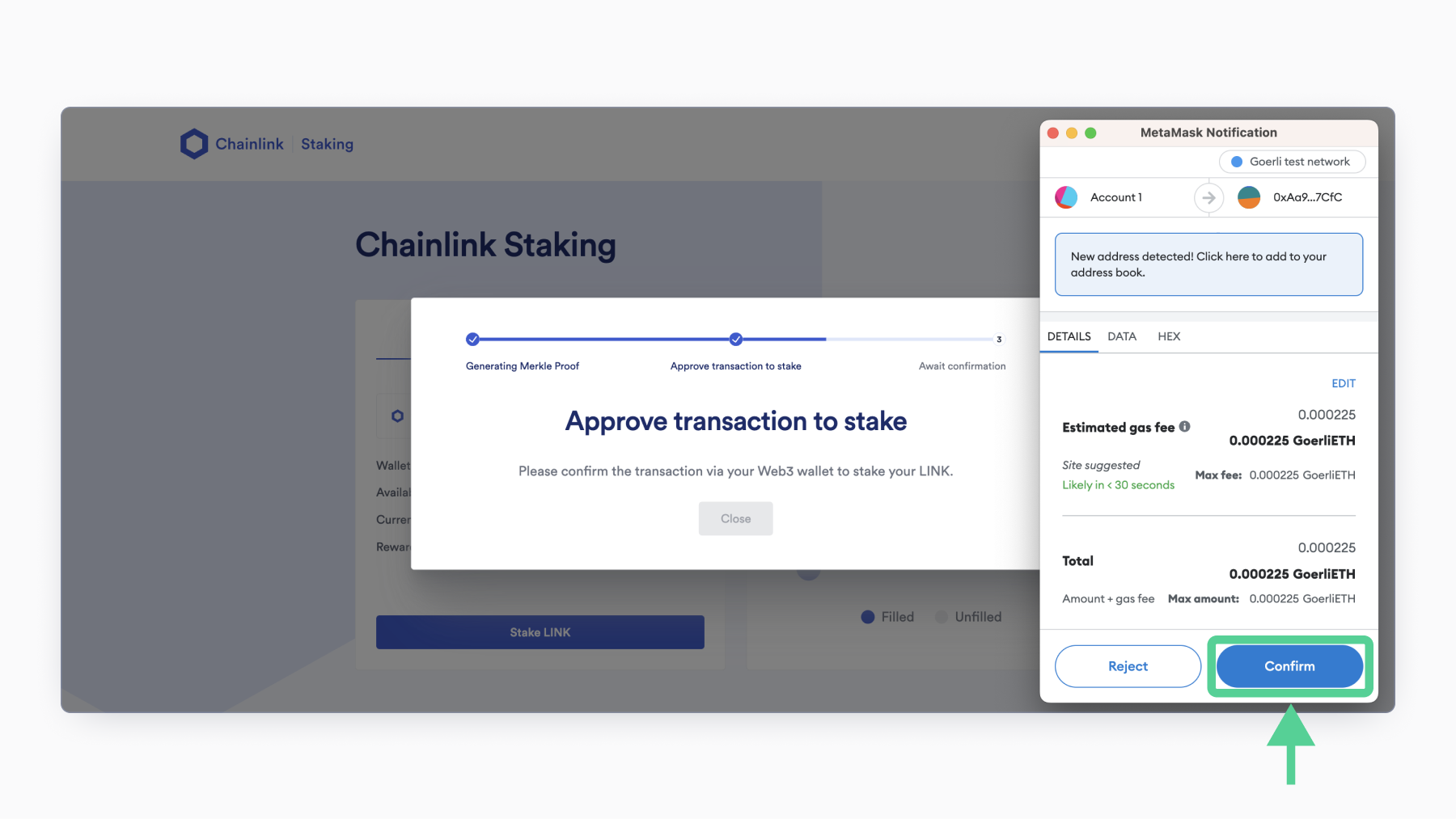
9. Approve the transaction.
Your Web3 wallet will then pop up, and you will be asked to confirm the transaction. Verify that you are okay with the estimated amount of ETH required to pay network transaction fees. Press the “Confirm” button to broadcast the transaction to the Ethereum network.
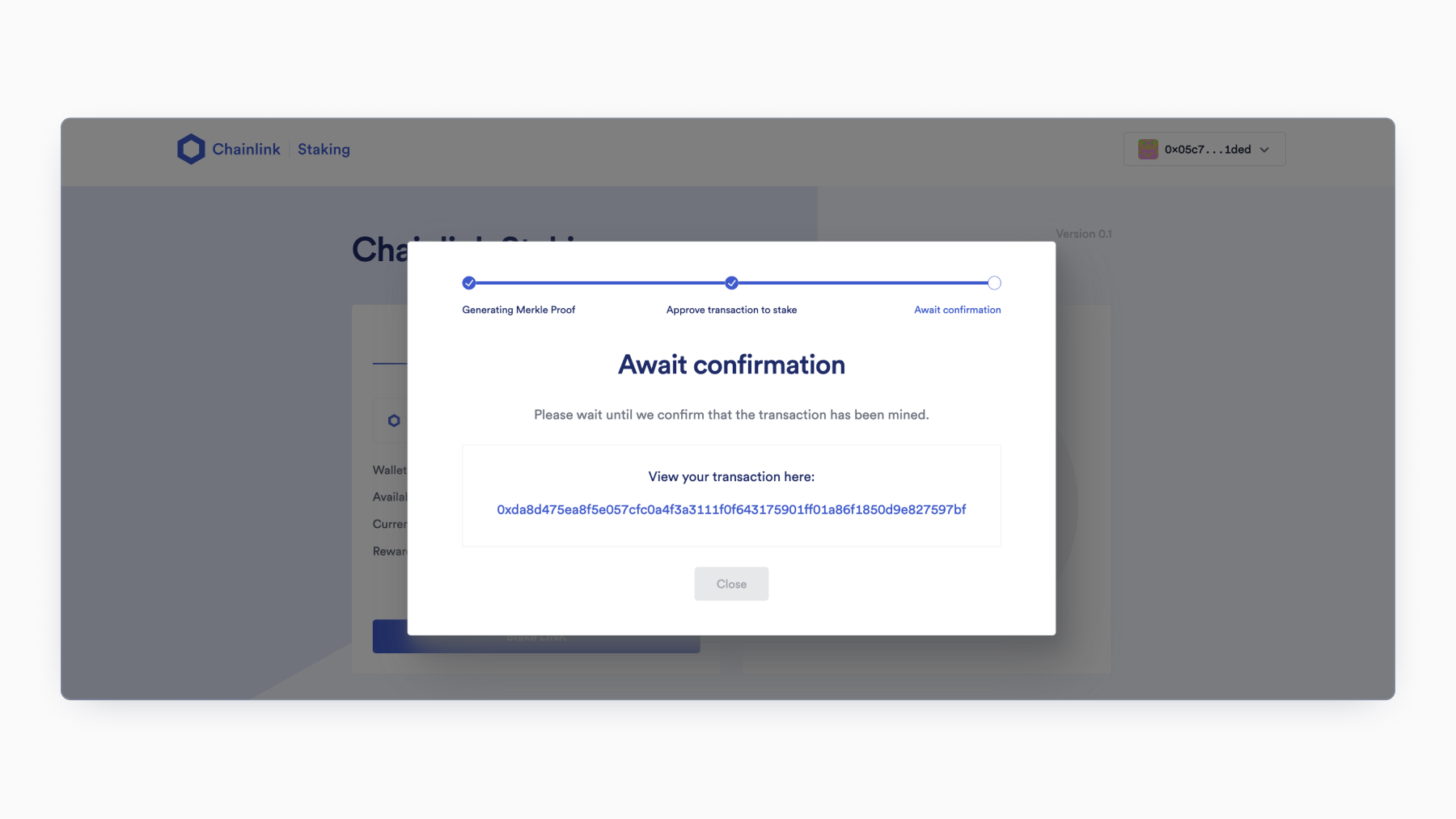
10. Wait for confirmation.
If you see this screen, your transaction has been successfully broadcast to the Ethereum network and is now pending confirmation. The amount of time it will take for your transaction to confirm will depend on network activity and gas prices. Refer to your wallet provider’s official support if you need to resubmit the transaction with a higher gas price.
11. And you’re done!
If you see a page similar to the screenshot below, congratulations! You have successfully staked your LINK in Staking v0.1. To see your transaction on Etherscan, click the link below “View your transaction here.”
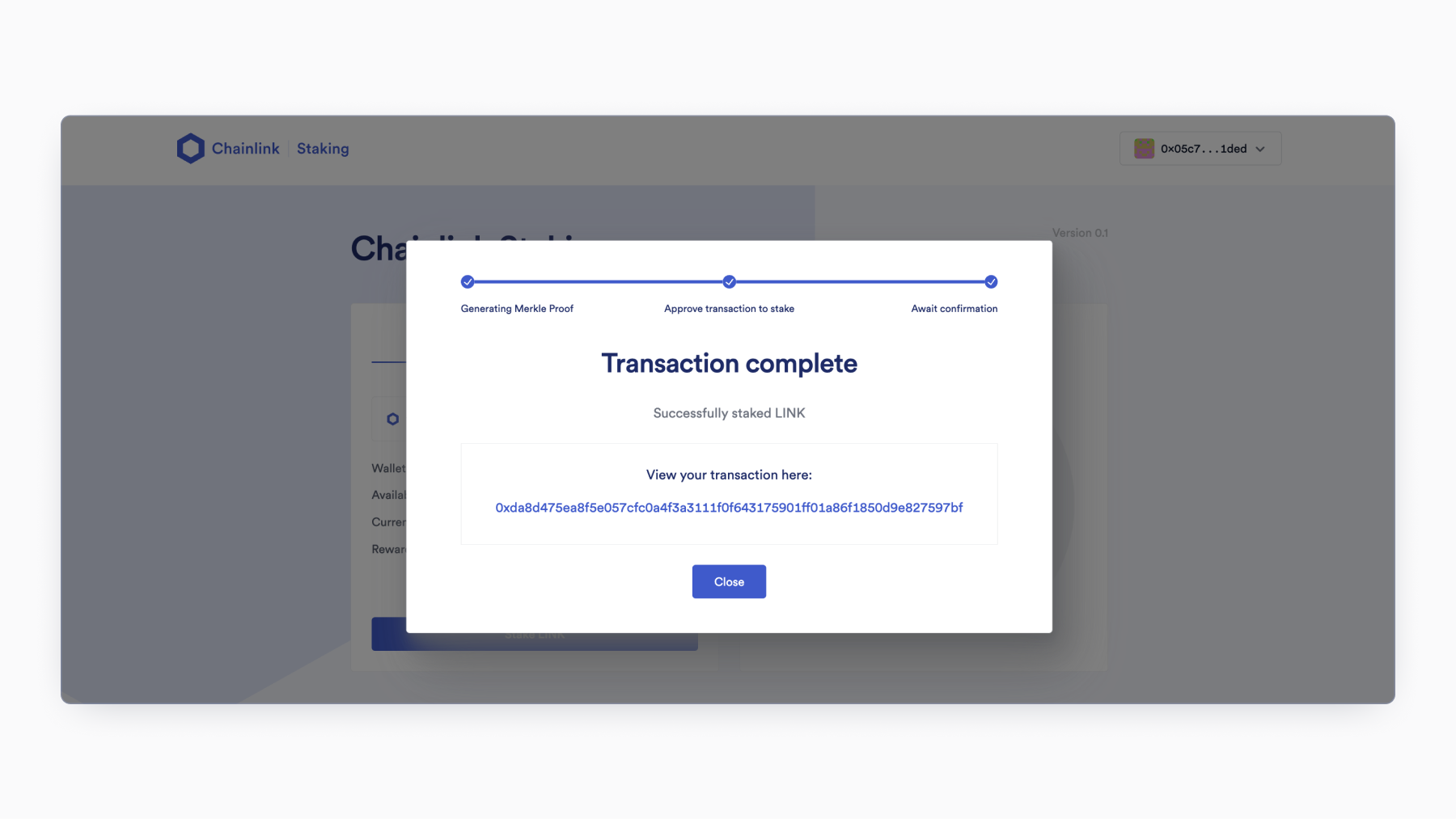
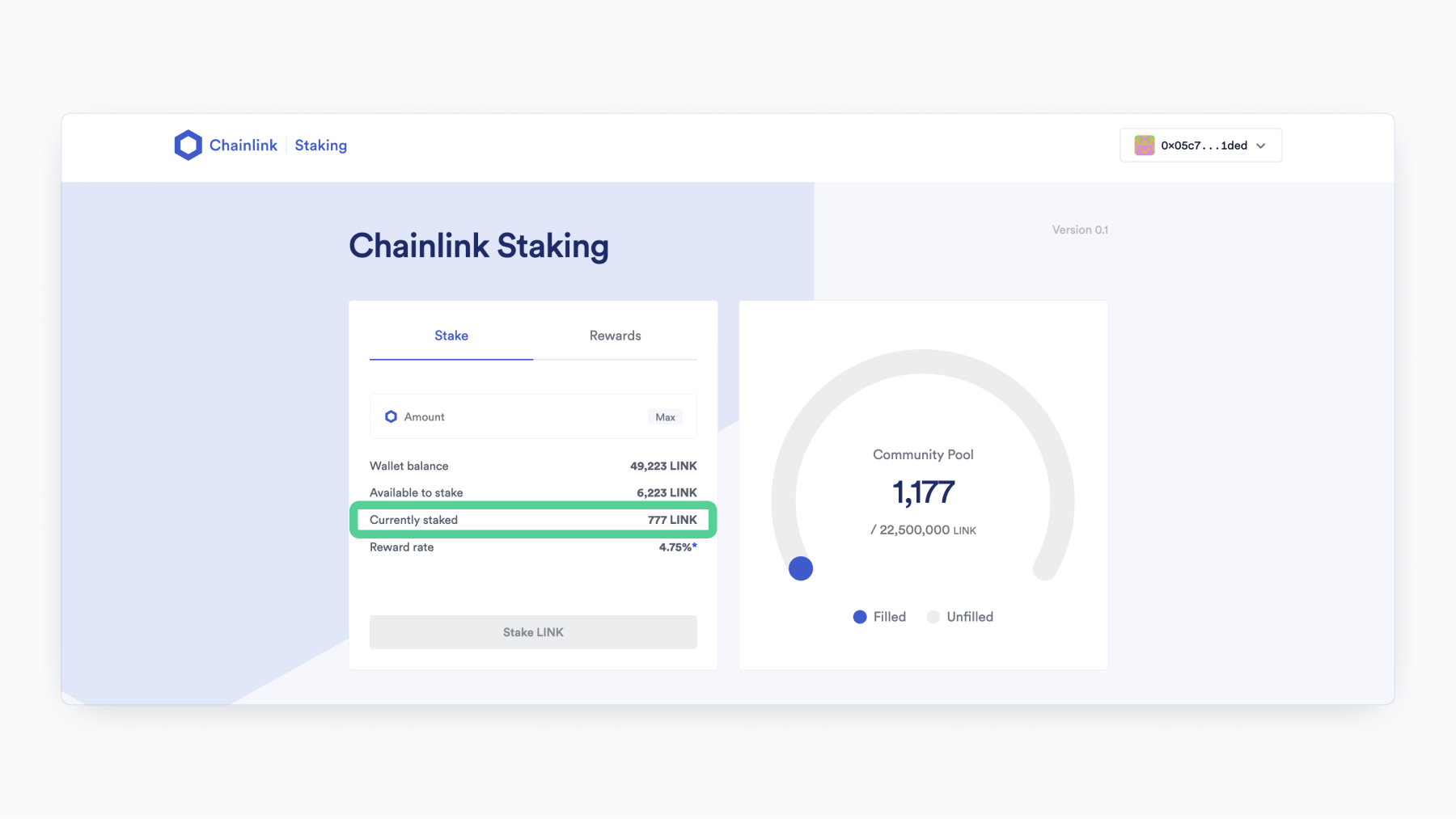
To confirm your staking balance, press “Close” to navigate back to the web page and check the number corresponding to “Currently staked.”
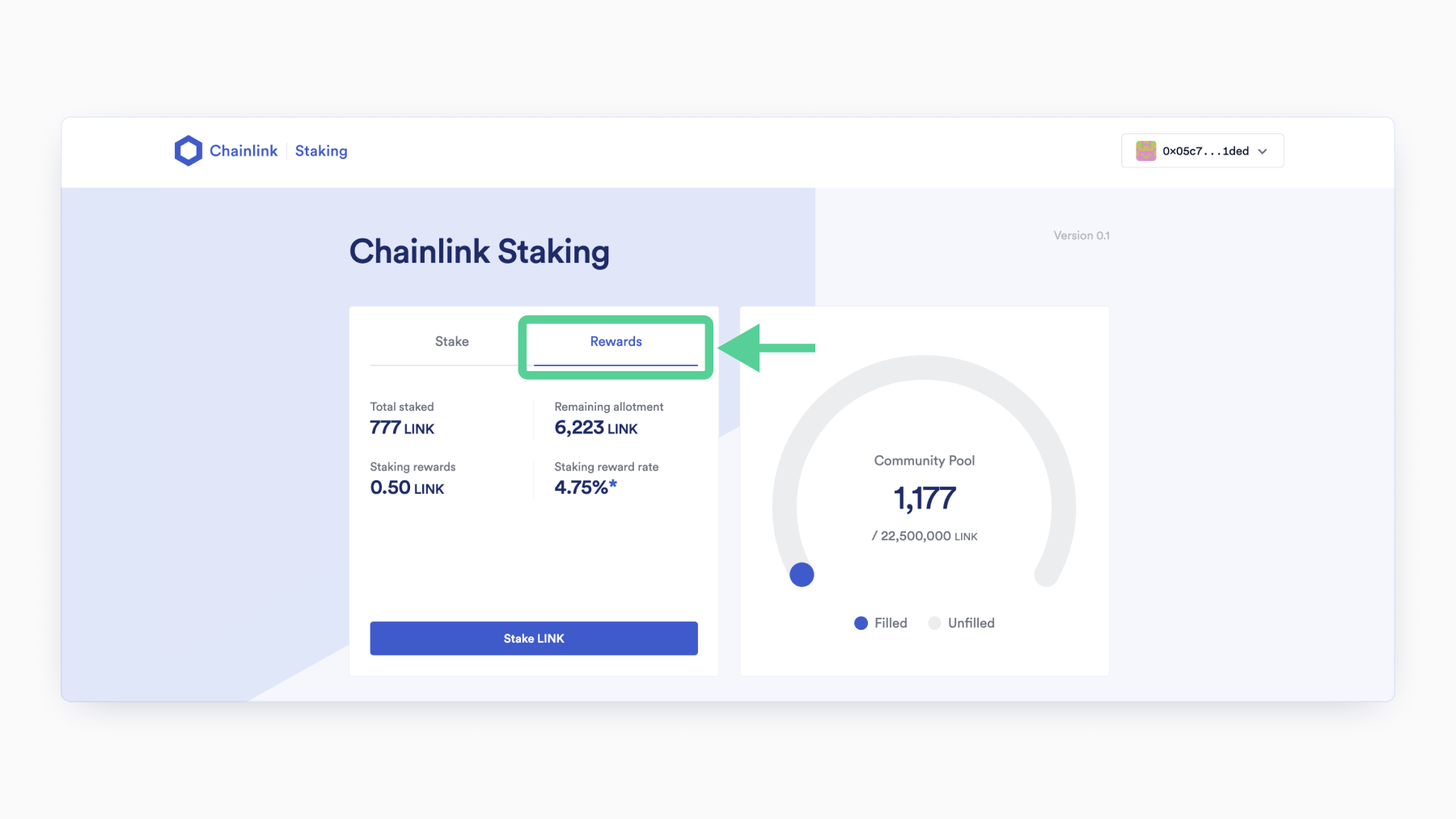
To check your rewards, press the “Rewards” tab. The “Staking rewards” section will update to correspond to the amount of LINK rewards you earn over time for helping secure the Chainlink Network.
More Resources on Chainlink Staking
Chainlink Staking is part of a larger initiative called Chainlink Economics 2.0, aimed at bringing the Chainlink Network to a new era of sustainable growth, cryptoeconomic security, and deeper value capture.
To learn more about Chainlink Staking v0.1, dive into the following resources:
- Staking v0.1 Launch Details
- Check Your Early Access Eligibility
- Chainlink Staking Roadmap
- Chainlink Staking v0.1 – Direct Staking Guide
—
Disclaimer: This post is for informational purposes only and contains statements about the future, including anticipated programs, products and features, developments, and timelines for the rollout of these new products and features. These statements are only predictions and reflect current beliefs and expectations with respect to future events; they are based on assumptions and are subject to risk, uncertainties, and change at any time. The Staking Interface is provided “as is” without representations, guarantees, or warranties of any kind. There can be no guarantee that any of the contemplated programs, products or features will be implemented as specified or at all nor any assurance that actual results will not differ materially from those expressed in these statements, although we believe them to be based on reasonable assumptions. All statements are valid only as of the date first posted and we may not update this post in response.
The post How To Stake Chainlink (LINK) appeared first on Chainlink Blog.
2
1

 从同一位置管理所有加密资产、NFT 和 DeFi 资产
安全地关联您正在使用的投资组合,以开始交易。


