6 Best Crypto Portfolio Trackers for 2026

Last updated . Pricing and app ratings were verified on 31 July 2026.
Last winter I counted the apps holding my crypto. Eight. Two exchanges, four wallets, one staking dashboard, one forgotten DeFi position. Answering one simple question took twenty minutes every morning. Am I up or down?
That pain is fixable. The right tracker turns eight tabs into one screen. It also catches what you forget. Staking rewards, dust balances, and old wallets add up. So I did the homework. I compared syncs, free tiers, and security models. I verified every price against official pages this month. Then I turned the research into this guide.
Below are my six picks for 2026. CoinStats Portfolio Tracker is first. I will be honest about why.
The short answer. CoinStats is the best crypto portfolio tracker for 2026 overall. It syncs 300+ wallets and exchanges, with AI insights on top. Kubera wins for net worth, Coinigy for trading, DropsTab for research. Rotki takes privacy. Crypto Pro takes Apple devices.
We make CoinStats, so yes, we are biased. We know it. So this guide sticks to plain facts: coverage, features, and public pricing. The verdict is yours.
- CoinStats is our best overall pick for 2026.
- Every tracker here was verified alive, with pricing checked in July 2026.
- CoinStats, DropsTab, Rotki, and Crypto Pro all offer free tiers.
- Match the tool to your workflow: net worth, trading, research, privacy, or Apple.
- Good trackers use read-only access. Never share private keys.
What makes a good crypto portfolio tracker
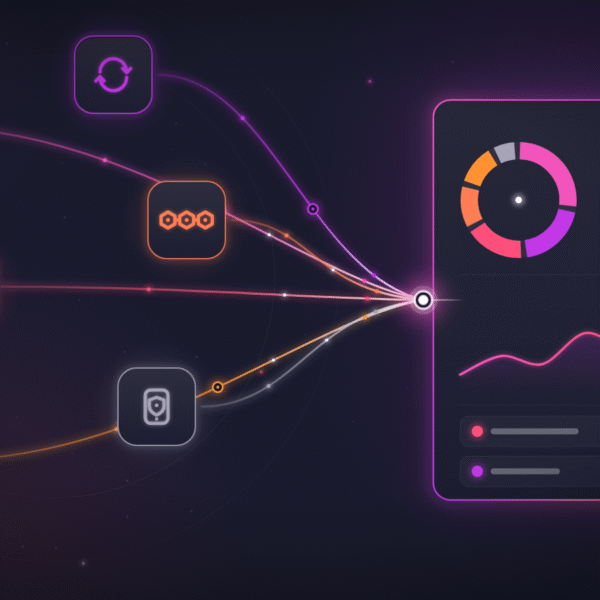
A portfolio tracker pulls your holdings into one live view. It reads balances from exchanges, wallets, and DeFi protocols. Then it shows value, allocation, and profit over time. The best ones also explain what changed and why.
Here is the five-point checklist I scored every tool against. I applied it the same way to all six picks. Every claim below traces to an official page, checked this month. Two former favorites failed the liveness test and got cut. That is the level of pruning this list survived.
Coverage. Count your venues before choosing. A tracker must support your exchanges, wallets, and chains. Gaps mean manual spreadsheets, which defeats the point. Coverage claims also age fast, so check the live integration list.
Sync quality. The gold standard is read-only exchange keys plus public wallet addresses. Balances should refresh without babysitting. Cost basis should survive transfers between your own accounts. Weak sync engines show wrong profit numbers within a week.
DeFi and staking depth. Staked assets and LP positions are easy to lose track of. Good trackers read protocol positions, not just token balances.
Price and free tier. Free tiers vary from generous to decorative. Check transaction limits and portfolio counts before you commit. I list verified pricing for every pick below.
Privacy and security. Read-only access keeps funds out of reach. Some tools go further and keep all data on your device. Decide how much you want a server to know.
Read-only in, insight out. No tracker here ever needs your private keys.
One more note. AI portfolio features are spreading fast across the category. Treat them as a baseline, not magic. The difference is the data quality underneath.
The 6 best crypto portfolio trackers at a glance
Six tools survived the checklist. The table shows where each one wins.
| Tracker | Best for | Free tier | Entry price | Standout |
|---|---|---|---|---|
| CoinStats | All-in-one tracking | 10 portfolios, 20,000 transactions | $13.99/mo billed yearly | AI agent on your own portfolio |
| Kubera | Total net worth | None. $1 trial for 14 days | $250/yr | Crypto next to stocks and property |
| Coinigy | Active traders | None. 30-day free trial | $18.66/mo | Charting and trading across exchanges |
| DropsTab | Market research | Yes. Up to 50 portfolios | Not publicly listed | Token unlock and vesting calendars |
| Rotki | Privacy | Yes. 1,000 recent events | Premium: see rotki.com | Open source, data stays local |
| Crypto Pro | Apple devices | Yes. Core app free | Premium from $7.99 | Apple Watch app, no account needed |
Pricing and limits verified July 2026 against official pages.
A note on ranking. This order weighs coverage first, then sync quality, then price. Specialist tools rank on their specialty, not raw breadth. Ties break on how actively each product ships updates. Your workflow can reorder the bottom five freely. The top spot is harder to argue with.
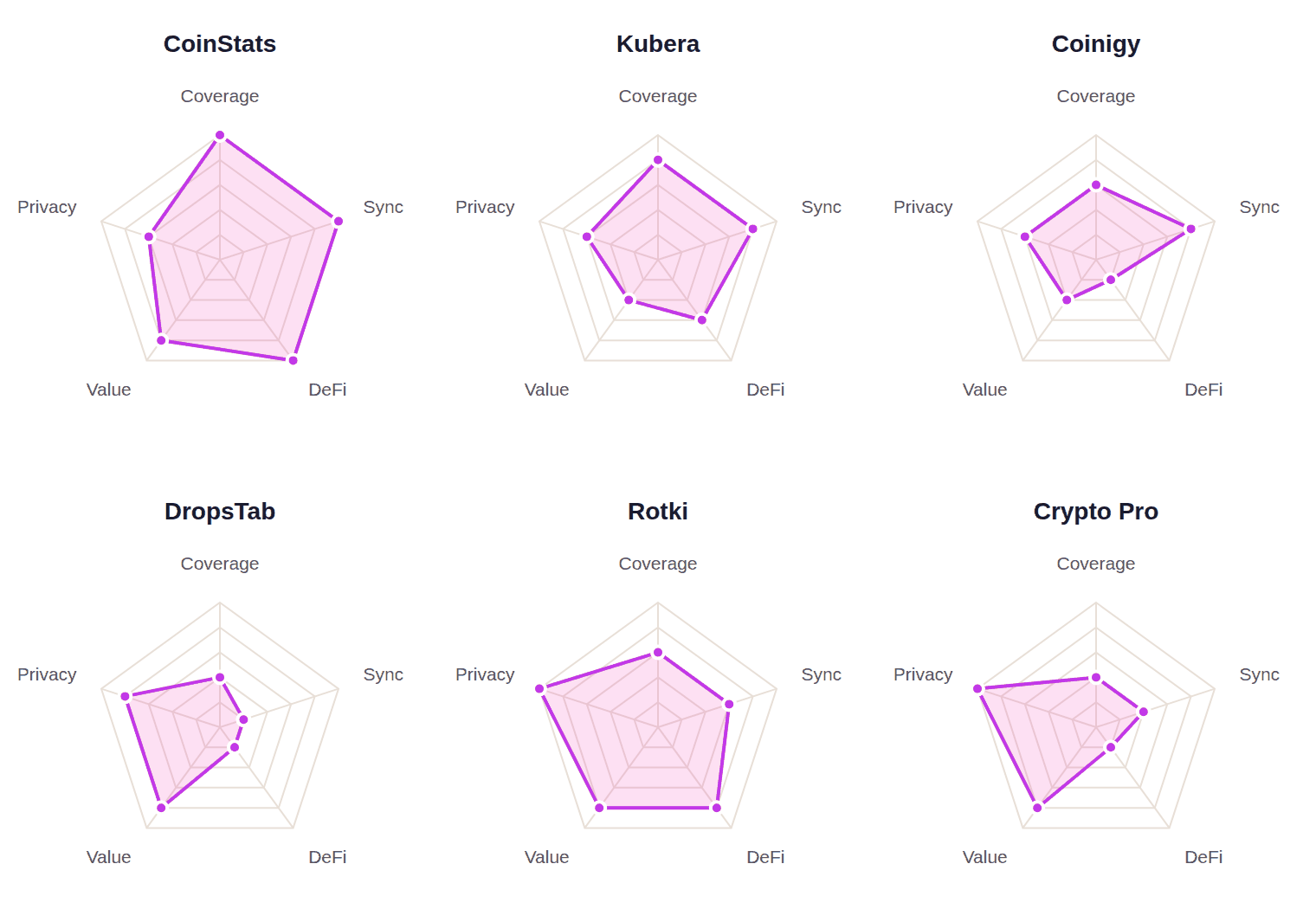
How the six compare, axis by axis. Editorial scores from the July 2026 verification, zero to five. The glance table above holds the underlying facts.
CoinStats
CoinStats connects your whole crypto life in one place. It syncs 300+ wallets and exchanges across 50+ blockchains. It also reads positions from 10,000 DeFi protocols. One million people track their portfolios with it.
- Read-only sync for exchanges, wallets, and DeFi positions.
- Tracks 20,000+ coins with live prices and alerts.
- AI agent answers questions about your own holdings.
- Exit strategy tool models targets with AI price scenarios.
What to verify: free accounts sync each portfolio 10 times per day.
Here is the practical picture. Paste a wallet address or add a read-only exchange key. CoinStats pulls balances, cost basis, and DeFi positions in minutes. The AI agent then answers plain questions. Which coin drove today’s move? What is my real exposure to one narrative?
Premium runs $13.99 per month billed yearly, after a 7-day trial. Heavy users can step up to Degen at $89 per month. That tier adds 500 portfolios and AI backtesting. A $399 lifetime plan exists for committed holders. Full details sit on CoinStats pricing.
Real prompts from CoinStats AI Agent. It answers from your portfolio, not generic charts.
“People used to check five apps to know where they stood. Now one screen answers it in seconds. We built CoinStats so your portfolio explains itself. AI should do the digging, not you.”
Narek Gevorgyan, founder and CEO, CoinStats
Kubera
Kubera is a balance sheet for everything you own. Crypto sits next to stocks, bank accounts, and property. It suits investors who treat crypto as one sleeve of a bigger picture. The premium Black tier adds nested portfolios and granular access controls. Family offices are the target there.
- Connects banks and brokerages at thousands of institutions worldwide.
- Crypto support covers DeFi, NFTs, staking, and lending.
- Tracks real estate, vehicles, gold, and private investments.
- Fully loaded 14-day trial costs $1.
What to verify: crypto-only users pay for a lot of non-crypto machinery.
Coinigy
Coinigy is a trading terminal with portfolio tracking built in. One login charts, trades, and monitors balances across your exchanges. It has served multi-exchange traders since 2014.
- Syncs exchange accounts through read-only or trading API keys.
- TradingView-powered charting with real-time market data.
- Instant price alerts across every connected venue.
- Advertises 45+ supported exchanges, including Binance, Coinbase, and Kraken.
What to verify: wallet tracking is by public address, not DeFi protocol positions. App updates date to 2024 and 2025.
DropsTab
DropsTab pairs a light portfolio with heavyweight market intelligence. Its token unlock calendars show vesting cliffs before they hit price. Research-driven investors use it to time entries and exits. A separate Telegram bot adds wallet alerts from $29 per month.
- Tracks 11,000+ listed coins with market and tokenomics data.
- Unlock and vesting schedules, with allocation breakdowns by round.
- Up to 50 portfolios with realized and unrealized profit tracking.
- Public portfolios let you share positions with a link.
What to verify: portfolio entries are manual. No exchange auto-sync is documented.
Rotki
Rotki is the privacy pick. It is open source and runs on your own machine. Your portfolio data never lives on someone else’s server. It doubles as an accounting tool for tax season. The free tier is real but capped. It processes your 1,000 most recent events and two weeks of net-worth history.
- Local-first design: balances and history stay on your device.
- No email or account needed to start.
- Premium adds staking, DeFi history, analytics, and encrypted sync.
- Actively developed, with its latest release in June 2026.
What to verify: setup is more technical than cloud trackers.
Crypto Pro
Crypto Pro lives where Apple users live. It runs on iPhone, iPad, Mac, and Apple Watch. There is no account and no data collection. Everything stays encrypted on your device. It suits holders who want glanceable prices, not deep sync.
- Native widgets for home screen, lock screen, and menu bar.
- Apple Watch app shows prices and portfolio at a glance.
- Portfolio data is stored locally, not on company servers.
- Updated in July 2026, rated 4.7 stars by 47,000 users.
What to verify: Apple only. Premium billing periods are labeled inside the app.
Top picks by category
Different investors need different winners. Here is the short version.
Wallets, exchanges, DeFi, and AI insights in one app.
Pick it to replace every balance tab you have open.
Crypto tracked beside stocks, banks, and property.
Pick it when crypto is one sleeve of your wealth.
Charting, alerts, and trading across exchange accounts.
Pick it if you live in candlestick charts.
Unlock calendars and tokenomics beside a light portfolio.
Pick it to see vesting cliffs before they hit price.
Open source and local-first. Your data stays home.
Pick it if servers should never see your balances.
iPhone, iPad, Mac, and Watch. No account needed.
Pick it for widgets and wrist-glance prices.
Comparison by use case
Prefer scenarios to categories? Find your situation below.
Multi-exchange and multi-wallet holders
Top pick: CoinStats. One sync replaces a morning of tab checking. Binance-heavy? See our Binance portfolio tracker guide.
Alternatives: Coinigy for exchange accounts and wallet addresses.
Crypto next to stocks and property
Top pick: Kubera. A single balance sheet for everything you own.
Alternatives: CoinStats for the crypto sleeve.
Day trading across venues
Top pick: Coinigy. Charts, orders, and balances in one terminal.
Alternatives: CoinStats for price alerts on the go.
Hunting unlocks and vesting cliffs
Top pick: DropsTab. Supply events mapped before they move markets.
Alternatives: CoinStats to measure the portfolio impact.
Self-custody purists and clean records
Top pick: Rotki. Local data, open code, and accounting-grade history.
Alternatives: Crypto Pro for local-only mobile tracking.
iPhone and Apple Watch first
Top pick: Crypto Pro. Native on every Apple screen you own.
Alternatives: CoinStats apps for iOS and Android.
How to choose your crypto portfolio tracker
Start with a count. List your exchanges, wallets, chains, and DeFi positions. Write the list down. Ten minutes of inventory beats a month of wrong data. The tracker that covers all of them wins by default. Coverage gaps are the top reason people churn back to spreadsheets.
Next, decide where your data should live. Cloud trackers like CoinStats trade convenience for a hosted account. Local tools like Rotki and Crypto Pro keep everything on device. Both models are valid. Choose deliberately.
Then test before you pay. Every pick here has a free tier or trial. Connect your real accounts, wait a day, and check the numbers. Watch cost basis after a transfer between your own wallets. That one test exposes weak sync engines fast.
Alerts deserve their own test. Set one price alert and one portfolio move alert. Check they arrive fast enough to act on. Slow alerts are just news.
A good alert fires the moment your line crosses the threshold.
Finally, think about the exit paths. Can you export transactions when tax season arrives? Can you leave with your history intact? Good tools make leaving easy, which is exactly why you stay.
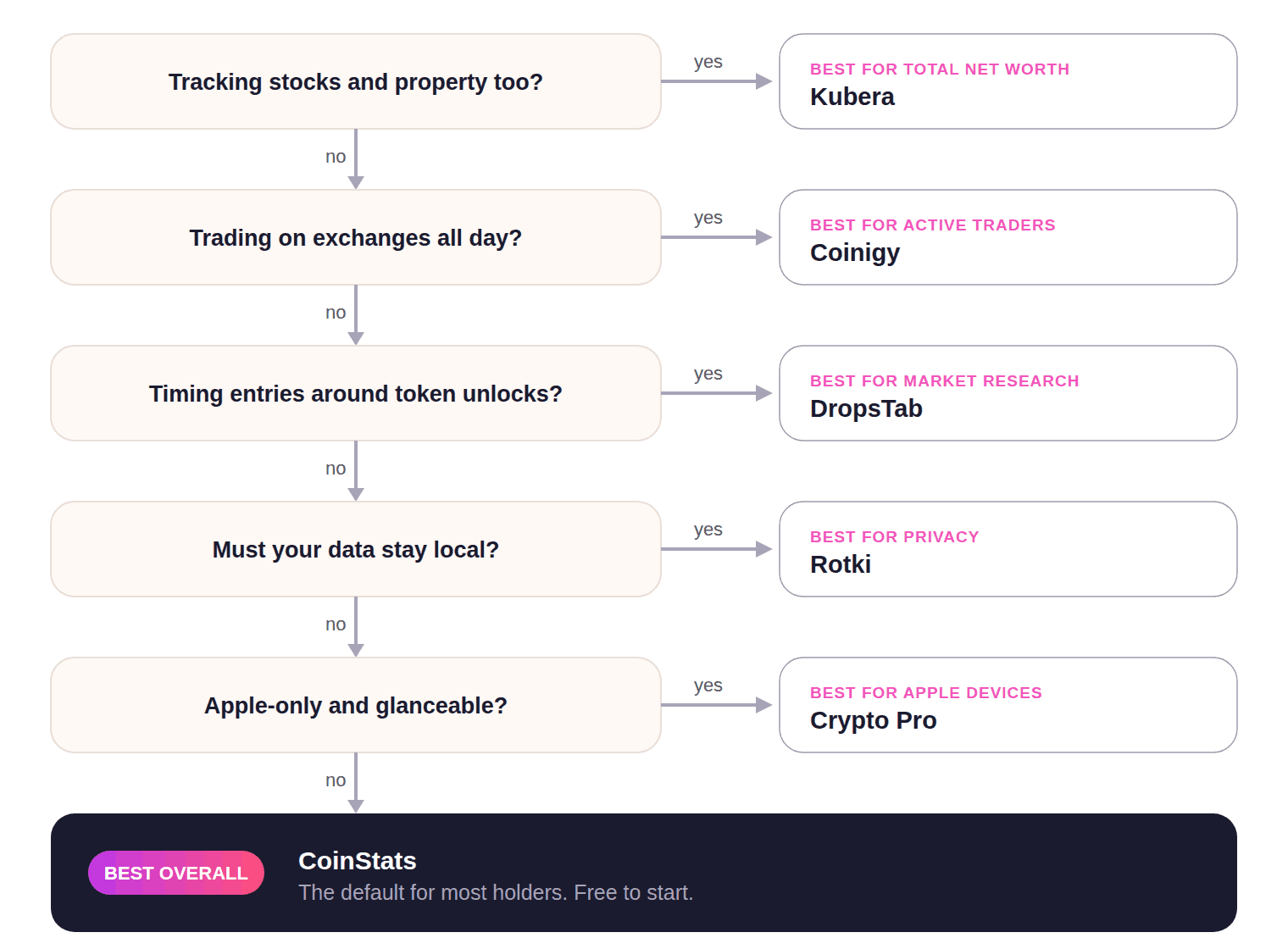
Five questions route you to the right tool. Most holders end at the default.
Builders have one more option. CoinStats Crypto API serves the same wallet, market, and DeFi data. Teams use it for custom dashboards and agents. Our best crypto API guide compares the options.
Six portfolio tracking mistakes to avoid
I made most of these myself. Learn cheaply.
Tracking only exchange balances. Wallets, staking, and DeFi drift out of sight fast. Partial pictures cause bad decisions. Sync everything or the totals lie.
Typing entries by hand. Manual logs rot within a week of real activity. Automated sync exists so your records match reality. Save spreadsheets for planning, not bookkeeping.
Ignoring cost basis after transfers. Moving coins between your own accounts is not a sale. Weak tools count it as one, wrecking profit numbers. Test this before trusting any dashboard.
Moving coins between your own wallets is not a sale. Good trackers know.
Granting more access than needed. Trackers never need trade or withdrawal permissions. Create read-only keys and nothing else. Revoke keys you no longer use.
Chasing features over coverage. A beautiful app that misses two wallets is a broken app. Coverage first, extras second.
Skipping exports until tax season. Regulators do not accept screenshots. Confirm your tracker exports clean transaction history. Your future self will thank you in April.
Still not sure? Here is the question everyone keeps asking.
Representative of recurring r/CryptoCurrency threads on choosing a portfolio tracker.
Frequently asked questions about crypto portfolio trackers
What is a crypto portfolio tracker?
What is the best crypto portfolio tracker?
Is there a free crypto portfolio tracker?
How do crypto portfolio trackers work?
Are crypto portfolio trackers safe?
Do portfolio trackers need my private keys?
Can the IRS see my crypto wallet?
How do I track crypto across multiple wallets and exchanges?
Can I track DeFi positions?
Can I track crypto and stocks together?
How do I track my portfolio performance and profit?
How much of my portfolio should be in crypto?
How do I choose a crypto portfolio tracker?
The bottom line. Portfolio tracking is a solved problem in 2026. CoinStats solves it broadest, with sync, DeFi, and AI in one app. The other five earn their slots in sharper niches. Pick for your workflow, connect read-only, and retire the spreadsheet.