
New User Guide: How to Register an IOST Mainnet Account
3
2
An IOST mainnet account is the key for every user to enter the IOST mainnet ecosystem. Every account name must be from 5 to 11 characters long and will only contain numbers, letters, and “_”. In addition, every mainnet account is unique. This way, IOST allows users to create an account that is easier to remember and fun to use.

There are multiple ways to create an IOST mainnet account. Here are the popular ways:
- Via TokenPocket Mobile Wallet (Costs Only 150 IOST)
- Via Sonata Website (New & Free)
- Via Jetstream Chrome Extension Wallet (Free)
- Via Citadel Wallet (New & Free)
The different methods are described below.
*This article is updated on 12 September 2020
Method 1: Via TokenPocket Mobile Wallet
This method is suitable for mobile users.
TokenPocket
First, download TokenPocket here.
Wallet Creation Through Codes
- When running TokenPocket for the first time, choose IOST, “I don’t have an account”, and “Create By Code”
- After setting your IOST account name and wallet password, click to buy an activation code and enter your mobile number to get an activation code. Copy and paste this code on the registration page and continue with the following steps.
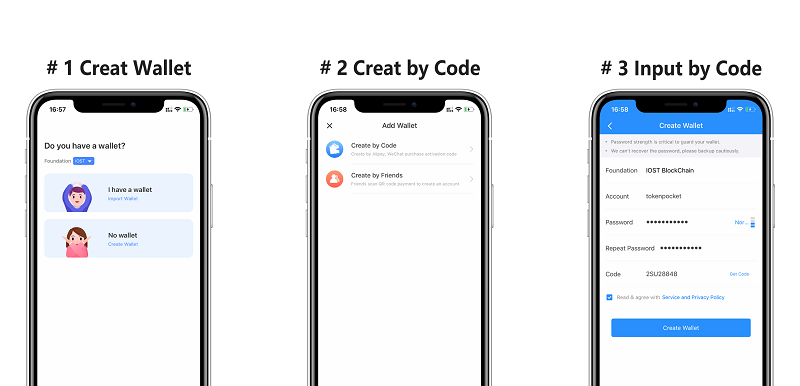
The password you enter here is the password to access this App, which will be necessary for future actions including token transaction and private key exportation. It can only be regained by your private key should it is lost.
3. Backup your private key.
4. Check all the information you entered and click to activate the wallet.
Paid Creation
For paid creation, please choose the “paid creation” option within the TokenPocket app in step 1 and then follow the instructions. At the time of writing, TokenPocket supports payments via PayPal, Alipay, WeChat pay, Sofort, and credit/debit card
TokenPocket Officials
- TokenPocket Twitter: https://twitter.com/TokenPocket_TP
- TokenPocket Telegram Support: https://t.me/tokenPocket_en
- Vote for TokenPocket at https://www.iostabc.com/account/tokenpocket
Method 2: Via Sonata Website (New)
Creating an account on Sonata is free thanks to Sonata’s fund.
Requirements
- Phone number
- Internet-enabled device
Steps to create an IOST account via Sonata
- Goto https://sonata.asia/accountCreation
- Click NEXT
- Type in an active phone number with country code that allows you to receive SMS
- A confirmation message will be sent to the phone number filled with a 6 digit code
- Complete the verification and click next
- Fill in a username, this is your receiving address, a minimum of 5 letters is supported and a maximum of 11 letters is allowed
- Click next and allow the page to load for a while, if the username you selected is available, a confirmation message will be displayed to you
- A private key is generated, copy the private key entirely and paste in a secure document be it offline or online.
For the full tutorial, refer to the original source here.
Sonata Officials
- Website: https://sonata.asia/
- Twitter: https://twitter.com/sonata_iost
- Sonata Telegram Support: https://t.me/sonata_grp
- Vote for Sonata at: https://www.iostabc.com/account/sonata85?activetab=0&listtab=0&page=1&rowsPerPage=20
Method 3: Via Jetstream Chrome Wallet Extension
Creating an IOST account on the Jetstream chrome extension wallet is free. This method is suitable for desktop users.
For the full tutorial, refer to Jetstream’s official article here.

Jetstream Officials
- Twitter:https://twitter.com/Jetstream__
- Website: https://jetstream.world/
- Telegram Support:https://t.me/jetstreamworld
Method 4: Via Citadel One Seed Wallet (New)
Creating an IOST one seed wallet on the Citadel platform is free. This new wallet offers many new and useful functions for IOST holders.
For the full tutorial, refer to Citadel’s official article here.

Citadel Officials:
- Twitter: https://twitter.com/CitadelParadigm
- Twitter: https://twitter.com/Paradigm_fund
- Vote for ParadigmFund/ Citadel at https://www.iostabc.com/account/paradigm_cd?activetab=0&listtab=0&page=1&rowsPerPage=20
Note: Free account creation services availability is subject to the providers’ funds pool. All IOST accounts have a cost, so when you get one for free, it means someone else is paying on your behalf. If you can’t find any free account provider and need one urgently, consider paying for one.
………………………………………..
Join The IOST Community!
IOST’s Node Program is widely praised as the globally leading staking program by numerous blockchain research institutions with attractive returns, low risk, and ease of use are some of the key program highlights. To learn more and participate in one of the world’s top staking program, please visit:
https://www.iostabc.com/producers
If you would like to hang out with the IOST community on chat, social media or to discuss product development, we have something for everyone:
- International English Telegram Group: https://t.me/officialios
- IOST Announcement Channel: https://t.me/iost_announcements
- IOST Official Twitter: https://twitter.com/IOST_Official
- IOST CTO Terry Wang Twitter: https://twitter.com/terrence_iost
- IOST CEO Jimmy Zhong Twitter: https://twitter.com/jimmyzhong_iost
- Slack Developer Community: https://invite.iost.io
- Uptrennd: https://www.uptrennd.com/iost
- Reddit: https://www.reddit.com/r/IOStoken
- Facebook Page: https://www.facebook.com/IOSTofficial/
- Facebook Group: https://bit.ly/IOST-FB-Group
…………………………………………………….
New User Guide: How to Register an IOST Mainnet Account was originally published in IOST on Medium, where people are continuing the conversation by highlighting and responding to this story.
3
2

 Manage all your crypto, NFT and DeFi from one place
Securely connect the portfolio you’re using to start.