
Dialling into the Future: Building an AI-Powered Appointment Booking Agent with Fetch.AI,
3
0
Dialling into the Future: Building an AI-Powered Appointment Booking Agent with Fetch.AI, ElevenLabs, and Twilio
The days of wrestling with phone menus or waiting on hold to book an appointment are inching closer to obsolescence — and I’m thrilled to be part of that shift. Imagine typing a quick request into a webpage, and moments later, your phone rings with an AI assistant ready to chat, all in real time. This isn’t a distant dream — it’s a milestone I’ve hit in an ongoing project using Fetch.AI’s AI agents, ElevenLabs’ conversational magic, and Twilio’s telephony backbone, tied together with a sprinkle of ngrok for testing.
In this blog, I’ll walk you through the architecture, share the code, and highlight the “aha!” moments that got me here. This is a work in progress — a snapshot of where I’m at in a broader development journey. Whether you’re a dev itching to automate or just curious about AI’s next steps, let’s dive in!
What’s This All About?
The aim is straightforward: let users book appointments hands-free with a prompt and their phone number. Where I’ve landed so far is a system where an AI agent calls you, chats naturally, and books a slot — no human required. Here’s the current flow:
- A frontend captures the user’s request.
- Fetch.AI’s agent ecosystem, the core foundation, analyzes the user’s request, finds the right agent within the ecosystem, and assigns the task to it — like the ‘Appointment Booking Agent’ for booking requests.
- Twilio dials the user and ElevenLabs powers a live conversation.
It’s automation that feels personal, and Fetch.AI is the bedrock making it all possible. Let’s break it down.
System Architecture: The Blueprint
The system is made up of different components that each play a specific role. Fetch.AI acts as the central hub, connecting everything together. It manages how data flows through the system, ensuring that user requests are properly handled by the right agents, like the “Appointment Booking Agent” for scheduling tasks. Here’s the architecture:
Components
- Frontend: A basic web interface where users enter a prompt (e.g., “Book an appointment at City Clinic”) and their phone number.
- Primary Fetch.AI Agent (Search Agent): Picture this as the project’s helpful guide. It lives in Fetch.AI’s agentverse — a busy online hub for AI helpers — where it reads the user’s request (like “Book an appointment!”) and hands it off to my custom “Appointment Booking Agent” to get the job done. It’s the one keeping everything moving!
- Appointment Booking Agent: My AI Agent, built with the Fetch.ai SDK, running locally via ngrok during development and eventually hosted in the agentverse, managing calls and audio.
- ngrok: Tunnels my local server (e.g., https://localhost:8000) to a public URL (e.g., https://abc123.ngrok.io) for external access during testing.
- Twilio: Handles outbound calls and real-time audio streaming.
- ElevenLabs: Delivers the conversational AI, chatting with users via WebSocket.
Flowchart
Here’s how data flows through the system:
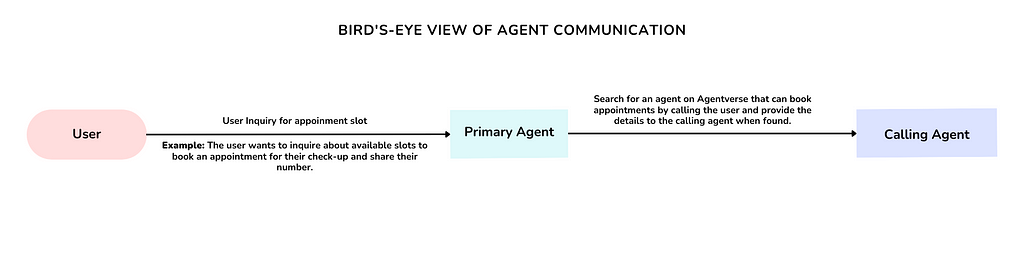
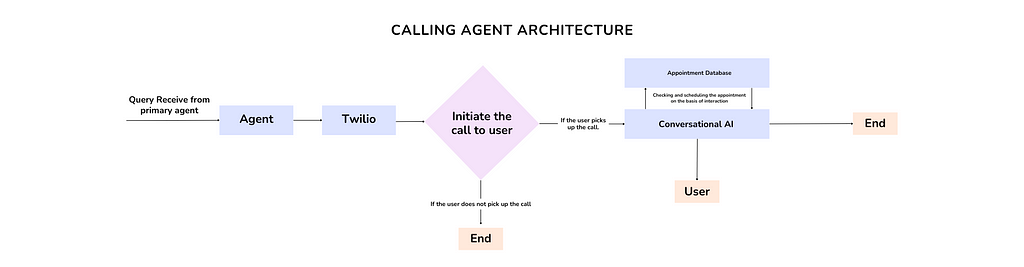
- Step 1: User submits prompt and number via frontend.
- Step 2: Primary AI Agent (Search Agent) — the system’s foundation — analyzes and routes the task to the Booking Agent.
- Step 3: Booking Agent, hosted on Fetch.AI’s agentverse (and ngrok-exposed locally), tells Twilio to call the user.
- Step 4: Twilio connects the call to ElevenLabs for real-time dialogue.
- Step 5: Agent books the appointment, and the call ends.
The Code: Bringing It to Life (So Far)
The Appointment Booking Agent is a key player, built with the Fetch.AI SDK and hosted on Fetch.AI’s agentverse. This ecosystem is the foundation that initiates and coordinates everything. Here’s how it works, with key snippets to illustrate.
Setup and Registration
First, I load environment variables and register the agent with Fetch.AI’s agentverse:
load_dotenv()
ELEVENLABS_AGENT_ID = os.getenv('ELEVENLABS_AGENT_ID')
TWILIO_PHONE_NUMBER = os.getenv('TWILIO_PHONE_NUMBER')
AGENTVERSE_KEY = os.getenv('AGENTVERSE_KEY')

app = FastAPI()

@app.get("/register")
async def registerAgent():
    ai_identity = Identity.from_seed("It used to book appointment!", 0)
    name = "Appointment Booking Agent"
    ai_webhook = os.getenv('ngrok_URL', "https://0.0.0.0:8000/make-call")
    register_with_agentverse(ai_identity, ai_webhook, AGENTVERSE_KEY, name, readme)
    return {"status": f"{name} got registered"}
ngrok’s public URL (e.g., https://abc123.ngrok.io/make-call) is used during local development, but once registered, the agent lives in the agentverse, ready to receive tasks.
Setting Up ElevenLabs
Before the magic happens, you’ll need to configure ElevenLabs’ Conversational AI:
- Sign up at ElevenLabs, create an agent, and grab your ELEVENLABS_AGENT_ID.
- Customize the Agent for appointment booking (e.g., “Hello! I’m here to help you book an appointment. What time works for you?”).
- Add the ID to your .env file. This powers the real-time voice interaction via WebSocket.
Initiating the Call
When the Primary Fetch.AI Agent assigns a task, the /make-call endpoint fires up Twilio:
@app.post("/make-call")
async def make_outbound_call(request: Request):
    body = await request.json()
    message = parse_message_from_agent(json.dumps(body))
    payload = message.payload
    to = payload.get("to")

    call = twilio_client.calls.create(
        url=f"https://{request.headers['host']}/incoming-call-eleven",
        to=to,
        from_=TWILIO_PHONE_NUMBER
    )
    return {"message": "Call initiated", "callSid": call.sid, "status": "success"}
The url points to my ngrok-exposed /incoming-call-eleven route during testing, which Twilio uses to connect the call.
Real-Time Audio Magic
The /media-stream WebSocket bridges Twilio and ElevenLabs:
@app.websocket("/media-stream")
async def media_stream(websocket: WebSocket):
    await websocket.accept()
    async with websockets.connect(f"wss://api.elevenlabs.io/v1/convai/conversation?agent_id={ELEVENLABS_AGENT_ID}") as elevenlabs_ws:
        async def handle_twilio_messages():
            async for message_str in websocket.iter_json():
                if message_str['event'] == 'media':
                    audio_chunk = base64.b64decode(message_str['media']['payload'])
                    await elevenlabs_ws.send(json.dumps({
                        'user_audio_chunk': base64.b64encode(audio_chunk).decode('utf-8')
                    }))

        async def handle_elevenlabs_messages():
            async for message_str in elevenlabs_ws:
                message = json.loads(message_str)
                if message['type'] == 'audio':
                    await websocket.send_json({
                        'event': 'media',
                        'media': {'payload': message['audio_event']['audio_base_64']}
                    })

        await asyncio.gather(handle_twilio_messages(), handle_elevenlabs_messages())
User speech flows to ElevenLabs, and AI responses come back — all in real time.
Why It’s a Big Deal
This isn’t just a proof-of-concept — it’s a stepping stone toward smarter automation, with Fetch.AI as the backbone. The current milestone shows promise: ngrok simplifies local testing, and Fetch.AI’s agentverse, Twilio, and ElevenLabs handle the heavy lifting. It’s not perfect yet, but it’s a glimpse of what’s possible.
What’s Next?
This is an ongoing journey, and I’m exploring practical next steps beyond clinic scheduling (which, while cool, needs more polish to be truly feasible). Here are some realistic use cases I’m eyeing:
- Customer Support Triage: Route incoming requests to the right team with a quick AI call.
- Event RSVPs: Let users confirm attendance via voice, no forms needed.
- Personal Task Assistants: Schedule reminders or follow-ups with a conversational nudge.
Wrapping Up
From a prompt to a live call, this project — built on Fetch.AI’s SDK — is a milestone in reimagining everyday automation. It’s not flawless: determinism (ensuring consistent outcomes) is a work in progress, and latency can still hiccup. But that’s the fun part — I’m inviting devs to jump in! Check out the full code on GitHub, grab the fetch.ai SDK, fire up ngrok, and help solve the quirks. Together, we can dial further into the future.
Dialling into the Future: Building an AI-Powered Appointment Booking Agent with Fetch.AI, was originally published in Fetch.ai on Medium, where people are continuing the conversation by highlighting and responding to this story.
3
0
 Verwalten Sie alle Ihre Kryptowährungen, NFTs und DeFi an einem Ort
Verbinden Sie sicher das Portfolio, das Sie zu Beginn verwenden möchten.