
Adding Stripe to Your Agentic Workflow: Integrating Stripe Agent Toolkit with Fetch.ai uAgents
3
1
Handling payments efficiently is a vital component of many applications. With Fetch.ai’s uAgents, you can build decentralized workflows that automate tasks like payments, data exchange, and resource coordination. By integrating the Stripe Agent Toolkit, your agents can now handle fiat payments seamlessly, enabling a broader reach and accessibility.
This guide will walk you through integrating Stripe with Fetch.ai’s uAgents, creating an agentic workflow that efficiently manages fiat payments.
Understanding the Core Components
Fetch.ai’s uAgents
Fetch.ai’s uAgents are lightweight and autonomous agents designed to manage workflows by communicating through well-defined protocols. These agents can interact with APIs, other agents, or decentralized systems, making them versatile for tasks such as:
- Workflow automation
- Payment processing
- Resource coordination
uAgents offer a robust foundation for creating payment workflows integrated with external systems like Stripe.
Github: https://github.com/fetchai/uAgents
Stripe Agent Toolkit
The Stripe Agent Toolkit simplifies access to Stripe’s payment APIs for automation. It supports creating payment links, verifying transactions, and managing invoices. The toolkit complements Fetch.ai’s uAgents by enabling fiat payment automation, broadening the scope of agentic applications.
Github: https://github.com/stripe/agent-toolkit
Why Add Fiat Payments?
While decentralized systems often rely on cryptocurrency, fiat payments remain essential for accessibility.
Key Benefits:
- Broader Reach: Fiat payments are familiar and accessible to most users.
- Ease of Use: Stripe’s well-documented APIs simplify fiat payment handling.
- Adoption Bridge: Fiat integration lowers the barrier for new users entering agent-based systems.
Integrating Stripe with Fetch.ai’s uAgents ensures your workflows cater to both crypto-savvy users and those reliant on fiat.
Workflow Overview
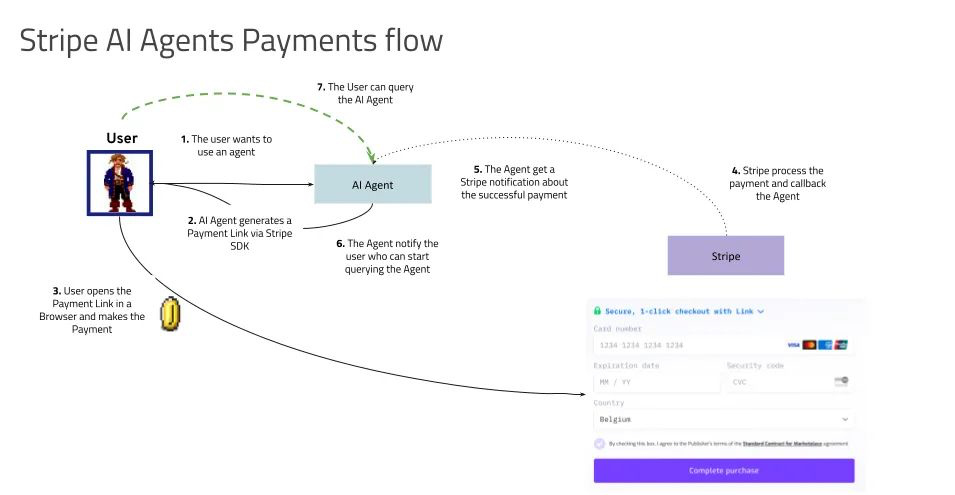
- User Request: The User Agent receives a payment request, including details like product name, amount, and quantity.
- Payment Link Generation: The Stripe Agent creates a payment link using the Stripe API and sends it to the User Agent.
- Payment Completion: The user completes the payment via the generated link.
- Confirmation via Webhook: Stripe confirms the payment through a webhook, processed by the Stripe Agent.
- Transaction Verification: The Stripe Agent verifies the payment and generates an invoice.
- User Notification: The User Agent informs the user of the successful payment and shares the invoice.
This setup enables a smooth, automated payment process using agents.
Step-by-Step Implementation
Technical Implementation
Step 1: Setting Up the Environment
Prerequisites:
- Python 3.10+
- Fetch.ai’s uAgents library
- Stripe API Key and Webhook Secret
- OpenAI API Key (for enhanced agent capabilities)
- Poetry (for dependency management)
Installation:
- Clone the repository:
git clone
cd fetch-stripe-payment-agent
- Install dependencies:
poetry install
- Set environment variables in a .env file:
STRIPE_SECRET_KEY=
STRIPE_WEBHOOK_SECRET=
OPENAI_API_KEY=
Step 2: Running the Agents:
poetry run python run_agents.py
This runs both the Stripe Payment Agent and the User Agent, exposing them as REST endpoints.
Expose the local server using ngrok:
ngrok http 8000
Update Stripe webhook settings to point to the ngrok URL (e.g., https://
Step 3: Handling Payments
The Stripe Payment Agent generates payment links by interacting with Stripe APIs.
Agent Code:
@stripe_agent.on_rest_post("/generate_payment_link", PaymentRequest, PaymentResponse)
async def handle_payment(ctx: Context, req: PaymentRequest) -> PaymentResponse:
    result = payment_processor.create_payment_link(
        amount=req.amount,
        currency=req.currency,
        product_name=req.product_name,
        quantity=req.quantity,
        customer_email=req.customer_email
    )
    return PaymentResponse(
        status="success",
        details="Payment link generated successfully",
        payment_link=result
    )
This code handles payment requests and generates links via Stripe’s APIs.
Step 4: Confirming Payments via Webhook
When a payment is completed, Stripe sends a webhook event. The agent processes this event to verify the transaction and update payment status.
Webhook Code:
@app.route('/webhook', methods=['POST'])
async def webhook():
    event = stripe.Webhook.construct_event(payload, sig_header, endpoint_secret)
    if event['type'] == 'payment_intent.succeeded':
        payment_intent = event['data']['object']
        await httpx.post(
            "https://localhost:8000/stripe_webhook",
            json={"type": event['type'], "data": payment_intent}
        )
This ensures that payments are confirmed and securely recorded.
Real-World Use Case
Consider a scenario where a subscription-based SaaS platform integrates Fetch.ai’s uAgents with Stripe. The workflow could include:
- Recurring Payments: Automate subscription renewals with the Stripe Agent Toolkit.
- Invoice Generation: Send users detailed invoices post-payment.
- Multi-Currency Support: Accept payments in USD, EUR, and other fiat currencies.
For example, a platform offering AI-driven analytics tools could automate subscription renewals, manage invoices, and notify users about payment success — all using agents.Observing Outputs
Extending the Workflow
With the Stripe Agent Toolkit, additional functionalities can be incorporated:
- Recurring Payments: Automate subscriptions for services.
- Refund Management: Simplify handling refunds.
- Multi-Currency Support: Accept payments in various fiat currencies.
These extensions enhance the usability and scalability of your agentic workflows.
By integrating the Stripe Agent Toolkit with Fetch.ai’s uAgents, you bridge fiat and decentralized systems, creating inclusive workflows that cater to a diverse user base. This integration showcases how agents can simplify traditionally complex processes like payment handling, enabling automation and efficiency.
To get started, explore the detailed code examples in our GitHub repository: Fetch.ai Stripe Integration Example
Start building today and expand the potential of your agentic workflows!
Adding Stripe to Your Agentic Workflow: Integrating Stripe Agent Toolkit with Fetch.ai uAgents was originally published in Fetch.ai on Medium, where people are continuing the conversation by highlighting and responding to this story.
3
1
 Manage all your crypto, NFT and DeFi from one place
Securely connect the portfolio you’re using to start.