5 Best Crypto Trackers to Manage Your Wallets and Exchanges in 2026

Last updated . Pricing and app ratings were verified on that date.
- What makes a good crypto tracker
- Tracker, exchange app, or spreadsheet
- The 5 best crypto trackers at a glance
- CoinStats
- Kubera
- DeBank
- DEX Screener
- Live Coin Watch
- Zapper shut down: what to use instead
- Top picks by category
- Comparison by use case
- How to choose your crypto tracker
- Setting up your first crypto tracker
- How trackers work out your profit
- What a tracker can and cannot see
- What changed for trackers in 2026
- Three mistakes worth avoiding
- What people actually recommend
- Frequently asked questions
I have been buying crypto since 2017. For most of those years I tracked it badly.
My holdings lived in four places at once. Some sat on exchanges. Some sat on a hardware wallet. The rest was spread across DeFi positions I half remembered.
Every few weeks I rebuilt the same spreadsheet. It was already wrong by the time I finished.
A crypto tracker is a tool that reports what you own. Good ones read exchanges, wallets, and DeFi positions. That is the real job a crypto tracker does. Not price charts. Charts are everywhere and mostly free. The hard part is one honest number for what you own.
So I went through the trackers people keep recommending. Below are my five picks for 2026. CoinStats crypto tracker is first. I will be honest about why.
We make CoinStats, so yes, we are biased. We know it. So this guide sticks to plain facts: coverage, connections, and public pricing. The verdict is yours.
- CoinStats connects 300+ wallets and exchanges across 120+ blockchains in one place.
- Kubera fits people tracking crypto beside property, stocks, and bank accounts.
- DeBank reads onchain DeFi positions in real detail. It skips exchange balances.
- DEX Screener is a market screener, not a portfolio tracker. Many people run both.
- Zapper shut down on 3 August 2026. CoinStats and DeBank are the replacements.
What makes a good crypto tracker
Two different products both get called a crypto tracker. Mixing them up wastes a lot of time.
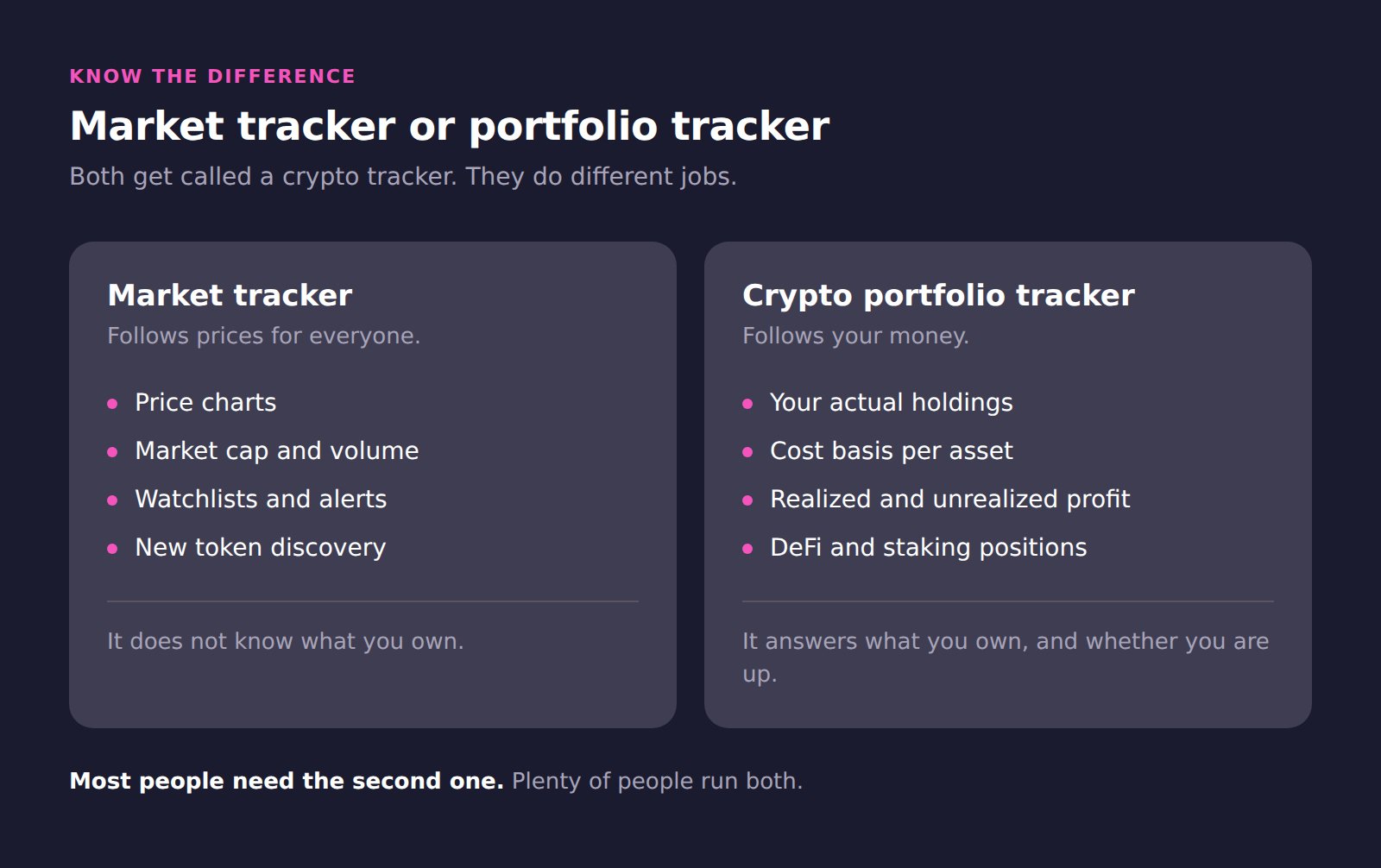
A market tracker follows prices. It shows charts, market caps, and volume. It does not know what you own.
A crypto portfolio tracker follows your money. It connects to your exchanges and wallets. It reports holdings, cost basis, and profit or loss.
Most people need the second one. Some people want both, which is fine.
Crypto ownership is no longer a niche habit. Federal Reserve survey data put US crypto use at 10% of adults in 2025. Most of those people hold in more than one place.
I judged every tracker here on five things.
Connection coverage. How many exchanges, wallets, and chains it reaches. This decides whether your number is complete.
Onchain depth. Whether it reads DeFi positions properly. A raw token balance is not a position. We compared these separately in our DeFi tracker roundup.
Cost basis and profit or loss. Whether it tracks what you paid, not just what you hold.
An honest free tier. What you actually get without paying, and where the wall sits.
Security posture. Read-only access only. A tracker never needs withdrawal rights. Major exchanges let you scope a key to query permissions only. That is the security principle called least privilege.
- We only list products that are live and maintained in August 2026.
- Every price and free tier comes from the provider’s own pricing page.
- App ratings are quoted from Apple App Store and Google Play.
- We dropped Zapper from the ranking after its shutdown was confirmed.
- We make CoinStats. Every fact here is sourced so you can check it.
Tracker, exchange app, or spreadsheet
Most people do not start with a tracker. They start with whatever is already open.
The exchange app
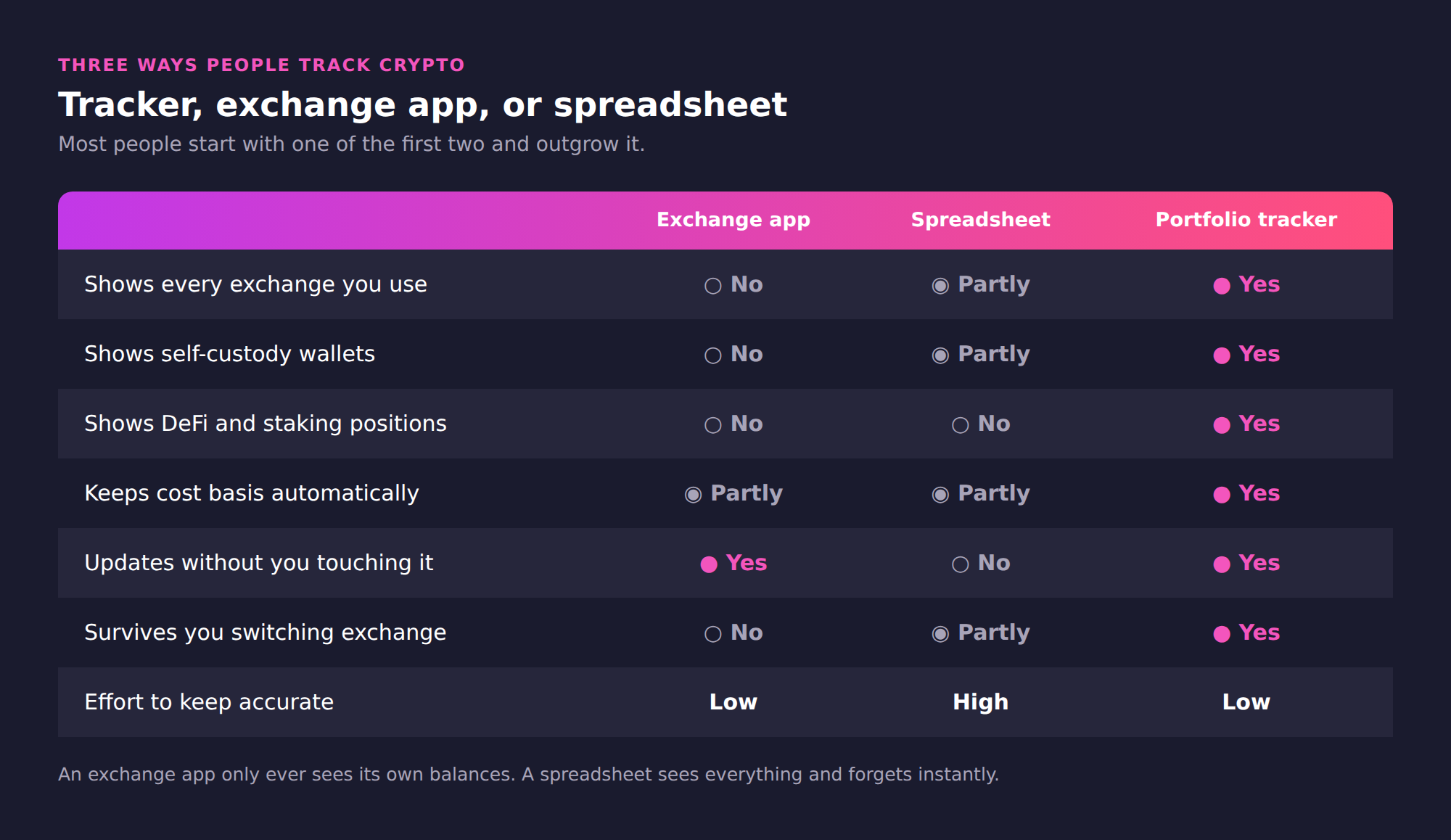
Your exchange app is accurate about exactly one thing. It knows what sits on that exchange. It cannot see your hardware wallet. It cannot see a position held anywhere else. Move funds out and the number goes stale immediately.
The spreadsheet
A spreadsheet can hold everything, which is the appeal. The problem is upkeep. Prices move every second and your sheet does not. Every new trade needs a manual row. Most people abandon the habit within a few months.
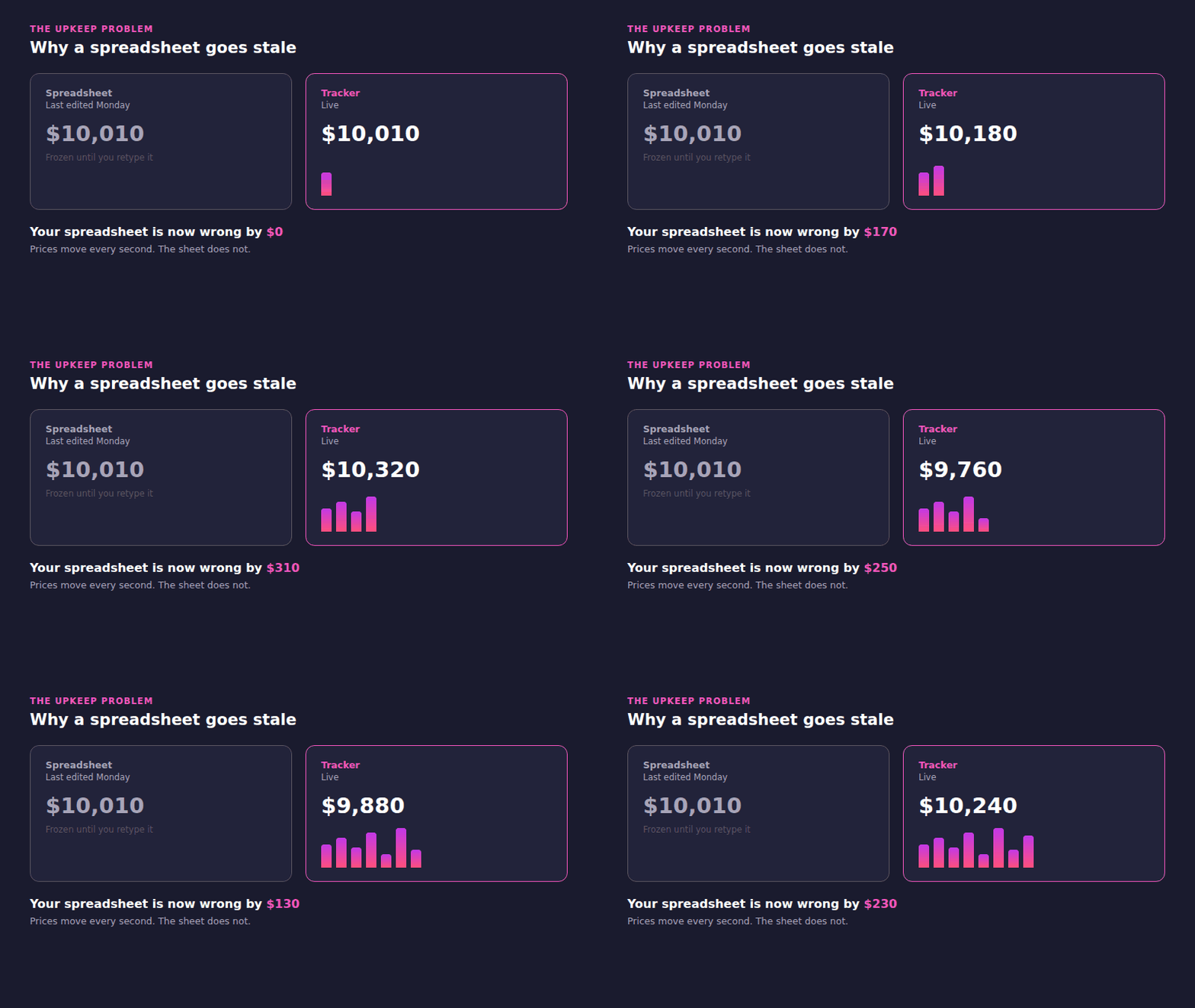
The gap is not dramatic on any single day. It compounds quietly over months.
The portfolio tracker
A tracker sits between the two. It reads every account on its own. It keeps the transaction record a spreadsheet forgets. The tradeoff is that you connect accounts, which some people would rather not do.
There is no shame in the spreadsheet. It works fine for two coins on one exchange. It falls apart the moment you use three venues.
The 5 best crypto trackers at a glance
| Tracker | Best for | Free tier | Entry paid price | Mobile apps |
|---|---|---|---|---|
| CoinStats | All-in-one portfolio tracking | Yes, Basic plan | $15.99 monthly, $13.99 annual | iOS and Android |
| Kubera | Total net worth, not just crypto | No, 14-day trial | $250 per year | Web app only |
| DeBank | Onchain DeFi position detail | Yes, core tracking free | Not publicly listed | iOS and Android |
| DEX Screener | Live DEX charts and new pairs | Yes, fully free | Not sold to traders | iOS and Android |
| Live Coin Watch | Free market dashboard | Yes, fully free | None listed | iOS and Android |
Pricing and limits verified 3 August 2026. Zapper is covered separately below.
Coverage is not the same as quality. Each tracker is shaped by the job it was built for.
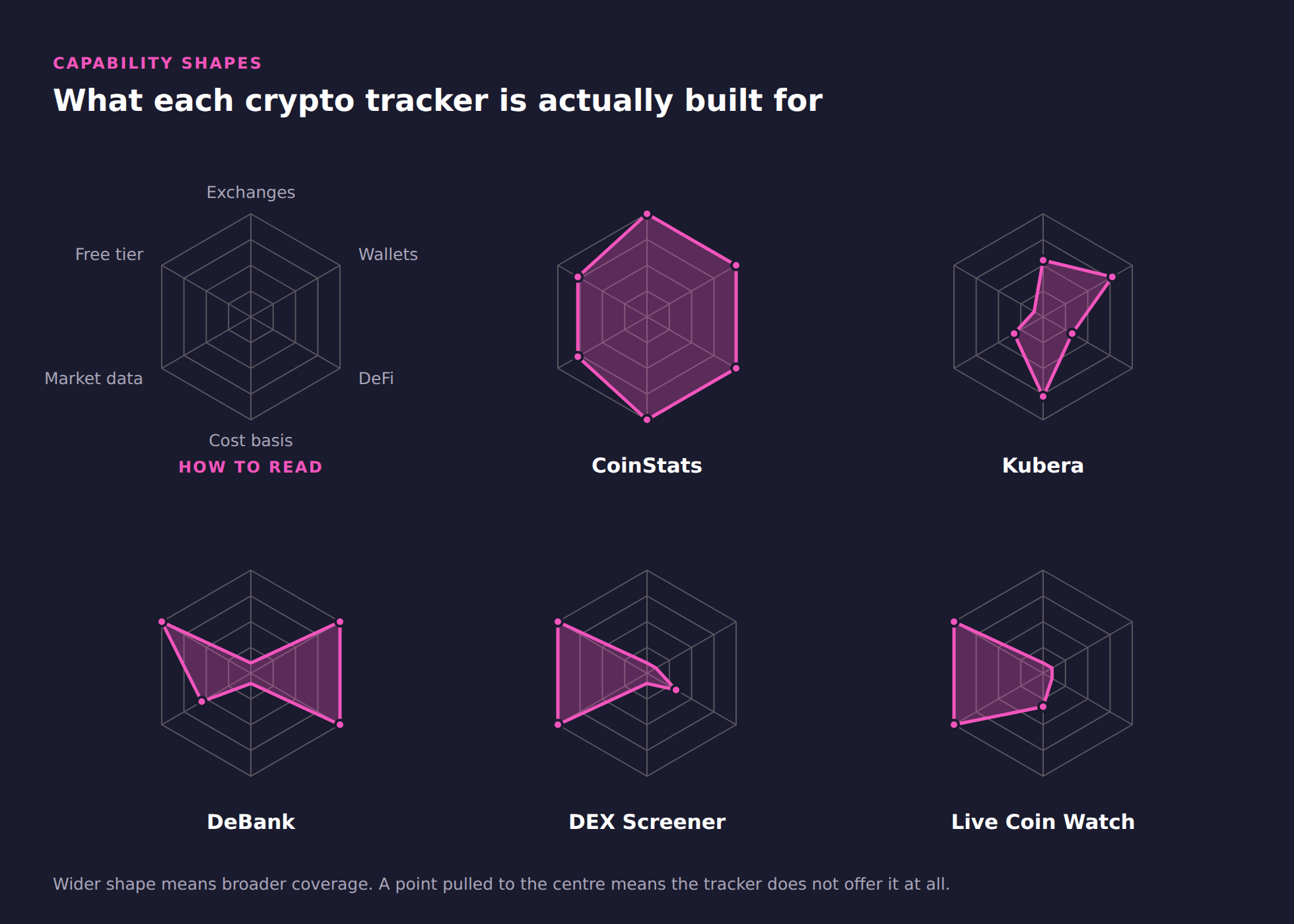
CoinStats covers the widest shape here. DeBank is deep but narrow. DEX Screener and Live Coin Watch barely overlap with the others at all. They are market tools, and their shape says so.
CoinStats
CoinStats pulls exchanges, wallets, and DeFi positions into one portfolio. CoinStats has run since 2017 and reports one million users. Access to connected accounts stays read-only.
- Connects 300+ wallets and exchanges, including Binance, BingX, Coinbase, MetaMask, and Ledger.
- Tracks DeFi positions across 10,000+ protocols, including lending and liquidity.
- Imports transaction history, then reports realized and unrealized profit or loss.
- Includes an AI research agent on paid plans, plus alerts and analytics.
What to verify: Token Risks and Time Machine sit on the Degen tier. Transaction history windows differ by exchange. Where past trades cannot sync, profit or loss may start from your connection date.
Here is one practical example. You hold coins on two exchanges, a hardware wallet, and a lending protocol. You add each exchange with a read-only API key. You paste the wallet address. CoinStats then imports the transaction history behind those balances. That is what makes cost basis possible. The crypto portfolio tracker returns one balance, one cost basis, and one profit figure. DeFi positions land in the same view through the DeFi tracker. Lending and liquidity stay inside the total.
Free accounts get real functionality, not a demo. Basic covers ten portfolios and a large transaction allowance. Paid tiers raise sync frequency and unlock deeper analytics.
CoinStats AI Agent arrived in April 2026 on Premium and Degen plans. It runs research across news, onchain data, and your own holdings. A backtesting mode on Degen tests strategies against historical data. Treat it as a research aid, not a signal service.
“People do not lose track of crypto because they are careless. They lose track because their money sits in eight places. Those places do not talk to each other. We built CoinStats so one screen answers the only question that matters. What do I actually own, and am I up or down? You cannot improve a number you cannot see.”
- CoinStats connects 300+ wallets and exchanges in one portfolio.
- CoinStats covers 120+ blockchains and 20,000+ coins.
- CoinStats tracks DeFi positions across 10,000+ protocols.
- CoinStats reports one million users since launching in 2017.
- CoinStats rates 4.8 on the App Store from 84K ratings.
- CoinStats rates 4.5 on Google Play from 105K reviews.
- CoinStats paid plans start at $15.99 monthly, or $13.99 billed annually.
Kubera
Kubera is a personal balance sheet rather than a crypto-only app. Kubera puts coins next to stocks, property, and bank accounts. There is no free plan.
- Tracks wallet addresses on Bitcoin, Ethereum, Solana, and other major chains.
- Connects bank and brokerage accounts across many countries, plus manual private assets.
- Values property and vehicles automatically in supported regions.
- Offers a beneficiary handoff, so someone inherits access to the record.
What to verify: Kubera runs as a web app you install from the browser. It has no tax reports, and crypto depth is shallower than a DeFi-native tool.
DeBank
DeBank reads a wallet address and breaks down what sits inside each protocol. Core tracking is free. DeBank has since added a wallet, a social layer, and its own chain.
- Shows lending, liquidity, staking, and reward positions, not just token balances.
- Covers a wide set of EVM chains from one wallet address.
- Reads any public wallet address, so you can check a portfolio quickly.
- Lets you follow other wallets, which helps with onchain research.
What to verify: DeBank shows no centralized exchange balances and no cost basis. Its App Store rating is low. Test the mobile app before relying on it.
DEX Screener
DEX Screener charts tokens trading on decentralized exchanges. DEX Screener surfaces new pairs within seconds of liquidity landing. DEX Screener stays free for traders.
- Covers 60+ chains, including Ethereum, Solana, Base, and BNB Chain.
- Shows live price, liquidity, volume, and trade history for each pair.
- Supports watchlists, multi-chart layouts, and price alerts.
- Publishes a free API with documented rate limits.
What to verify: DEX Screener has no portfolio features at all. There is no cost basis, no exchange sync, and no holdings view. Pair it with a portfolio tracker.
Live Coin Watch
Live Coin Watch is a fast, free market dashboard. Live Coin Watch lists 60,000+ coins across more than a thousand exchanges. A manual portfolio sits alongside it.
- Shows price, market cap, volume, and order book depth without a login.
- Publishes liquidity within two percent, which most free dashboards skip.
- Supports unlimited portfolios, including a mode for logging transactions.
- Offers a free API with a documented daily request limit.
What to verify: Portfolio entries are manual, so this is a market tool first. The iOS app has shipped no update since December 2024.
Zapper shut down on 3 August 2026: what to use instead
Zapper spent close to seven years as a DeFi dashboard. Zapper tracked tokens, protocol positions, and NFTs in one view. Zapper reported 2 million monthly actives and $13 billion processed at its peak. That run has now ended.
Five trackers survived our post-shutdown check. See the full list of Zapper alternatives we verified in August 2026.
Zapper co-founder and CEO Seb Audet announced the wind-down on 8 July 2026. Zapper’s website, mobile apps, and API went offline on 3 August 2026.
Zapper is no longer reachable. Anyone still tracking wallets there needs a new tracker now.
We left Zapper out of the ranking for that reason. Recommending a closed product would be dishonest.
Pick by what you actually hold. Exchange balances point one way, wallet-only holdings point the other.
CoinStats and DeBank cover most of what Zapper did. CoinStats replaces the portfolio view and adds exchange balances and cost basis. DeBank replaces the protocol-level detail for self-custody wallets only.
Top picks by category
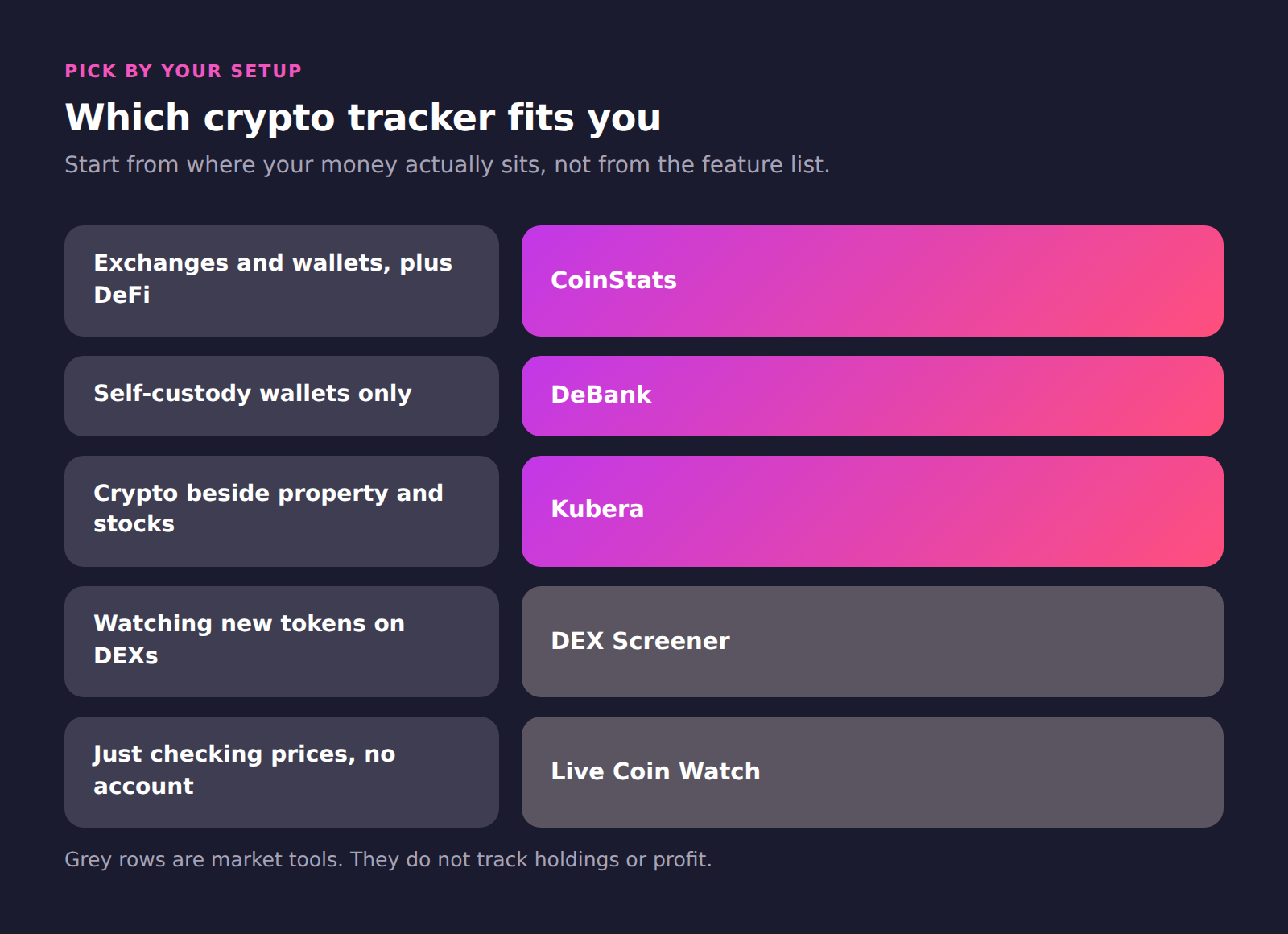
Exchanges, wallets, and DeFi positions in one portfolio.
Pick this if your holdings sit in more than one place.
Crypto tracked beside property, stocks, and bank accounts.
Pick this if crypto is part of a bigger balance sheet.
Protocol-level detail from a public wallet address.
Pick this if you never touch centralized exchanges.
New pairs and live liquidity across many chains.
Pick this as a market companion, not a portfolio tool.
Broad market data with no account required.
Pick this for fast price checks on any device.
Two ways to keep tracking after 3 August 2026.
Pick CoinStats for exchanges, DeBank for wallets only.
| Category | Top pick | Pick this if |
|---|---|---|
| Best all-in-one tracker | CoinStats | Your holdings sit in more than one place. |
| Best for total net worth | Kubera | Crypto is part of a bigger balance sheet. |
| Best onchain DeFi tracker | DeBank | You never touch centralized exchanges. |
| Best for DEX trading | DEX Screener | You want a market companion, not a portfolio tool. |
| Best free price dashboard | Live Coin Watch | You want fast price checks on any device. |
| Best route off Zapper | CoinStats or DeBank | You tracked wallets on Zapper before 3 August 2026. |
Comparison by use case
Crypto portfolio tracking across exchanges and wallets
Top pick: CoinStats. CoinStats reads both account types and merges them into one balance.
Alternatives: none here cover exchanges and wallets together.
DeFi portfolio tracking and yield positions
Top pick: CoinStats. CoinStats reports DeFi positions inside the same portfolio total.
Alternatives: DeBank, for deeper protocol-by-protocol breakdowns.
Crypto wallet tracker for a single address
Top pick: DeBank. Paste an address and read positions without signing up.
Alternatives: CoinStats, if you later add exchange accounts.
Crypto beside stocks, property, and cash
Top pick: Kubera. Crypto becomes one line on a full balance sheet.
Alternatives: none here track non-crypto assets.
Live DEX charts and new token discovery
Top pick: DEX Screener. New pairs appear within seconds of liquidity landing.
Alternatives: Live Coin Watch, for broader centralized market data.
Free crypto price tracking without an account
Top pick: Live Coin Watch. Prices, volume, and order books load without a login.
Alternatives: DEX Screener, for onchain pairs specifically.
How to choose your crypto tracker
Start from where your money actually sits. Write down every exchange, wallet, and protocol you use. That list decides the shortlist, not the marketing copy.
Then test the free tier with real accounts. Connect two or three of your biggest holdings. Check whether the total matches what you already believe.
Look closely at what breaks. Missing DeFi positions and missing chains are the usual culprits. Staked assets and liquidity positions get dropped most often.
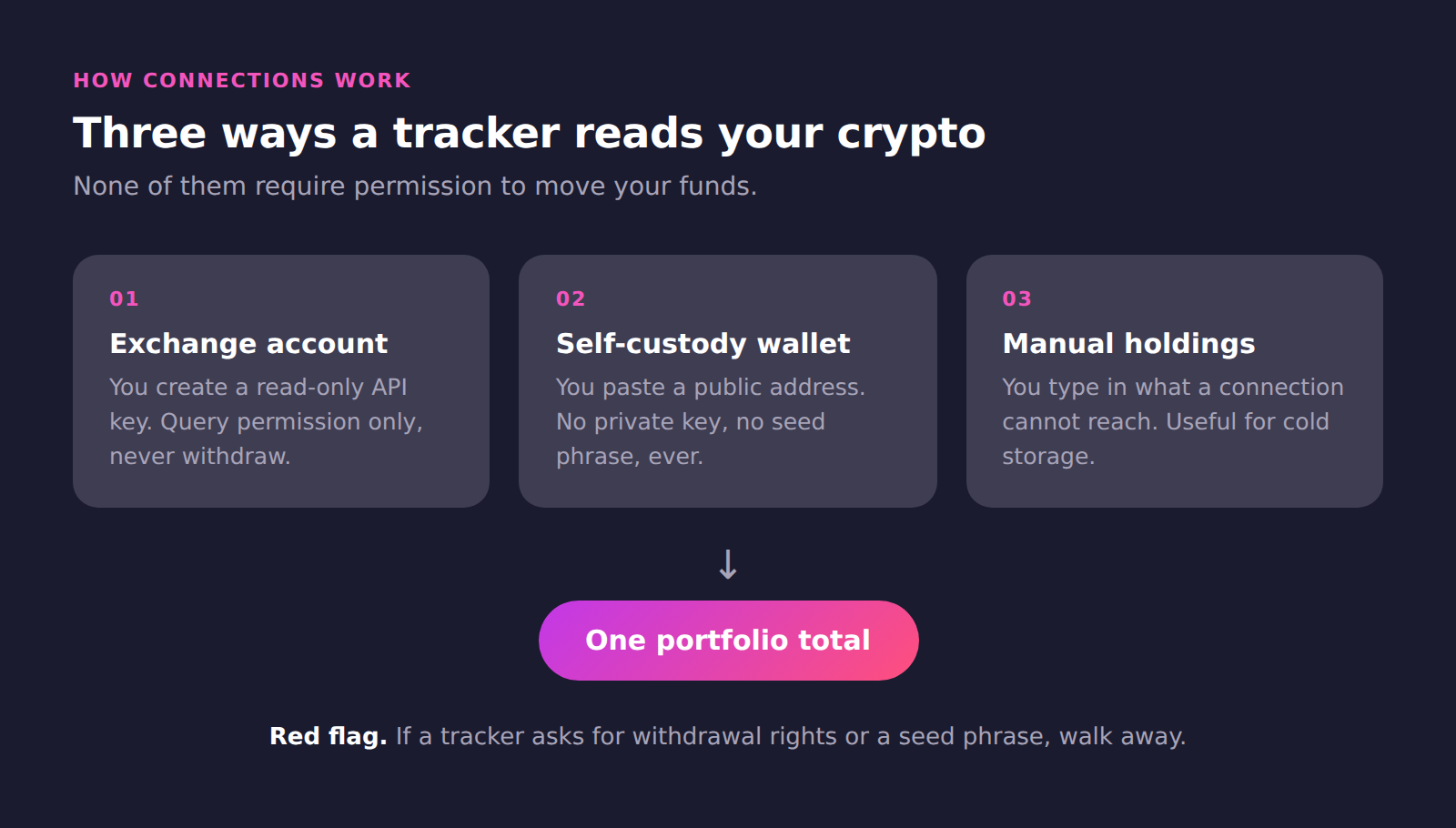
Use read-only keys everywhere. A tracker never needs withdrawal rights. If a product asks for them, walk away. Public wallet addresses are safer still, because onchain balances are already public.
Regulators say the same thing about keys and phrases. An SEC investor bulletin on crypto asset custody is blunt. Never share your private keys or seed phrases.
Check the sync limits before paying. Free plans usually refresh less often than paid ones. That matters more if you trade daily than if you hold.
Finally, decide whether you need tax output. Some trackers export transactions for a tax tool. Others expect you to handle that separately.
Setting up your first crypto tracker
The whole process takes about ten minutes. This is the order that works.
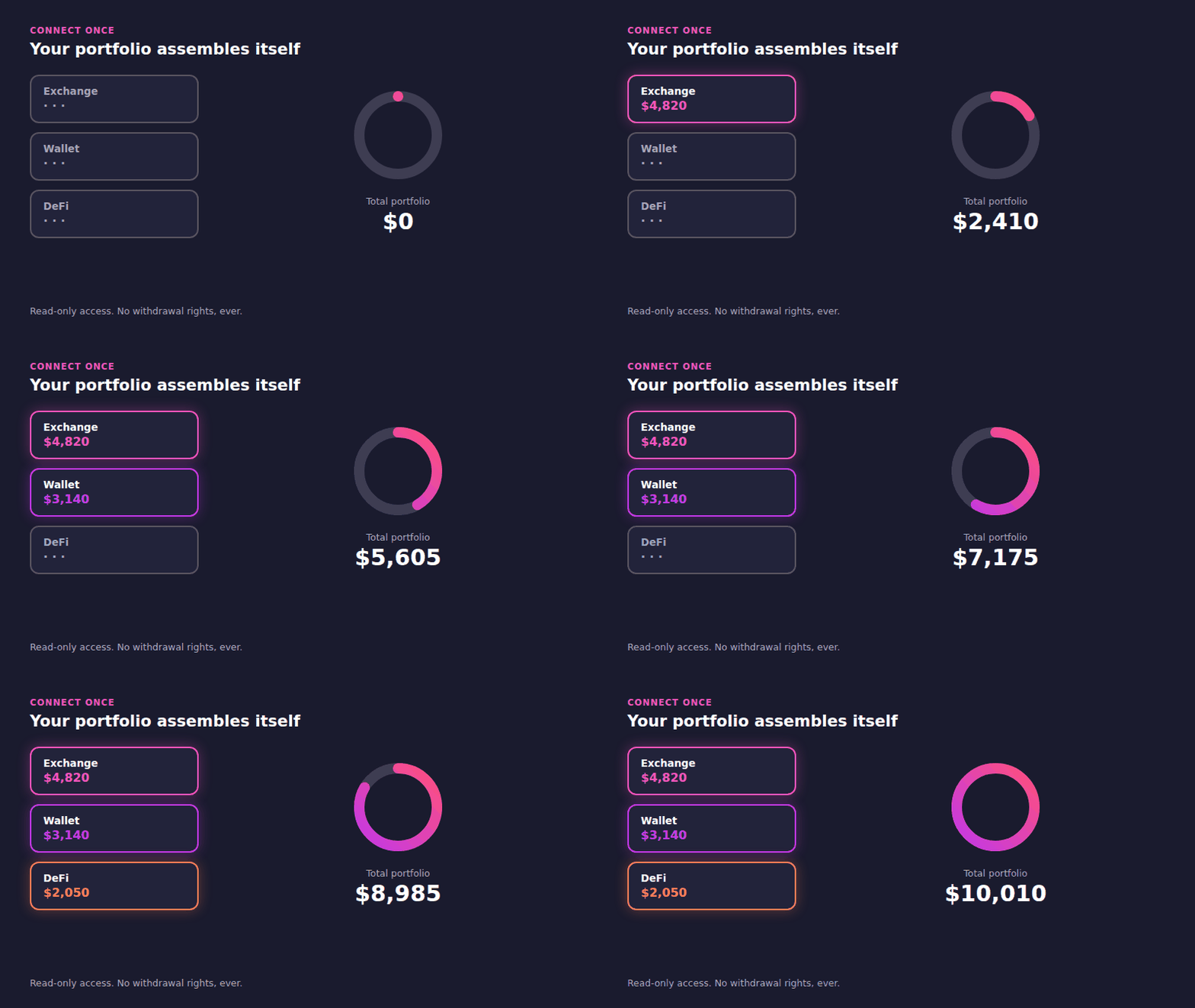
Start with your largest account
Connect the exchange holding most of your money first. If that number comes back right, the rest is worth doing.
Create the key with query permissions only
In your exchange settings, create a new API key. Enable read or query permissions. Leave withdrawal and trading switched off.
Add wallets by public address
Copy the public address from your wallet app. Paste it into the tracker. Repeat for each chain you hold.
Fill the gaps by hand
Some holdings will not connect. Cold storage and smaller chains are the usual cases. Add those manually once.
Check the total before you trust it
Compare the tracker total against what you expect. Investigate any gap straight away. A missing DeFi position is the usual cause. Staked assets are the next most common.
Turn on alerts last
Alerts are useful only once the portfolio is accurate. Set them up after your total looks right. Otherwise you get notified about numbers you do not trust. Desktop widgets work the same way.
How trackers work out your profit
Profit sounds simple. It is the hardest thing a tracker does.
Cost basis is the whole game
Cost basis is what you paid for an asset. Without it a tracker can only show current value. That tells you what you hold. It cannot tell you whether you are up.
Getting cost basis needs your transaction history, not just your balance. This is why connection quality matters more than chart quality.
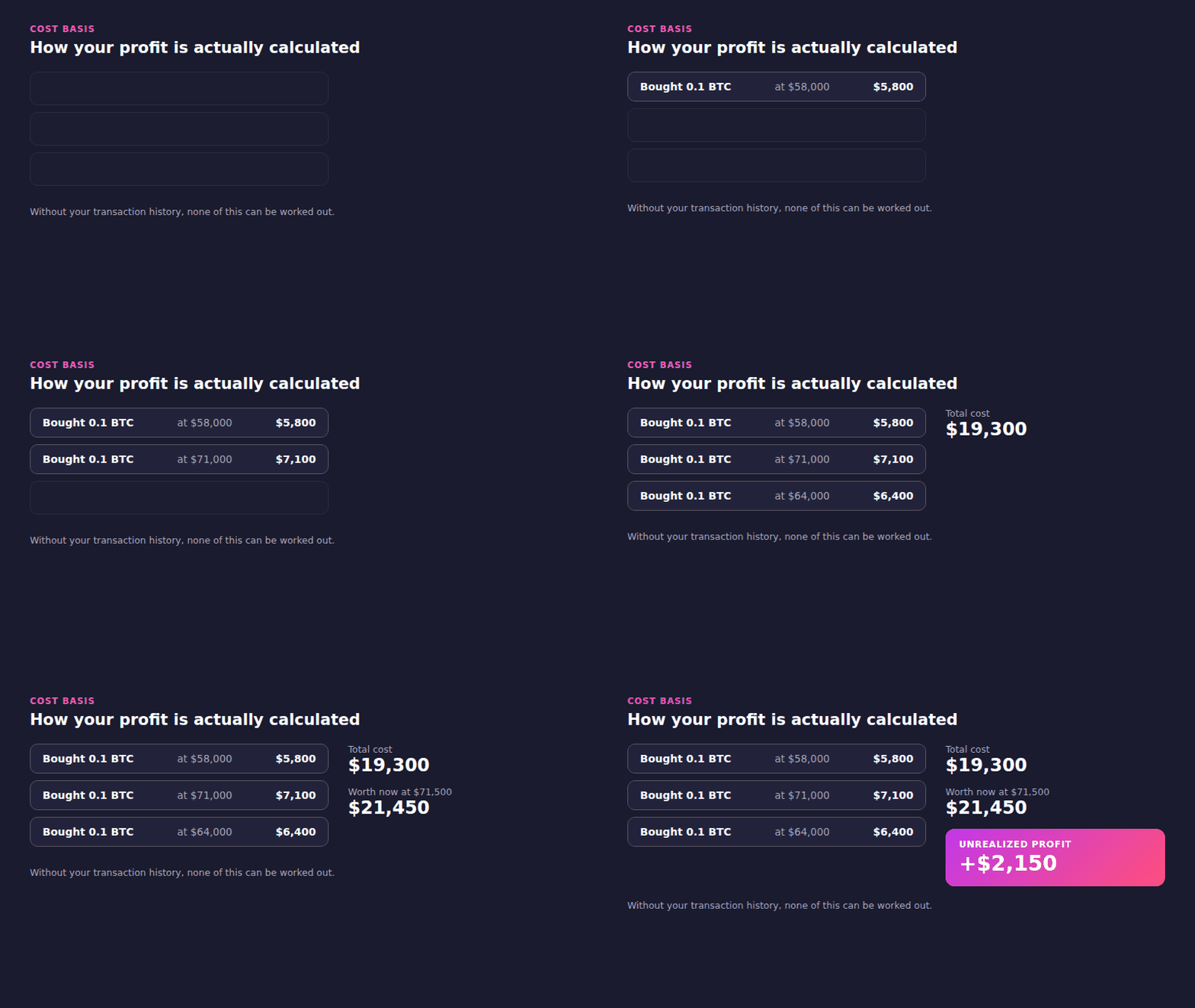
Three buys at three prices become one average. That average is what your profit is measured against.
Realized and unrealized are different numbers
Unrealized profit is gain you still hold. Realized profit is gain you locked in by selling. Tax authorities care about the second one. A swap counts as a disposal, even without touching cash.
Staking rewards complicate this further. Income arrives at one price and is sold at another. If you use earn products, check that both events get recorded.
Fees quietly change the maths
Trading fees, network fees, and spreads all reduce real profit. A tracker that ignores them overstates your gains. Some products report fees paid as a separate figure. Check whether yours does, because the gap compounds over hundreds of trades.
Gas costs matter most for onchain activity. A year of swaps can cost more than one bad trade.
Where the number goes wrong
Exchanges do not all return the same history depth. Binance returns years of trades. Others return only the last few hundred. Where past trades cannot sync, profit gets calculated from your connection date.
That is the most common reason a tracker total looks wrong. Check the history window before trusting the figure.
What a crypto tracker can and cannot see
This is the question that stops most people connecting anything.
What it reads
On an exchange, a read-only key returns balances and transaction history. Nothing more. On a wallet, a public address returns what is already public. Anyone can look the same data up on a block explorer.
What it cannot do
A read-only key cannot withdraw. It cannot place a trade. It cannot change your account settings. Exchanges enforce that at the key level, not inside the app you connect.
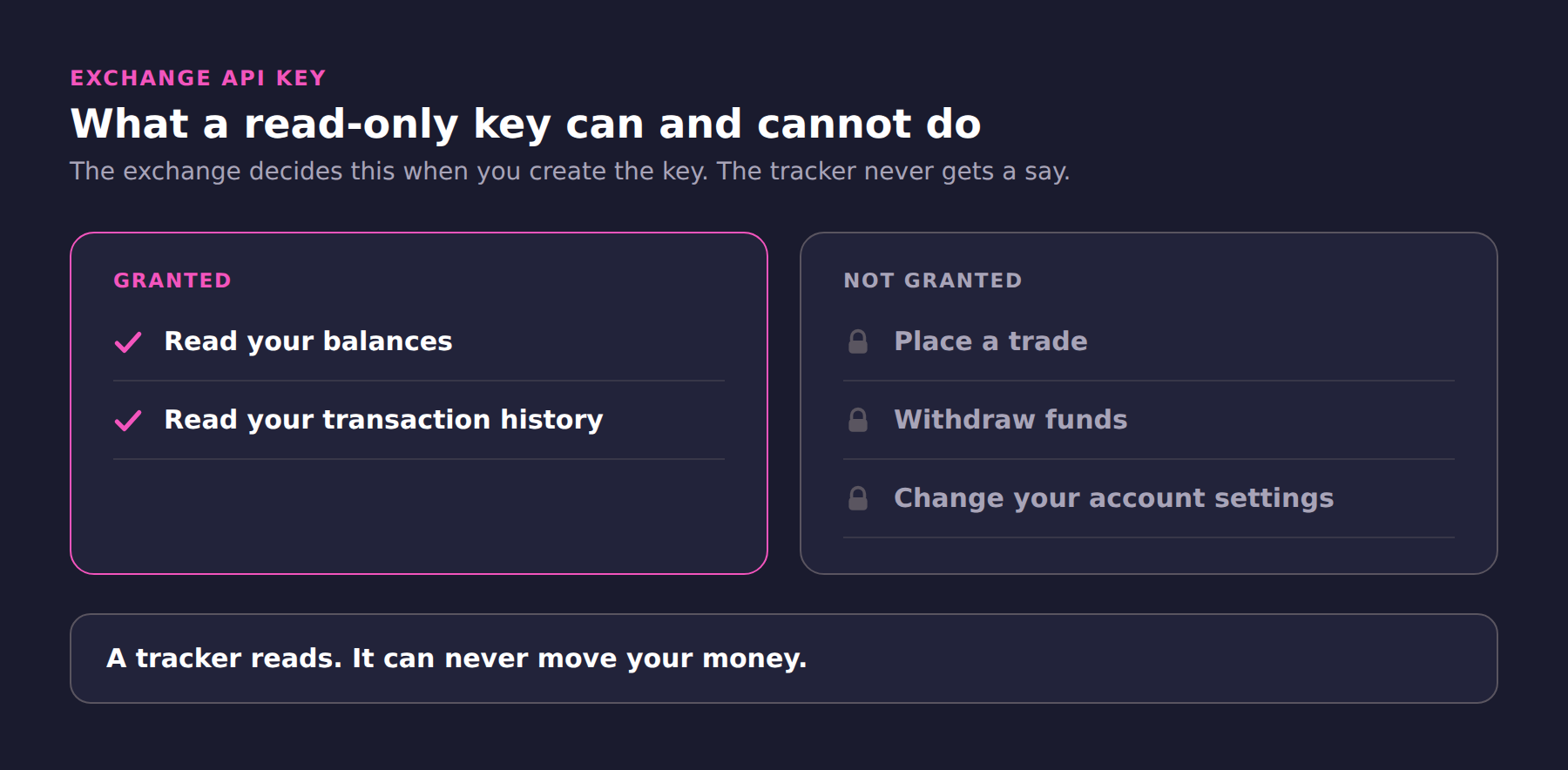
This is why the permission screen matters more than the app. Set it correctly once and the risk is capped.
A public address hands over no control at all. No private key is involved. No seed phrase is involved.
The one real risk
The risk is not theft. It is disclosure. A tracker knows your total, and that is worth protecting. Use a strong password. Turn on two-factor authentication. Delete keys you no longer use.
Treat tracker access the way you treat email access. It reveals a great deal and controls nothing. That distinction is worth settling before you connect anything.
What changed for crypto trackers in 2026
Consolidation is real
Zapper closed in August 2026. Several trackers have shut down over the past two years. Free tools with no revenue model are the ones that vanish. Pick a product with a business behind it.
Tax reporting got stricter
Brokers began reporting gross proceeds for 2025 transactions. Basis reporting follows for 2026. Your own records now need to match what gets filed on your behalf.
Free tiers got tighter
Data costs money, and trackers now price accordingly. Free plans still exist across most products here. What changed is sync frequency and portfolio limits. Read the plan table rather than the marketing page.
Kubera dropped its free plan entirely. Others kept one but moved analytics behind payment.
Trackers started answering questions
Portfolio apps used to only display data. Several now ship research agents that read your holdings. CoinStats added one in April 2026. Treat the output as a starting point, not advice.
Developers can reach the same data directly. That is what a crypto API is for.
Three mistakes worth avoiding
Judging a tracker by its homepage
Every tracker claims broad coverage. That claim describes a catalogue, not your accounts. Test with your own venues before deciding.
Ignoring the history window
A tracker that syncs balances but not history cannot compute cost basis. You will see a total and no profit figure. Check this on day one.
Paying before testing the free tier
Free plans are generous enough to prove the connections work. Connect everything first. Upgrade only when you hit a real limit.
What people actually recommend
These questions come up constantly in crypto communities. The same frustration drives most of them.
Representative of recurring r/CryptoCurrency threads on choosing a tracker.
Tigran is a growth marketer at CoinStats, working across crypto and consumer apps. He has tracked his own crypto since 2017. That spans centralized exchanges, hardware wallets, and DeFi positions. The habit shapes how he tests these products. He connects real accounts rather than reading feature lists.
He writes about portfolio tracking, wallet data, and crypto market tools.
More from Tigran on the CoinStats blog · LinkedIn · X