
Crypto Trading Journal Template for Net Profit and Trade Reviews

Published November 29, 2026 · Last updated
Key Takeaways
- Log the actual buy price, sell price, and fees to see what a trade earned.
- Write your exit rule before you trade so you can check it afterward.
- Track net profit, not gross. Net P/L is what you received on exit minus what you paid on entry, with every fee included.
Most crypto traders remember their wins. Far fewer know their net profit.
A profitable crypto trade on paper is not always a profitable trade in reality. Trading fees, funding costs, gas fees, and poor execution can eat into your returns. Without a proper record of your trades, it is difficult to know how much money you are actually making.
Say, you buy ETH at $2,000 per coin and sell at $2,003. The price rose 0.15%, earning you $3 before fees. If the buy and sell fees totaled $4.01, you lost $1.01.
A crypto trading journal fixes that. It records each trade, works out what you actually made, and gives you a short routine for reviewing your decisions so the same mistakes stop repeating.
This guide gives you a copy-ready crypto trading journal template, the exact net profit formulas (including partial exits and futures funding), a filled-in example and a weekly review process.
To check a single trade quickly, use the CoinStats Crypto Profit Calculator.
Click here to get your free crypto trading journal template here.
What is a Crypto Trading Journal?
A crypto trading journal is a record of your cryptocurrency trades, their financial results, and the decisions behind them.
Unlike an exchange’s transaction history, which primarily records what you bought and sold, a trading journal helps you understand why you made each trade and whether it was a good decision.
A well-maintained crypto trading journal answers five important questions:
- How much money am I actually making after fees?
- Which cryptocurrencies do I trade most successfully?
- Which trading strategies produce the best returns?
- What mistakes am I repeatedly making?
- Am I following my trading plan?
You can maintain a trading journal using a spreadsheet, a dedicated trading journal app, or a combination of a crypto portfolio tracker and manual notes.
How to use the crypto trading journal template
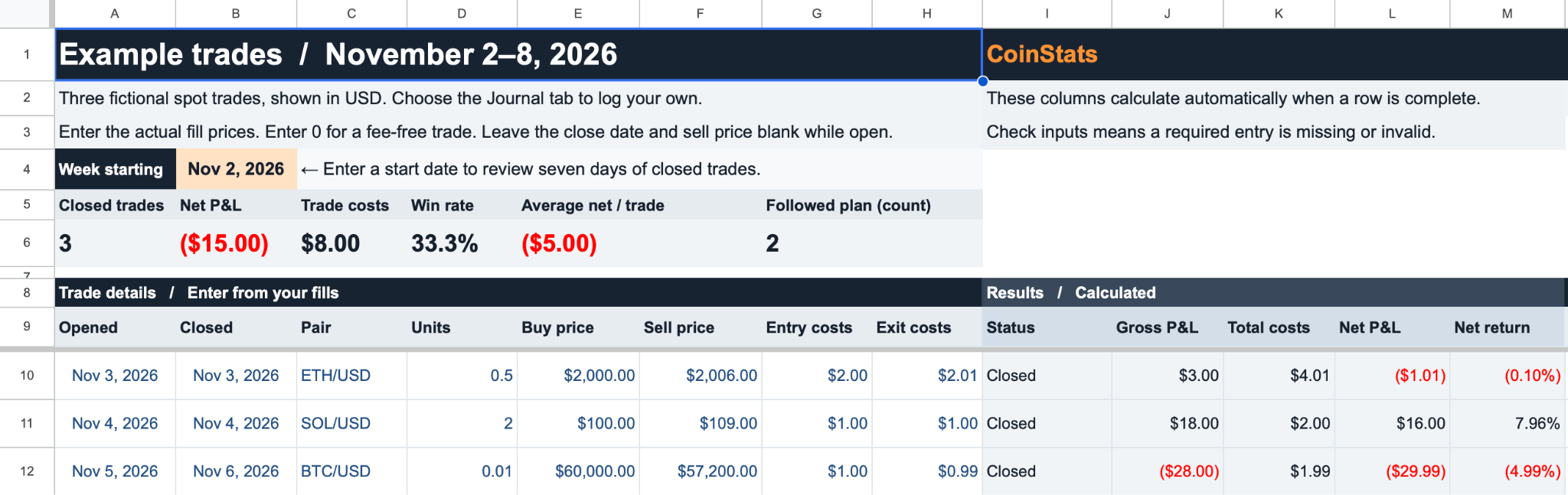
Open the workbook in Excel or import it into Google Sheets. The Example tab shows a completed week. The Journal tab has 200 rows for your trades.
Use one row per spot trade, where you buy the coin itself and later sell it. Keep an order’s fills together. Each fill is the amount traded at a particular price. Give purchases with different exit plans separate rows.
| When | What to enter | Where to find it |
|---|---|---|
| Before trading | Setup and plan at entry | Name the setup. Write an exit rule you can check later. |
| At entry | Open date, pair, units, buy price, and entry costs | Copy the actual fill and fee from the completed buy order. |
| At exit | Close date, sell price, and exit costs | Use the sell order. Enter costs in USD, or 0 if fee-free. |
| During review | Followed plan? Yes or No. Then one note. | Compare what you did with the rule you wrote at entry. |
Leave the close date and sell price blank while the trade is open. Once you enter the sale and both costs, the spreadsheet shows gross profit or loss (P&L), total costs, net P&L, and net return. If you see Check inputs, look for a missing fee, a sell price without a close date, or a close date earlier than the buy.
How to calculate net profit on a crypto trade
Net profit = (sell price − buy price) × units sold − entry costs − exit costs.
In the template:
- The first part measures what the price move earned.
- The two cost fields account for money spent to make the trade. Use the fees on your receipts. If you paid a fee in another token, such as BNB on an ETH trade, record its dollar value when the exchange charged it. Include a network fee if you paid it separately to execute the trade. The spread and any difference between your expected price and your fill already affect the recorded buy or sell price.
Here is the ETH trade from the template. The prices and fees are hypothetical.
| Item | Calculation | CoinStats result |
|---|---|---|
| Total cost to buy | 0.50 ETH × $2,000 + $2 buy fee | $1,002.00 |
| Cash received on sale | 0.50 ETH × $2,006 − $2.01 sell fee | $1,000.99 |
| Net profit or loss | $1,000.99 − $1,002.00 | −$1.01 |
| Net return | −$1.01 ÷ $1,002.00 × 100 | −0.10% |
To check your own row, open the CoinStats Crypto Profit Calculator.
For this example, select ETH and enter $2,000 for Buy price, $1,000 for Investment, and $2,006 for Sell price. Enter $2 for Investment Fee and $2.01 for Exit Fee. CoinStats adds the entry fee to the investment, so entering $1,002 in the Investment field would count the buy fee twice.
What if an order fills at two prices?
Say you sold 0.20 ETH at $2,000 and 0.30 ETH at $2,010. You received $400 on the first fill and $603 on the second, before fees. Divide the $1,003 total by the 0.50 ETH sold. The sell price to enter is $2,006. A simple average of the two prices gives $2,005 and understates the sale because more ETH sold at the higher price.
Use the same method for multiple buy fills. If your exchange supplies an average fill price, use that and add the fees from the fills once. Look for the quantity filled, execution price, and fee in your exchange’s order history.
What to write in a crypto trade review
Your journal records the decisions behind each trade: why you entered, when you planned to exit, and how you executed.
In the ETH example, the trader exited after two hours as planned when ETH failed to reach $2,020. Despite a net P&L of −$1.01, they followed their plan, making both entries accurate.
In contrast, the SOL trade was profitable (+$16), but the trader bought before the hourly candle closed above $99. This trade is marked as not following the plan, with a note to set candle-close alerts in the future.
Use consistent setup names across trades to easily track performance over time, and add contextual notes only when they help clarify your decision-making.
How to review a week of crypto trades
Enter a date in the orange Week starting cell. The summary counts trades that close on that date or the following six days. Here are the three trades for the week of November 2.
| Trade | Net P&L | Followed plan? |
|---|---|---|
| ETH/USD | −$1.01 | Yes |
| SOL/USD | +$16.00 | No |
| BTC/USD | −$29.99 | Yes |
What did the trades earn? One of the three was profitable, a 33.3% win rate. Before costs, the trades lost $7 in total. After $8 in trade costs, the week ended at −$15, or −$5 per closed trade. Win rate alone misses the size of the BTC loss.
Which rule needs attention? The trader followed the plan twice, and the only profitable trade broke its entry rule. Three trades are enough to spot that early entry. They tell you little about whether buying early usually pays. A concrete test for the next week is to set the hourly alert and log whether each breakout entry happened after it rang.
Conclusion
Start with one closed trade from your order history. Enter the fills and fees, then check the result against the CoinStats Crypto Profit Calculator. If you can explain the gain or loss but cannot say whether you followed your plan, write a more specific rule before your next entry.
Frequently asked questions
Can I use the crypto trading journal in Excel or Google Sheets?
Yes. Open the .xlsx file directly in Excel. In Google Sheets, use File > Import and upload the workbook. Keep the Example tab for reference and enter your trades in Journal. The formulas use the values you record, so you can use it without connecting a wallet or exchange.
How do I journal a partial sale?
If you buy 1 ETH and sell 0.4 ETH, you have realized a result on the 0.4 ETH and still hold 0.6 ETH. To review each sale separately, split the purchase into rows for those quantities. Give the first row 40% of the original buy fee and the second row 60%. Enter each sale’s own fee and leave the unsold row open. If you prefer one review for the full position, close one combined row after the last sale. That choice puts the full result in the week of the final exit. CoinStats guide to realized and unrealized P&L
Why does my trading journal differ from my portfolio P&L?
The journal sums the closed trades you entered for the selected week. A portfolio can include earlier purchases, coins you still hold, and gains or losses as their prices change. Compare the same units, dates, fees, and cost basis before comparing the totals. How CoinStats calculates portfolio P&L
Can I use this template for crypto futures or short trades?
The formulas assume you buy the coin first and sell it later. A futures journal also needs the contract size, whether you went long or short, and any funding paid or received. You can reuse the plan and review questions for those trades. For the numbers, use a journal built for the contract you traded.