
Crypto Price API: How to Get Real-Time Prices (Step-by-Step)

Written by Tigran Mkrtchyan · Reviewed and fact-checked by Narek Gevorgyan · Published July 17, 2026 · Last updated · Pricing and limits verified October 2026
A crypto price API gives your app live market prices on demand. You send a request. You get back prices, market caps, and volumes as JSON. No scraping, no manual updates.
Prices move every second in crypto. Hardcoding them is never an option. A crypto price API keeps your numbers fresh on autopilot.
This guide shows you how to pull real-time prices step by step. You get working code in Python, JavaScript, and Google Sheets, plus raw HTTP requests. It stays beginner friendly, but detailed enough to ship.
New to the space? Our guide to the best crypto API options is worth a read first. For the wider picture, see how crypto APIs work.
What Is a Crypto Price API?
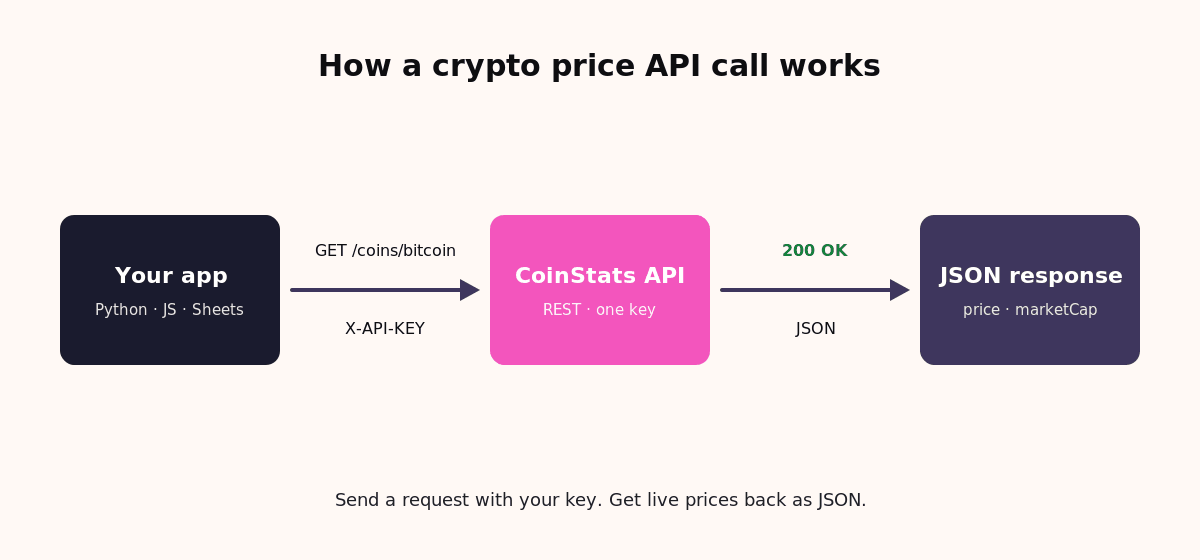
A crypto price API is a web service that returns cryptocurrency prices. Your code sends an HTTP request with an API key. The server replies with current or historical prices in JSON.
Two kinds of data matter most. Real-time prices show what a coin is worth right now. Historical prices show how it moved over time.
What You Can Pull From a Crypto Price API
A good price API returns more than a single number. Here is the data you get for each coin.
Beyond Prices: Tickers, Bid/Ask, and Exchange Rates
Prices are the start. A full crypto price API returns more market data too.
Ticker endpoints show bid and ask prices per exchange. That helps you check spreads and spot arbitrage gaps.
You can also convert values into fiat. Request any coin in USD, EUR, or GBP with a currency parameter. One integration covers prices, tickers, and exchange rates.
Bid and ask matter for execution. The bid is the best buy price. The ask is the best sell price. The gap between them is the spread. A wide spread means thin liquidity. Check it before you route an order.
Need on-chain data too? See our blockchain API guide.
How to Get Real-Time Crypto Prices With an API: Step by Step
Here is the full flow, from zero to live prices. The examples use CoinStats API. The same pattern works for most REST price APIs.
1 Get your free API key
First, create a free CoinStats API key. Sign up on the API dashboard, then generate a key. Send that key in the X-API-KEY header on every request.
Keep the key secret. Never paste it into frontend code. We cover safe storage further down.
2 Make your first request
Start with the coins endpoint. It returns a page of coins with prices. This call fetches the top 5 by rank.
GET https://api.coinstats.app/v1/coins?limit=5
X-API-KEY: YOUR_API_KEY
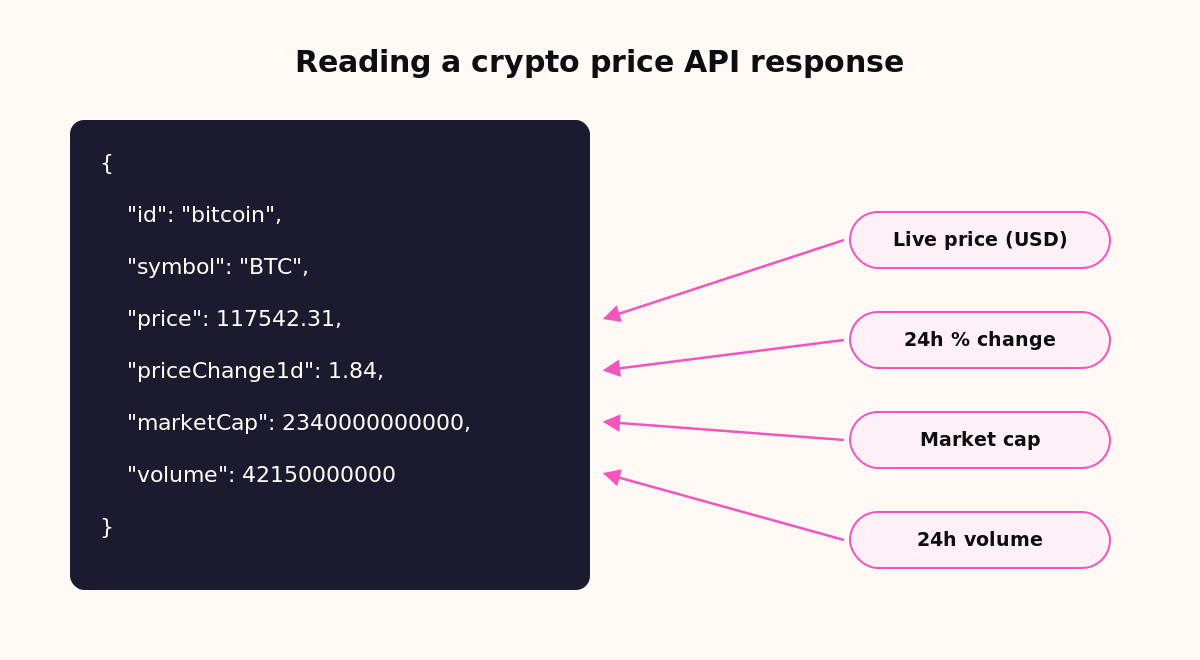
You get JSON back. Each coin includes price, market cap, and recent changes. The image below shows the fields that matter. The numbers are examples.
{
  "meta": { "page": 1, "limit": 5, "itemCount": 100000, "hasNextPage": true },
  "result": [
    {
      "id": "bitcoin",
      "name": "Bitcoin",
      "symbol": "BTC",
      "rank": 1,
      "price": 117542.31,
      "priceChange1h": 0.12,
      "priceChange1d": 1.84,
      "priceChange1w": -2.31,
      "marketCap": 2340000000000,
      "volume": 42150000000
    }
  ]
}
3 Get one coin’s live price
Need a single coin? Call the coin endpoint with its id. Bitcoin’s id is bitcoin.
Here it is in Python.
import requests

API_KEY = "YOUR_API_KEY"
url = "https://api.coinstats.app/v1/coins/bitcoin"

resp = requests.get(url, headers={"X-API-KEY": API_KEY})
coin = resp.json()

print(f"{coin['name']}: ${coin['price']:,.2f}")
print(f"24h change: {coin['priceChange1d']}%")
And the same call in JavaScript.
const API_KEY = process.env.COINSTATS_API_KEY;

const res = await fetch("https://api.coinstats.app/v1/coins/bitcoin", {
  headers: { "X-API-KEY": API_KEY },
});
const coin = await res.json();

console.log(`${coin.name}: $${coin.price.toLocaleString()}`);
console.log(`24h change: ${coin.priceChange1d}%`);
The price field is the current value. The priceChange1d field is the 24 hour move.
Want several coins at once? Pass ids to the coins endpoint.
GET https://api.coinstats.app/v1/coins?coinIds=bitcoin,ethereum
X-API-KEY: YOUR_API_KEY
The response holds one entry per coin. Read the price from each. This is how you track Bitcoin and Ethereum together.
4 Get historical prices and charts
For charts, call the charts endpoint with a period. Options run from 24h to all.
GET https://api.coinstats.app/v1/coins/bitcoin/charts?period=1w
X-API-KEY: YOUR_API_KEY
The response is an array of price points. Each point is [timestamp, USD, BTC, ETH]. The timestamp is Unix seconds.
[
  [1752624000, 117230.5, 1, 27.4],
  [1752627600, 117410.2, 1, 27.5],
  [1752631200, 117585.9, 1, 27.6]
]
Here is how to parse it into readable rows in Python.
import requests
from datetime import datetime, timezone

url = "https://api.coinstats.app/v1/coins/bitcoin/charts?period=1w"
resp = requests.get(url, headers={"X-API-KEY": "YOUR_API_KEY"})

for ts, usd, *_ in resp.json():
    when = datetime.fromtimestamp(ts, tz=timezone.utc)
    print(when.strftime("%Y-%m-%d %H:%M"), f"${usd:,.2f}")
Valid periods are 24h, 1w, 1m, 3m, 6m, 1y, and all. Pick the range your chart needs.
5 Pull prices into Google Sheets
No backend? A crypto price API works in Google Sheets too. The key needs a header, so add a small Apps Script function.
Open Extensions > Apps Script. Paste this function. Save it.
function CRYPTOPRICE(coinId) {
  const key = "YOUR_API_KEY";
  const url = "https://api.coinstats.app/v1/coins/" + coinId;
  const res = UrlFetchApp.fetch(url, { headers: { "X-API-KEY": key } });
  return JSON.parse(res.getContentText()).price;
}
Now use it in any cell like a normal formula.
=CRYPTOPRICE("bitcoin")Free Crypto Price APIs and When to Pay
Most crypto price APIs offer a free tier. It is enough to build and test a real app.
You still need an API key on the free tier. The key identifies your app and tracks usage.
CoinStats API uses credit-based pricing. Each call spends credits by complexity. Simple price calls cost the least. Upgrade only when your traffic grows.
Best Practices for Using a Crypto Price API
Working code is step one. These habits keep it fast, cheap, and safe in production.
A note on cost. CoinStats API uses credit-based pricing with a free tier. The coins list costs 2 credits. A single coin costs 1. A chart costs 3. Caching results is the easiest way to spend less.
Common Crypto Price API Mistakes
Most integration bugs come from a few habits. These are the ones that cost the most time.
A 429 response means you are rate limited. Treat it differently from a 401. One is your key. The other is your pace.
Do the math before you scale. Say you refresh 50 coins every 10 seconds. One coins list call covers all 50. That is 2 credits per call. At 6 calls a minute, you spend 12 credits. Fifty single-coin calls would cost 50 credits instead. One list call beats fifty single calls.
Cache at the edge of your app, not per component. One shared entry serves every widget on the page. Set a short TTL, around five seconds. Users will not notice the delay. Your credit bill will.
Crypto Price API Comparison: Top Providers
Here is how popular crypto price APIs compare on the basics.
| Provider | Coverage | Real-time | Historical | Wallet & DeFi | Free tier |
|---|---|---|---|---|---|
| CoinStats API | 100,000+ coins, 120+ chains | Yes | Yes | Yes | Yes |
| CoinDesk Data | Exchange market data | Yes | Yes | No | No, retired May 2026 |
| CoinPaprika API | Market data, REST and WebSocket | Yes | Yes | No | Yes |
| DexScreener API | DEX pair data across chains | Yes | No | No | Yes, no key |
| DIA | 3,000+ tokens, 100+ exchanges | Yes | Yes | No | Yes, no key |
| Messari (Blockworks) | Market data + research, 40,000+ assets | Yes | Yes | No | Web app only, no API |
| Tiingo | 8,000+ pairs, 60+ exchanges | Yes | Yes | No | Yes |
Core market data looks similar across providers. CoinStats API adds wallet balances, DeFi positions, and portfolio data on the same key. It also runs cheaper at the entry tier. Want the other side of that? Here are the closest CoinStats API alternatives.
What You Can Build
A price API is the foundation for many crypto products. Here are the most common ones.
How to Choose a Crypto Price API
Most price APIs stop at market data. Some projects need more. Wallet balances. DeFi positions. Portfolio math.
Look at coverage, data freshness, and history depth. Check the pricing model and the free tier. Ask whether it also serves wallet and DeFi data. Then one key covers your whole stack.
CoinStats Crypto API covers 100,000+ coins, 200+ exchanges, and 120+ blockchains. It runs on the same data as an app with over 1M monthly users. It ships a free tier and credit-based pricing. It also runs an MCP Server for AI agents and LLM apps.
Conclusion
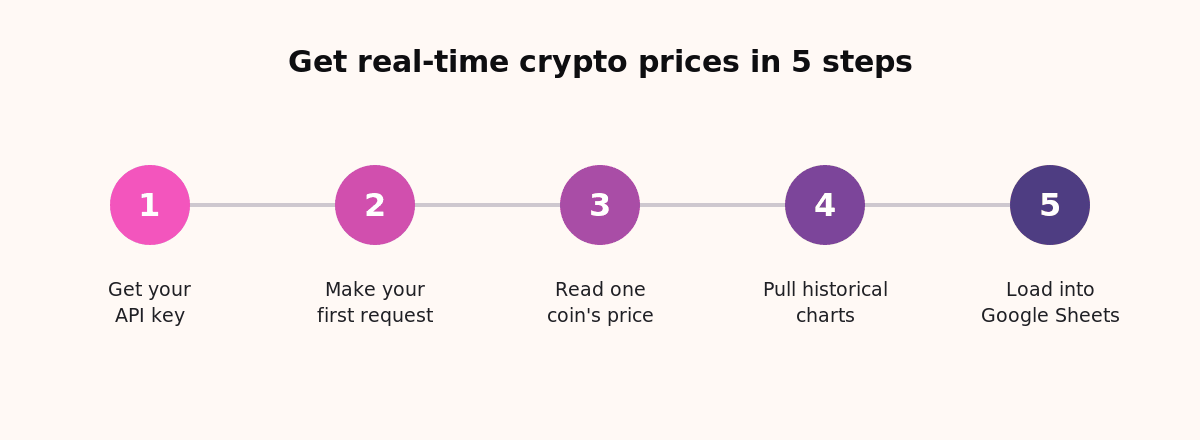
Getting real-time crypto prices is a five step job. Get a key. Call the coins endpoint. Read a single coin. Pull historical charts. Drop it into Sheets if you want.
The pattern is the same everywhere. Send a request with your key. Read the JSON. Cache the result. Handle errors.
Once prices flow, the rest gets easier. Add wallet data, DeFi positions, and portfolio math later. All from the same key.
Frequently Asked Questions
Quick answers to the questions developers ask most about a crypto price API.
What is a crypto price API?
It is a web service that returns cryptocurrency prices as JSON. Your code sends a request with an API key. You get back live or historical prices.
How do I get real-time crypto prices?
Sign up for an API key, then call a prices endpoint over HTTPS. The response returns the current price for each coin you request.
How often do crypto price APIs update?
Most refresh prices every few seconds. That is fast enough for trackers, dashboards, and most trading tools.
Can AI agents use a crypto price API?
Yes. CoinStats API ships an MCP Server. AI agents and LLMs query the same prices, wallets, and DeFi data.
Do I need an API key to get crypto prices?
Almost always, yes. A key identifies your app and tracks usage. Pass it in the X-API-KEY header on every request.
How do I get historical crypto prices?
Call a chart or history endpoint with a time period. CoinStats API returns price points from the last 24 hours up to all time.
Can I get crypto prices in Google Sheets?
Yes. Add a small Apps Script function that calls the API with your key. Then use it as a formula, such as =CRYPTOPRICE("bitcoin").
How many coins can I track?
It depends on the provider. CoinStats API covers 100,000+ coins across 120+ blockchains through one endpoint.
Can I get prices in EUR or GBP?
Yes. Add a currency parameter to your request. CoinStats API returns values in USD, EUR, GBP, and many more.
Is there a free crypto price API?
Yes. CoinStats API offers a free tier with credit-based pricing. You can start pulling live prices without a paid plan.
What is the best free crypto price API?
Several APIs offer free tiers. For prices plus wallet and DeFi data, CoinStats API is a strong free pick.
How much does a crypto price API cost?
Pricing is usually credit based. Simple calls cost fewer credits than heavy ones. A free tier lets you test before you scale.
How is CoinStats’ crypto price API different from other providers?
Core market data is similar. CoinStats API adds wallet balances, DeFi positions, and portfolio data. It also runs cheaper at the entry tier.
What is the best API for crypto prices?
The best fit depends on your needs. For prices plus wallet, DeFi, and portfolio data, CoinStats API fits most projects.
Tigran is the Head of Digital Marketing at CoinStats, working across crypto and consumer apps. His writing covers first-hand crypto experience and marketing case studies from that work. He has taken the stage at industry-leading conferences like MAU Vegas, Business of Apps Berlin, and App Promotion Summit London.
More from Tigran on the CoinStats blog · LinkedIn · X