
Pump.fun Sign-In Changes: Wallet Users Face November 30 Deadline Looms

0
0
Pump.fun Sign-In Changes: What Phantom and Solflare Users Must Do Now
From 30 November 2026, external wallets will no longer open the door to the popular Solana memecoin platform's website.
The Pump.fun sign-in changes replace apps such as Phantom, Solflare and Ledger with an email, Google, Apple or GitHub login.
The platform says funds, addresses, and positions stay untouched, but anyone who wants to keep their current profile must act before the deadline.
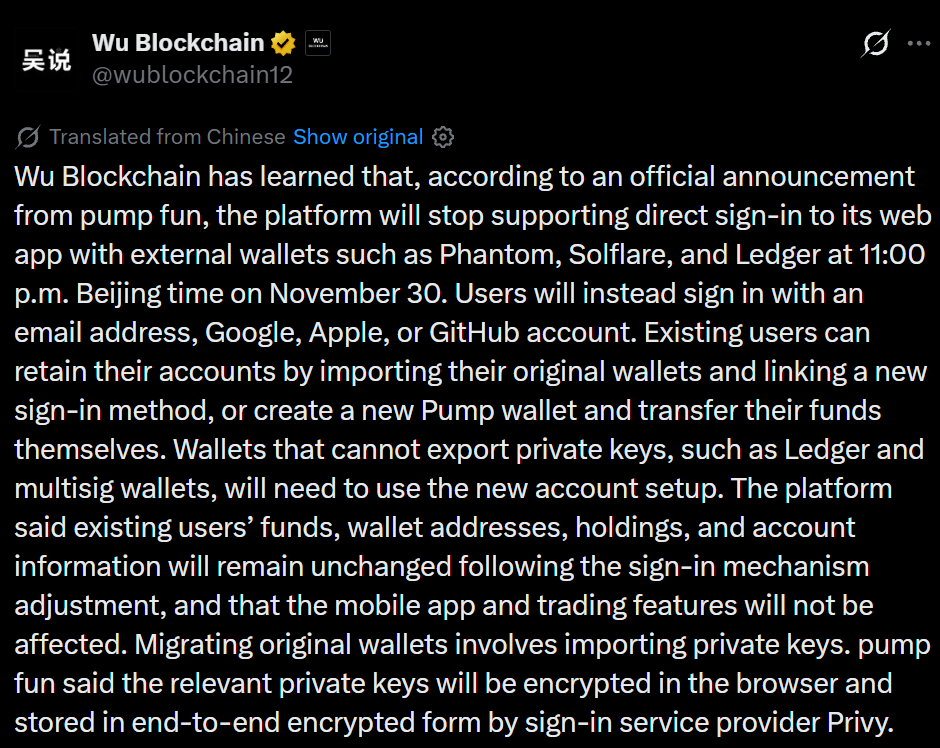
Source: Wu Blockchain Post
What Exactly Changes on November 30?
According to the official Pump.fun guide, the website stops accepting external wallet access starting 30 November 2026 at 15:00 UTC.
From that moment, visitors log in with an email, Google, Apple or GitHub account instead. The mobile app already works this way, so one login now covers both the app and the website.
The page stresses that nothing happens to funds or accounts: the address, positions, callouts, followers and username all stay unchanged. Only the way people enter the site is changing.
| Detail | What to Know |
| Effective date | 30 November 2026, 15:00 UTC |
| Ending | Access through third-party apps |
| Funds, address, username | Unchanged |
| Mobile app | Already uses the new method |
Three Ways to Keep Your Access
The official guide asks everyone currently using an external app to choose one path before 30 November.
Understanding the Pump.fun sign-in changes early prevents last-minute stress.
| Option | Best For | What You Do |
| 1. Keep this account (recommended) | Most existing users | Link a new login to your current address on the website |
| 2. Use the Pump app | Mobile users | Import your wallet into the app, then link a login in Settings |
| 3. Start fresh | Ledger, multisig or any setup whose key cannot be exported | Create a new login, receive a new Pump wallet, and move funds yourself |
With option 3, your history stays on the old address.
Step-by-Step: Keeping Your Current Profile
For option 1, the documentation gives these steps:
-
Log in as usual, open your profile card and choose Link email & socials.
-
In the Create account window, press Continue and select your wallet under "Use the wallet you're signed in as."
-
Paste the private key when asked. For Phantom, go to Settings → Manage accounts → this account → Show private key.
-
Add the email, Google or Apple login you want to use.
-
From then on, use that method on the website and in the app; external access for that address is switched off permanently.
The key is encrypted in your browser and held end-to-end encrypted by the provider, Privy, while the original address keeps working for everything else.
Pick your wallet first, not the email field. Choosing any other method on that screen starts a separate, empty account with a brand-new address, although the window asks you to confirm first.
If a QR code appears instead, your address already has a profile made in the Pump app: scan the code and add your login there.
Prefer mobile? The app route works too: import it, open Settings → Link email & socials, then use the same login on the website.
Who Is Not Affected and What Happens After the Deadline
Not everything changes. The official notice confirms that the Pump mobile app, API sessions and trading itself are not affected.
For users of Phantom's in-app browser, Google login is blocked inside such browsers, so choose the email route or open the site in Safari or Chrome.
After 30 November, a session still opened through a third-party app will see a screen asking for a login, with the same three options, and nothing is deleted. For existing users, the Pump.fun sign-in changes are therefore about access, not funds.
Safety First: Protect Your Private Key
Because the process requires a private key, scammers may try to exploit it. The official safety section says the platform requests a key in exactly one place: the Create account window opened by Link email & socials, inside your own signed-in session on its website.
It never asks for one in direct messages, on social media or on any other site, and anyone who does is a scammer.
-
Never enter private keys anywhere except the official window
-
Ignore anyone who requests keys through messages or links
-
Choose your address first, not the new-login field, to avoid creating an empty profile
-
Contact support via profile card → Support, or follow the official tech updates channel
Conclusion
The Pump.fun sign-in changes take effect on 30 November 2026 at 15:00 UTC, and the safest move is to act early.
Existing users can link a new login to their current address, use the app route, or start fresh with a new address, while trading, the mobile app and API sessions stay unaffected.
Review the official guide before the deadline and never share private keys outside the official window.
Disclaimer
This article is for educational and informational purposes only and is not financial or investment advice. Crypto assets are high risk, their prices can be very volatile, and you can lose some or all of your money. Always do your own research and consider speaking with a licensed financial advisor before making investment decisions.
0
0


 Manage all your crypto, NFT and DeFi from one place
Securely connect the portfolio you’re using to start.


