
Bitget Demo Trading: Practice Futures With Virtual USDT

0
0
Bitget demo trading is a practice mode for futures in which you trade with virtual money on live market prices. Every Bitget account has it switched on by default: in the app you open Futures, tap the three dots and choose Demo Trading, and Bitget credits virtual funds, 50,000 USDT in its own example. Profits and losses stay virtual, and the demo balance can never be withdrawn or moved to your real account, according to Bitget’s help page on demo trading.
Bitget demo trading: the key facts
- Cost: free, part of every Bitget account, no manual activation.
- Balance: virtual USDT, the demo version of the Tether stablecoin, 50,000 in Bitget’s example; demo contracts carry an S prefix, such as SBTCSUSDT.
- Markets: USDT-M pairs such as BTCUSDT, ETHUSDT, ADAUSDT and XRPUSDT, plus BTC and ETH in Coin-M and USDC-M.
- Prices: real-time market data, with minor delays possible.
- Limits: demo funds cannot be withdrawn, transferred or used for live trades.
This guide shows how to start the demo on the app and the website, what is the same and what differs from live trading, and a practice plan that makes the virtual money count. Why practice matters is easiest to see in numbers: at 10x leverage a 10 percent move consumes your margin, as our guide to leverage trading explains. Bitget is not listed in ESMA’s register of crypto-asset service providers authorised under MiCA, so this guide is for readers outside the EU in countries where Bitget operates.
What is Bitget demo trading?
Bitget demo trading is a separate futures environment with its own virtual balance. It uses the same order screen as live futures: you pick a pair, set leverage, choose a long or short position and an order type. Bitget describes it as a place for beginners to learn and for experienced traders to test new strategies without risking real assets.
Because the demo runs on live prices, a position you open in the demo reacts to the same market moves as a real one. What the demo cannot simulate is your own reaction to losing real money, which is why the practice plan further down starts with the size of the balance.
How to start Bitget demo trading on the app and website
You need a Bitget account to log in, but no deposit. The demo balance appears automatically the first time you open the mode.
| Step | Bitget app | Bitget website |
|---|---|---|
| 1 | Log in and tap the Futures tab | Log in at bitget.com |
| 2 | Tap the three dots in the top right corner and choose Demo Trading | Hover over Futures in the top bar and click Demo Trading |
| 3 | Pick a pair, for example BTCUSDT, and set leverage | Pick a pair, set leverage and choose market or limit |
| 4 | Choose long or short, enter the size and confirm | Enter the size and click Open Long or Open Short |
To leave the demo, switch back the same way. Your real futures account and its balance are untouched by anything you do in demo mode.
Which pairs you can trade in the Bitget demo account
The demo covers the most traded contracts in all three futures families. Bitget notes that the list can change with platform updates.
| Futures type | Demo pairs according to Bitget |
|---|---|
| USDT-M perpetual futures | BTCUSDT, ETHUSDT, ADAUSDT, XRPUSDT and other popular pairs |
| Coin-M futures | BTCUSD, ETHUSD |
| USDC-M futures | BTCUSDC, ETHUSDC |
For a first practice run, BTCUSDT is the natural choice: it is the contract most beginners trade later with real money, and its moves are documented in every market report, so you can compare your demo trades with what actually happened.
Bitget demo trading vs live trading: what changes
Most of the mechanics carry over one to one. The difference lies in the money and in you.
| Aspect | Demo trading | Live trading |
|---|---|---|
| Prices | Real-time market data, minor delays possible | Real-time market data |
| Order screen, leverage, long and short | Same as live | Same as demo |
| Balance | Virtual USDT, cannot be withdrawn or transferred | Your own deposit |
| Selection of pairs | The most traded contracts | All listed futures |
| Losses | Virtual, no effect on your assets | Real, up to the whole margin |
The last row is the one that matters. A demo loss of 5,000 virtual USDT is easy to shrug off, a real loss of 50 USDT often is not. With real money, the temptation grows to close winners too early and to hold losers too long. A plan written down before you start is the best defence.
A practice plan for the Bitget demo account
Bitget’s own guide to avoiding liquidation recommends simulating with the amount you really plan to trade and risking 1 to 2 percent per trade. Built around that, four steps make the demo useful:
- Size the demo like your real account. If you plan to start with 500 USDT, trade the demo as if you had 500 USDT, not 50,000. Otherwise every position is a hundred times too large to teach you anything.
- Fix your risk per trade. One to two percent of the balance, set through the stop-loss distance and the position size.
- Keep a journal of 20 trades. Entry, stop-loss, take-profit, leverage, reason and result. Twenty trades show patterns that one lucky trade hides.
- Test the risk tools on purpose. Open one position in isolated and one in cross margin, compare the estimated liquidation prices, and let one stop-loss trigger so you see how it executes.
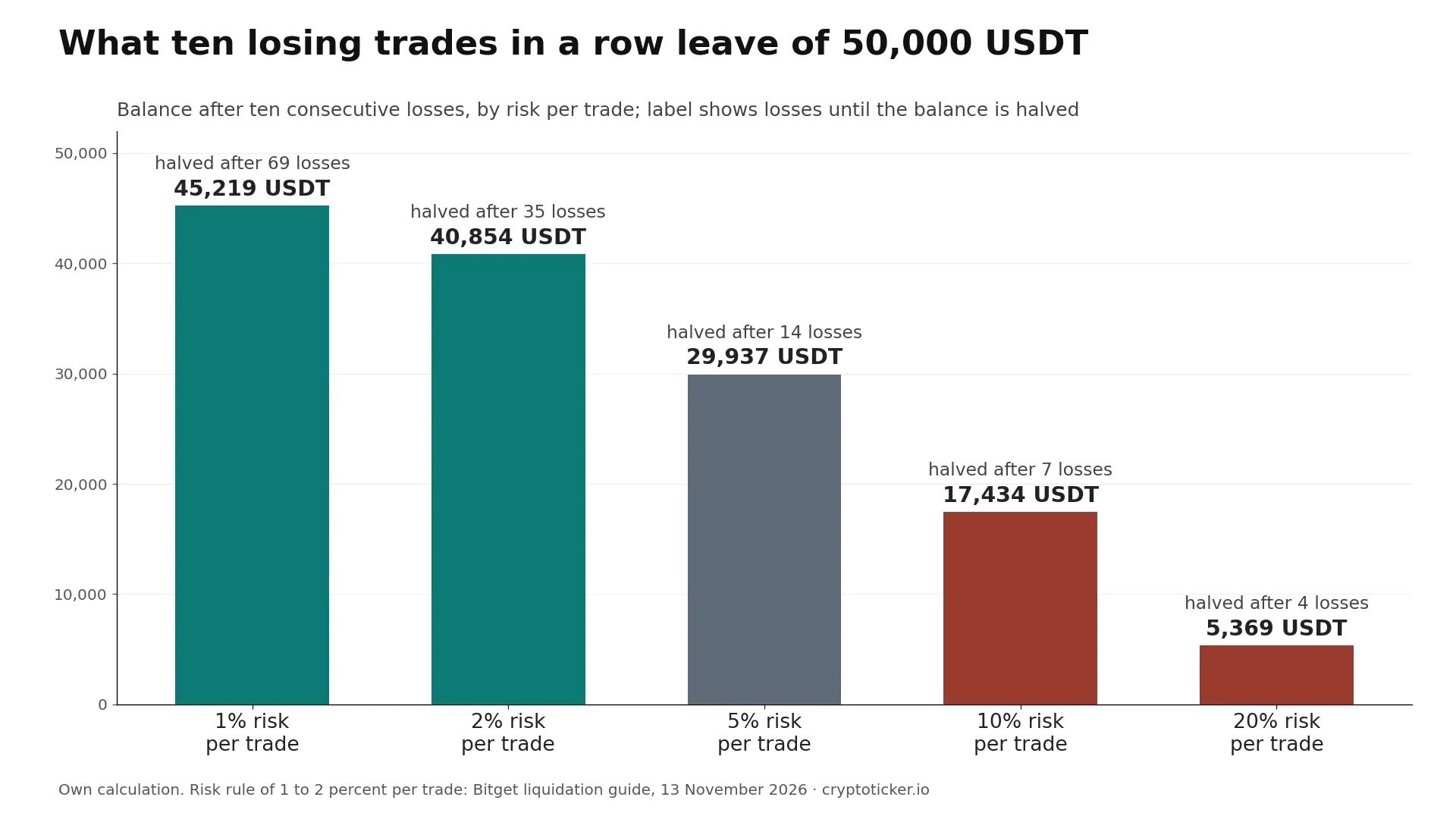
The risk per trade decides how long an account survives a losing streak. Starting from 50,000 virtual USDT, the table shows how many losses in a row halve the balance and what is left after ten losses.
| Risk per trade | Losses in a row until the balance is halved | Balance after 10 losses in a row |
|---|---|---|
| 1% | 69 | 45,219 USDT |
| 2% | 35 | 40,854 USDT |
| 5% | 14 | 29,937 USDT |
| 10% | 7 | 17,434 USDT |
| 20% | 4 | 5,369 USDT |
The difference between the rows is the point of the exercise: at 1 percent risk, ten losses in a row cost a tenth of the account; at 10 percent they cost two thirds.

Bitget demo trading for API strategies and CFDs
The demo is not only for manual trades. Bitget offers a demo trading API, so developers can test automated strategies with virtual funds before they connect a live account. Ready-made automation without code is covered in our guide to the Bitget trading bot; independent providers are listed in our comparison of the best crypto trading bots.
Since 15 October 2026 Bitget also runs a separate CFD demo account for its CFD products. It opens with 10,000 USDT in virtual funds after you accept the CFD terms, and the virtual balance can be raised or lowered at any time.
From Bitget demo trading to your first live trade
When your journal shows that you follow your own rules, the step to live trading is small. Start with an amount you can lose without consequences and keep the leverage you used in the demo.
- Open the account: if you do not have one yet, Bitget’s sign-up page opens with our referral code filled in; the Bitget referral code page explains the welcome pack.
- Fund it: deposit USDT and transfer it from Spot to USDT-M Futures under Assets.
- Know the costs: live futures cost 0.02 percent for maker and 0.06 percent for taker orders at the standard level, plus funding every eight hours. All rates are in our overview of Bitget fees.
- Repeat the first trade: same pair, same stop-loss logic, a tenth of the size. Every step of a live order, from margin mode to liquidation price, is in our guide to Bitget futures trading.
If you would rather compare the futures offers of several platforms before you deposit anywhere, our crypto exchange comparison lists fees and products side by side.
Where you can use Bitget demo trading
The demo is available wherever you can open a Bitget account. That excludes several regions:
- European Union: Bitget is not listed in ESMA’s register of crypto-asset service providers authorised under MiCA (version of 11 November 2026). EU readers find licensed exchanges in our comparison of regulated crypto exchanges.
- Excluded countries: Bitget’s Terms of Use exclude, among others, the United States, Canada, Singapore, Japan, Hong Kong, Germany, France and Austria.
- Australia: ASIC has warned investors that Bitget’s crypto futures are not licensed there; Australians use Bitget for spot trading.
Is Bitget demo trading worth it? Our assessment
Yes, for anyone who has never traded futures. The demo costs nothing, runs on live prices and uses the same screen as the real thing, so the clicks you learn there are the clicks you will make later. Its value depends on how you use it: a demo traded with 50,000 virtual USDT and 100x leverage teaches gambling, a demo traded with a realistic balance, a fixed risk per trade and a journal teaches trading.
Demo results do not predict live results, because fear and greed only appear when the money is real. Futures with leverage can wipe out a stake within hours. This guide explains how the practice mode works; it is not investment advice.
0
0

 Manage all your crypto, NFT and DeFi from one place
Securely connect the portfolio you’re using to start.


