
Running a Bitcoin node: is your own node worth €16 to €39 a year in electricity?

0
0
Running a Bitcoin node means keeping a full copy of the Bitcoin blockchain on your own hardware and checking every transaction yourself against the network's rules. For retail investors it pays off if they hold their coins themselves and no longer want to tell an outside server which addresses belong to them. Running costs are modest: at German electricity prices, an energy-efficient small computer uses roughly €16 to €39 a year. Storage is the bigger expense, because the blockchain now takes up well over 600 gigabytes.
If you only hold bitcoin on an exchange, you do not need a node of your own. If you use a wallet with your own key, however, a node gives you independence: the wallet no longer asks the manufacturer's servers whether a payment has arrived, but your own computer. This guide explains which hardware is enough, how much electricity and storage to plan for, how to connect your wallet, and why maintaining the software is the part where many operators fail.
What is a Bitcoin node? Full node, pruned node and Lightning node compared
A full node is a computer running Bitcoin client software that downloads every block since 2009 and recalculates each one. The node trusts no one: it only accepts a block once signatures, amounts and block rules check out. The most widely used software is Bitcoin Core, the network's reference implementation.
A pruned node checks just as thoroughly but discards old block data after verification and keeps only the most recent. That is why it needs little storage, though it can no longer serve old blocks to other nodes. For the privacy of your own wallet, that is no drawback.
A Lightning node is something else. It sits on top of a Bitcoin node and manages payment channels for fast small payments. That requires funds in a hot wallet that is permanently online. If you only want to verify and store, you do not need this second layer. Bitcoin miners, in turn, create new blocks; a node does not, and receives no reward.
Why your own node improves your wallet's privacy
Every wallet has to ask somewhere which balances belong to its addresses. Without your own node, those requests go to the wallet provider's servers or to public Electrum servers. The operator can see which addresses belong together and can link them to your IP address. With your own node, that mapping stays inside your home.
The second benefit is validation: your node checks for itself whether an incoming payment is valid and how many confirmations it has. You do not have to rely on an outside server telling the truth. Especially if you keep larger amounts in a hardware wallet, this closes the last gap to full self-custody. The third effect concerns the network: every node that accepts incoming connections relays blocks and transactions and makes Bitcoin harder to censor.
18,816 reachable Bitcoin nodes: one in four runs outdated Bitcoin Core software
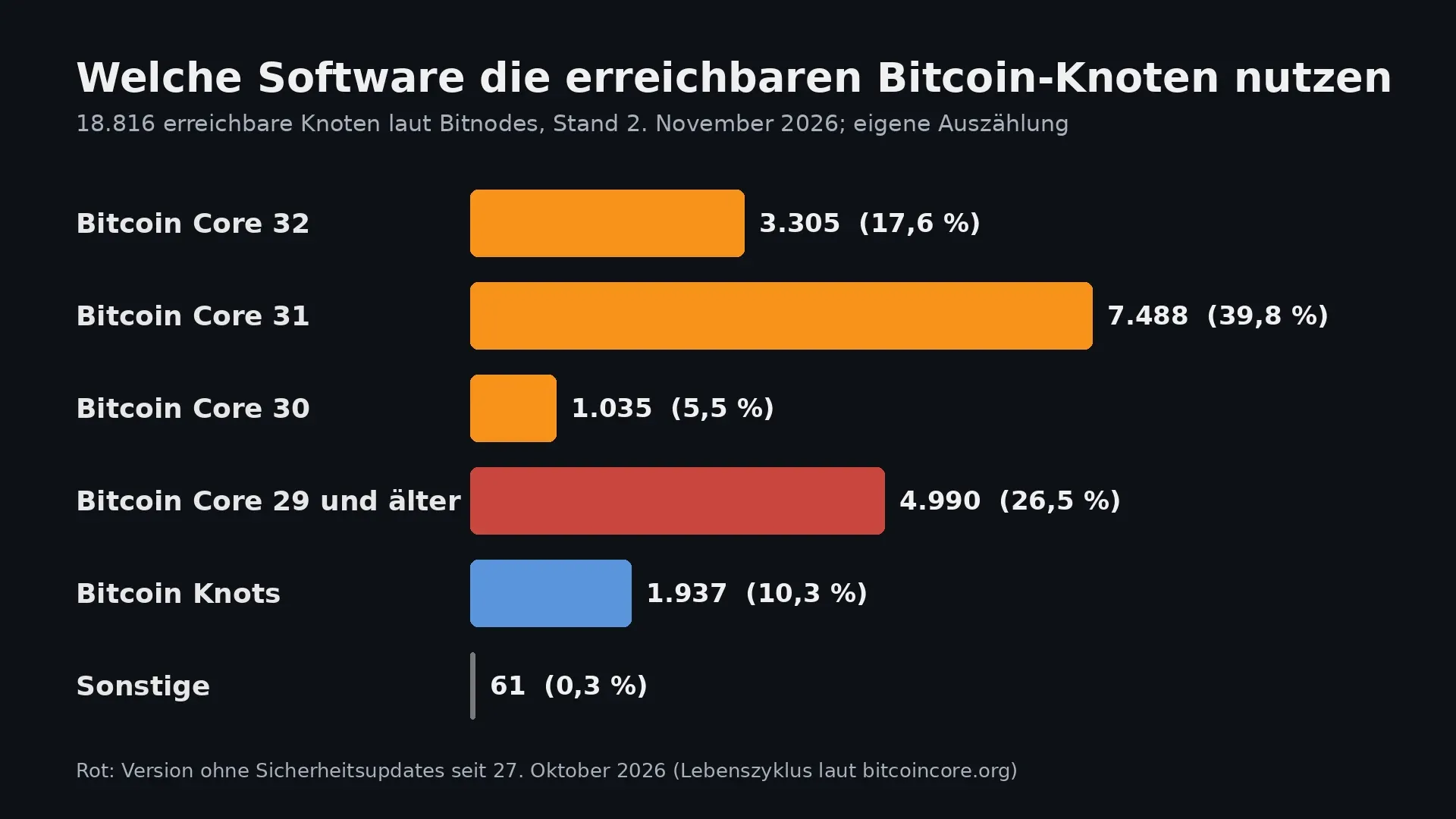
What the network looks like is shown by Bitnodes, a service that regularly counts all nodes reachable from outside. On November 2 there were 18,816. We counted the software identifiers ourselves: 16,818 nodes report as Bitcoin Core, or 89.4 percent. Another 1,937 nodes, 10.3 percent, run the alternative Bitcoin Knots. 7,824 of the counted addresses, a share of 41.6 percent, sit on the Tor anonymity network.
The age of the software stands out. Bitcoin Core 32 has only been available since October 27 and was running on 3,305 nodes a week later. Support for version 29 ended on the same date. According to the project's life cycle, only versions 30, 31 and 32 still receive security updates. Even so, 4,990 nodes reported Bitcoin Core 29 or older, 26.5 percent of all reachable nodes. Anyone who sets up a node and then forgets about it quickly joins this group.
October showed that this is not a theoretical risk. The Bitcoin Core project published three security advisories at once on October 28; on October 29 we described which nodes were affected and how the update works. Which options changed with version 32 is covered in our overview of Bitcoin Core 32.
Storage for the Bitcoin blockchain: 600 to 779 gigabytes and pruning mode
Figures on storage requirements vary. The Bitcoin Core download page cites a one-off download of around 600 gigabytes and 5 to 10 gigabytes a month after that. Blockchain.com's data series already showed about 779 gigabytes of block data at the end of October, excluding the software's database indexes. From October 4 to 28 alone, almost six gigabytes were added there.
For planning, that means a one-terabyte SSD will do for a full node for a while yet, and two terabytes give room for several years and for add-on services such as an Electrum server, which builds its own index. In pruning mode, by contrast, Bitcoin Core says 10 gigabytes are enough, with no loss of security in verification. The catch: a pruned node must also download and verify the whole blockchain once; it just does not keep it. And some add-on software, such as a full Electrum server, requires the unpruned data.
Hardware for a Bitcoin node: Raspberry Pi, mini PC or ready-made device
Three routes have become established. The cheapest is a single-board computer such as the Raspberry Pi 5 with eight gigabytes of memory and an NVMe SSD. It is quiet and frugal, but much slower than a normal computer during the first sync of the blockchain. The second route is a used or new mini PC with an x86 processor. It uses more electricity but computes faster and runs any Linux distribution. The third route is ready-made devices or prebuilt system images such as Umbrel, Start9 or RaspiBlitz, which install Bitcoin Core, an Electrum server and Lightning through a web interface.
Storage matters more than the processor. A traditional spinning hard disk slows verification so badly that the first sync can take weeks. An SSD is a must, and cheap models without their own cache cope less well with the constant writes. Four gigabytes of memory are enough to run the node; with eight or more the sync is noticeably faster, because Bitcoin Core can then keep more data in its cache.
Electricity costs of a Bitcoin node at 37 cents per kilowatt hour
According to published measurements, a Raspberry Pi 5 draws about 3 watts at idle and just under 9 watts at full load. With an NVMe SSD and fan, such a node runs roughly between 5 and 12 watts in continuous operation. Over a year, that is 44 to 105 kilowatt hours. At the average household electricity price of 37.0 cents per kilowatt hour that the German energy association BDEW calculated for 2026, running it costs about €16 to €39 a year.
A mini PC uses several times as much, depending on the model. Before buying, calculate with the idle figure the manufacturer states, because a configured node spends most of the day idling. Only the first sync pushes the processor and SSD to their limits for a few days.
Initial block download: the first sync of the blockchain takes days
The initial block download is the phase in which a new node fetches all blocks from other nodes and verifies them. Overnight into Tuesday, the blockchain reached block height 974,322. On a mini PC with a fast SSD and a good connection, the sync is often done in one to two days; on a Raspberry Pi it can take a week. During that time the node downloads several hundred gigabytes, so a capped data plan is unsuitable.
After that, things calm down. In normal operation, a new block and a few megabytes of traffic arrive every ten minutes on average. If the node accepts incoming connections, though, it also uploads data for others. Bitcoin Core offers an upload limit for this that you can set in the configuration file.
Connecting your wallet to your own Bitcoin node: Electrum server and Sparrow
The node is only useful once your wallet actually queries it. Most desktop wallets use the Electrum protocol for this. Between Bitcoin Core and the wallet sits an Electrum server, a program that makes the blockchain searchable by address. Fulcrum and electrs are widespread, and the ready-made systems ship both as apps. The Sparrow wallet can also connect directly to Bitcoin Core, with no Electrum server at all.
The combination of a hardware wallet and your own node is considered the cleanest form of self-custody: the key stays offline on the device, and the queries stay on your own network. Which programs can connect to your own server varies by provider; our comparison of software wallets helps you choose. Mobile wallets usually reach the node on the go via Tor, without you having to open a port on your router.
Securing your Bitcoin node: updates, RPC interface and Tor
Three rules keep the risk low. First, updates: with every new major version, support ends for the version three generations older, and security flaws are disclosed after a fixed period. In the release notes for Bitcoin Core 32.1, the project announces that two weeks later it will disclose three medium to high severity flaws that were fixed in version 30.0. Anyone who stays on an old version is then online with known vulnerabilities.
Second, the RPC interface: programs control the node through it, and it must never be exposed to the open internet. At most you may open port 8333, through which nodes connect to one another. Third, add-on services: every app on a ready-made system is another attack surface. How quickly that gets expensive was shown on November 2 by a BTCPay Server warning that hot wallets on older installations had been drained; we have summarized the background and the recommended steps. A pure verification node without a hot wallet does not carry this risk, because no funds sit on it.
Tor also hides the IP address from which your node sends transactions. Bitcoin Core can run exclusively over Tor, and the ready-made systems usually switch this on with a single click.
Bitcoin Knots or Bitcoin Core: the dispute over OP_RETURN data
Since Bitcoin Core 30 significantly raised the default limit for data in so-called OP_RETURN outputs in October 2025, the community has been arguing over how much non-payment data nodes should relay. Bitcoin Knots, a derivative of Bitcoin Core maintained by Luke Dashjr, filters such transactions more strictly. Both programs follow the same consensus rules and accept the same blocks; they differ in which unconfirmed transactions they pass on.
For your wallet's privacy, the choice makes no difference. Knots is a visible minority with 10.3 percent of reachable nodes, while Bitcoin Core remains the standard and is the software with the most guides and the fastest security updates. Newcomers are well served by Core and can decide the filtering question later.
Tax and legal aspects of running a Bitcoin node in Germany
A pure full node generates no income, because the network does not pay nodes for their work. Unlike mining, there is therefore no income you would have to declare on your tax return. Electricity costs are private expenses and do not reduce your tax. Anyone who also runs a Lightning node and earns routing fees is in different territory and should clarify the classification with a tax adviser. The node does not change the rules for your coins either: whether a sale after the one-year holding period is tax-free depends solely on the purchase date, not on the software you use to send it.
Bitcoin node: one terabyte of SSD and about €30 of electricity a year
A node of your own costs hardware once and little electricity after that. It gives you independence from outside servers and a wallet that reveals nothing about your addresses. In return it needs maintenance: let the updates slide and you end up in the quarter of nodes running without security updates. Three steps lead to a clean setup:
- Sort out custody first: the node protects your privacy, not your key. Keep the key on a device that stays offline; the hardware wallet comparison shows the differences in price and features.
- Choose suitable wallet software: make sure the wallet can connect to your own Electrum server or directly to Bitcoin Core. The software wallet comparison lists programs for desktop and smartphone.
- Withdraw your coins to your own wallet: only once your bitcoin is with you does your node also verify your own payments. Which providers handle withdrawals cheaply is covered in the comparison for buying bitcoin.
(As of November 3, 2026. This article is not investment advice. Prices and fee structures change; check the terms with the provider before you buy.)
0
0


 Manage all your crypto, NFT and DeFi from one place
Securely connect the portfolio you’re using to start.
 Where will Bitcoin trade next?
Live Polymarket and Kalshi odds on Bitcoin price targets, compared side by side.
See Bitcoin price odds


